
# cesium-地面裁剪
# 介绍
在cesium中有些模型是在地下、建筑物中的,因此需要对地表、山体或建筑物进行裁剪,展示内部的模型
cesium中裁剪的方法是new Cesium.ClippingPlaneCollection()
# 思路
地下裁剪,选中地面某一点,绘制一个标准矩形,进行裁剪
# 完整代码
<!DOCTYPE html>
<html lang="en">

<head>
    <!-- Use correct character set. -->
    <meta charset="utf-8">
    <!-- Tell IE to use the latest, best version. -->
    <meta http-equiv="X-UA-Compatible" content="IE=edge">
    <!-- Make the application on mobile take up the full browser screen and disable user scaling. -->
    <meta name="viewport"
          content="width=device-width, initial-scale=1, maximum-scale=1, minimum-scale=1, user-scalable=no">
    <title>Hello World!</title>
    <script src="../Cesium-1.89/Build/Cesium/Cesium.js"></script>
    <style>
        @import url(../Cesium-1.89/Build/Cesium/Widgets/widgets.css);

        html,
        body,
        #cesiumContainer {
            width: 100%;
            height: 100%;
            margin: 0;
            padding: 0;
            overflow: hidden;
        }

        #eye {
            position: absolute;
            width: 20%;
            height: 20%;
            bottom: 0;
            right: 0;
            z-index: 999;
            background: red;
            border: solid blue 1px;
        }

        #show {
            width: 100%;
            height: 100%;
        }
    </style>
</head>

<body>

<div style="display: -webkit-flex;display: flex;width: 100%;height: 100%">
    <div style="width: 90%;height: 100%">
        <div id="cesiumContainer"></div>
    </div>
    <div style="width: 10%;height: 100%;background-color: #d3d3d3;padding: 30px">
        <button onclick="cameraLookAtTransform()">模型定位</button>
        <button onclick="undergroundSpace()">地面裁剪</button>
    </div>
</div>
<script>
    //Cesium token
    let cesium_tk = "token";

    Cesium.Ion.defaultAccessToken = cesium_tk;

    // 添加mapbox自定义地图实例
    let layer = new Cesium.MapboxStyleImageryProvider({
        url: 'https://api.mapbox.com/styles/v1',
        username: 'sungang',
        styleId: 'styleId',
        accessToken: 'accessToken',
        scaleFactor: true
    });

    let viewer = new Cesium.Viewer('cesiumContainer', {
        imageryProvider: layer,
        geocoder: false,
        homeButton: false,
        sceneModePicker: false,
        baseLayerPicker: false,
        navigationHelpButton: false,
        animation: false,
        timeline: false,
        fullscreenButton: false,
        vrButton: false
    });


    viewer._cesiumWidget._creditContainer.style.display = "none";

    let model = new Cesium.Cesium3DTileset({
        url: '../res/data/3dtiles/tianjie/tileset.json',
        modelMatrix: Cesium.Matrix4.fromArray(
            [0.9972458032561666, 0.04372029028528979, 0.05991113506964879, 0,
                -0.03623787897545647, 0.9920229449104262, -0.12073646051879428, 0,
                -0.06471185374661931, 0.11823287609043515, 0.9908750491338749, 0,
                -663.0794944260269, 1211.490494620055, 2974.1003134818748, 1]),
    });

    let tileset = viewer.scene.primitives.add(model);

    //模型定位
    function cameraLookAtTransform() {
        var boundingSphere = model.boundingSphere
        viewer.camera.viewBoundingSphere(boundingSphere, new Cesium.HeadingPitchRange(Cesium.Math.toRadians(120.0), Cesium.Math.toRadians(-10), boundingSphere.radius * 2.5))
        viewer.camera.lookAtTransform(Cesium.Matrix4.IDENTITY)
    }

    function undergroundSpace() {
        //裁剪
        let globe = viewer.scene.globe;
        globe.depthTestAgainstTerrain = true;
        let position = Cesium.Cartographic.toCartesian(new Cesium.Cartographic.fromDegrees(118.69291952888493, 32.16083347458605, 0));
        globe.clippingPlanes = new Cesium.ClippingPlaneCollection({
            modelMatrix: Cesium.Transforms.eastNorthUpToFixedFrame(position),
            planes: [
                new Cesium.Plane(new Cesium.Cartesian3(1, 0.0, 0.0), -150.0),
                new Cesium.Plane(new Cesium.Cartesian3(-1.0, 0.0, 0.0), -150.0),
                new Cesium.Plane(new Cesium.Cartesian3(0.0, 1.0, 0.0), -120.0),
                new Cesium.Plane(new Cesium.Cartesian3(0.0, -1.0, 0.0), -120.0),
            ],
            edgeWidth: 1.0,
            edgeColor: Cesium.Color.BLACK
        });
    }
</script>
</body>

</html>
1
2
3
4
5
6
7
8
9
10
11
12
13
14
15
16
17
18
19
20
21
22
23
24
25
26
27
28
29
30
31
32
33
34
35
36
37
38
39
40
41
42
43
44
45
46
47
48
49
50
51
52
53
54
55
56
57
58
59
60
61
62
63
64
65
66
67
68
69
70
71
72
73
74
75
76
77
78
79
80
81
82
83
84
85
86
87
88
89
90
91
92
93
94
95
96
97
98
99
100
101
102
103
104
105
106
107
108
109
110
111
112
113
114
115
116
117
118
119
120
121
122
123
124
125
2
3
4
5
6
7
8
9
10
11
12
13
14
15
16
17
18
19
20
21
22
23
24
25
26
27
28
29
30
31
32
33
34
35
36
37
38
39
40
41
42
43
44
45
46
47
48
49
50
51
52
53
54
55
56
57
58
59
60
61
62
63
64
65
66
67
68
69
70
71
72
73
74
75
76
77
78
79
80
81
82
83
84
85
86
87
88
89
90
91
92
93
94
95
96
97
98
99
100
101
102
103
104
105
106
107
108
109
110
111
112
113
114
115
116
117
118
119
120
121
122
123
124
125
# 核心方法
    function undergroundSpace() {
        //裁剪
        let globe = viewer.scene.globe;
        globe.depthTestAgainstTerrain = true;
        let position = Cesium.Cartographic.toCartesian(new Cesium.Cartographic.fromDegrees(118.69291952888493, 32.16083347458605, 0));
        globe.clippingPlanes = new Cesium.ClippingPlaneCollection({
            modelMatrix: Cesium.Transforms.eastNorthUpToFixedFrame(position),
            planes: [
                new Cesium.Plane(new Cesium.Cartesian3(1, 0.0, 0.0), -150.0),
                new Cesium.Plane(new Cesium.Cartesian3(-1.0, 0.0, 0.0), -150.0),
                new Cesium.Plane(new Cesium.Cartesian3(0.0, 1.0, 0.0), -120.0),
                new Cesium.Plane(new Cesium.Cartesian3(0.0, -1.0, 0.0), -120.0),
            ],
            edgeWidth: 1.0,
            edgeColor: Cesium.Color.BLACK
        });
    }
1
2
3
4
5
6
7
8
9
10
11
12
13
14
15
16
17
2
3
4
5
6
7
8
9
10
11
12
13
14
15
16
17
# 实现效果
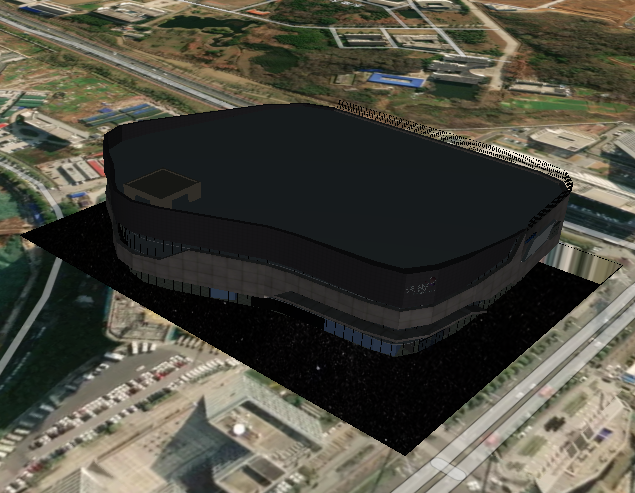
← 添加地下模型 地面裁剪(多个剪切面) →