
# cesium-地面裁剪(多个剪切面)
# 介绍
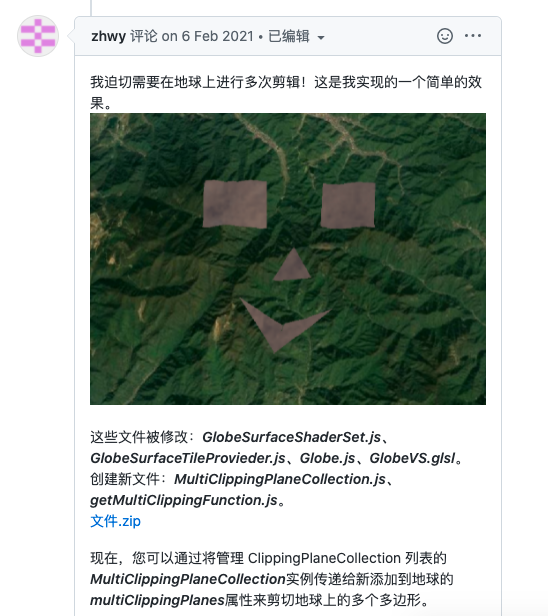
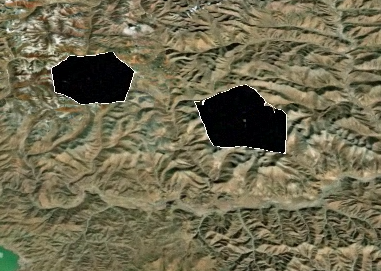
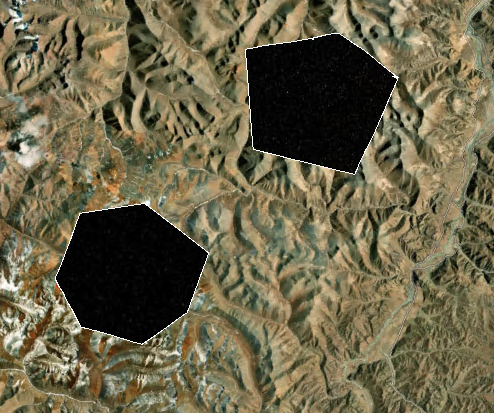
我之前的文章介绍过地面裁剪的实现,这里介绍一下裁剪多个面的方式。
Cesium自带的ClippingPlaneCollection只能实现单凸多边形挖除,为了实现多个面的裁切和简单凹多边形,这里我们需要修源码以提供支持。
在github中的问题讨论中已经有人实现了,实现方式需要重新打包源码
# 实现效果
# 源码打包
- 这里我使用的cesium源码版本为:1.79.1下载地址 (opens new window)
- 打包工具使用的是webstorm
- node.js版本为14.17.5
# 替换文件

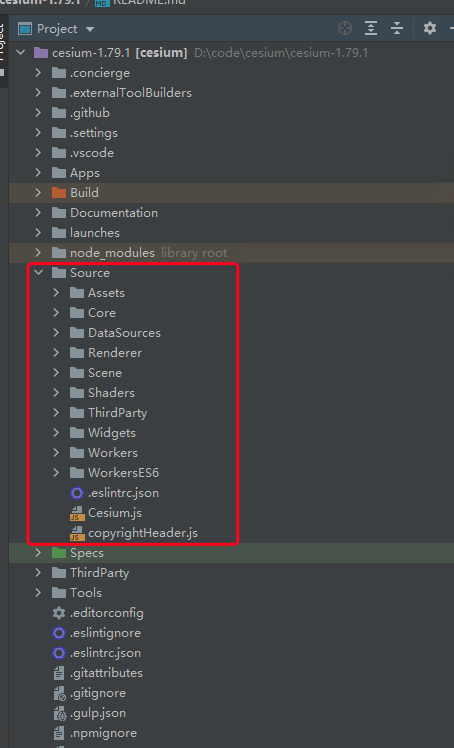
所有替换文件位置都在Source下,可以检索一下替换
# 使用打包命令打包
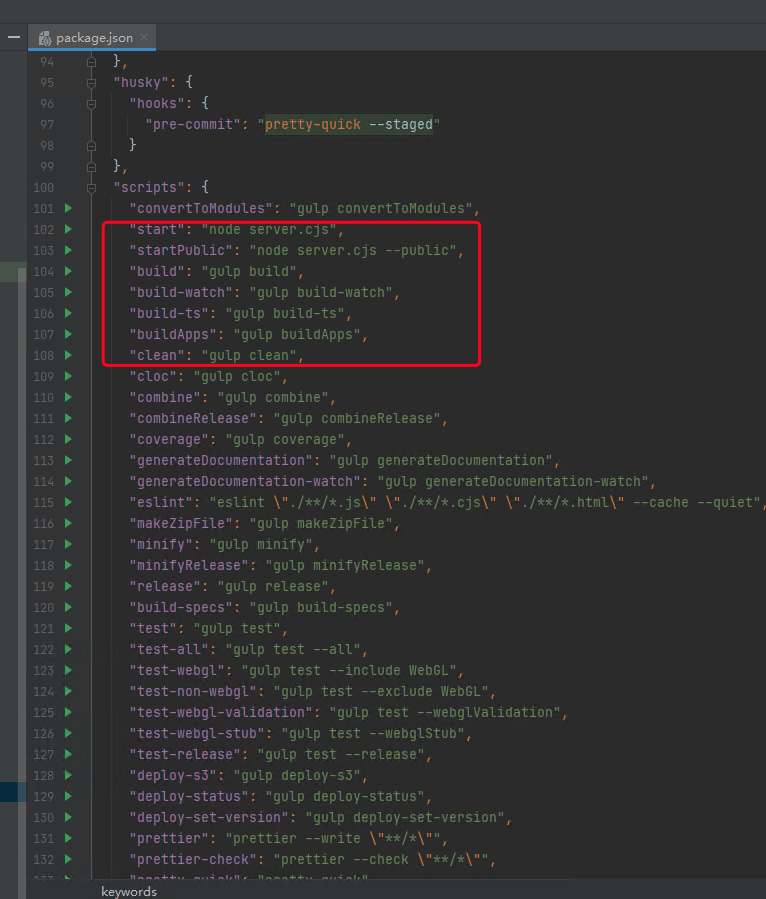
npm run build
1
# 部署打包代码
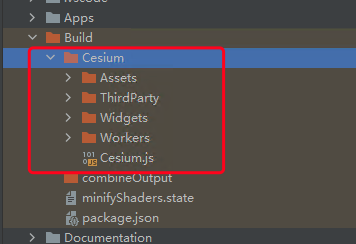
可以部署到nginx、apache等服务器上
# 完整代码
这里使用vue实现
<template>
  <div class="home">
    <el-row type="flex" :gutter="20">
      <el-col :span="24">
        <div class="grid-content bg-purple">
          <el-breadcrumb separator="/">
            <el-breadcrumb-item>cesium</el-breadcrumb-item>
            <el-breadcrumb-item>裁剪功能</el-breadcrumb-item>
            <el-breadcrumb-item>地形多裁剪</el-breadcrumb-item>
          </el-breadcrumb>
        </div>
      </el-col>
    </el-row>
    <el-row type="flex" :gutter="20">
      <el-col :span="24">
        <div class="grid-content bg-purple" >
          <cesiumComponent  id="cesium" ref="refCesium"/>
        </div>
      </el-col>
    </el-row>
    <el-row type="flex" :gutter="20">
      <el-col :span="24">
        <div class="grid-content bg-purple">
          <el-button type="primary" @click="addDem()">复位</el-button>
          <el-button type="primary" @click="clippings()">裁剪</el-button>
        </div>
      </el-col>
    </el-row>
  </div>
</template>

<script>
import cesiumComponent from '../cesium.vue'

export default {
  name: "clipping_many",
  data() {
    return {
      _viewer: undefined,
      polygonOne: [
        [
          87.27401733398438,
          29.61763959537609
        ],
        [
          87.24723815917969,
          29.586594438725495
        ],
        [
          87.25410461425781,
          29.542398322601738
        ],
        [
          87.29187011718749,
          29.52208551698379
        ],
        [
          87.34336853027344,
          29.52507295013191
        ],
        [
          87.35916137695312,
          29.580623120820174
        ],
        [
          87.33100891113281,
          29.6194303704904
        ],
        [
          87.27401733398438,
          29.61763959537609
        ]
      ],
      polygonTwo: [
        [
          87.50747680664062,
          29.558526173207785
        ],
        [
          87.43572235107422,
          29.52507295013191
        ],
        [
          87.45014190673828,
          29.452154410825624
        ],
        [
          87.53837585449219,
          29.449762750751052
        ],
        [
          87.5497055053711,
          29.50266505164239
        ],
        [
          87.50747680664062,
          29.558526173207785
        ]
      ],
      isClipping: false
    };
  },

  components: {
    cesiumComponent
  },
  mounted() {
    this.init();
  },
  methods: {
    init() {
      this.$refs.refCesium.initMap();
      this._viewer = this.$refs.refCesium._viewer;
      this.addDem();
    },
    addDem() {
      let that = this;
      that._viewer.terrainProvider = new Cesium.CesiumTerrainProvider({
        url: '**/dem/ASTGTM_N29E087D'
      });
      that._viewer.camera.flyTo({
        destination: Cesium.Cartesian3.fromDegrees(87.42919921875, 28.700224692776988, 67863.0),
        orientation: {
          heading: Cesium.Math.toRadians(0.0),
          pitch: Cesium.Math.toRadians(-45.0),
          roll: 0.0
        }
      });
    },
    clippings() {
      let that = this;
      let clippingPlanes1 = this.createClippingPlane(this.polygonOne);
      let clippingPlanes2 = this.createClippingPlane(this.polygonTwo);
      let clippingPlaneCollection1 = new Cesium.ClippingPlaneCollection({
        planes: clippingPlanes1,
      });
      let clippingPlaneCollection2 = new Cesium.ClippingPlaneCollection({
        planes: clippingPlanes2,
      });
      if(!that.isClipping){
        that._viewer.scene.globe.depthTestAgainstTerrain = true;
        that._viewer.scene.globe.multiClippingPlanes = new Cesium.MultiClippingPlaneCollection({
          collections: [clippingPlaneCollection1, clippingPlaneCollection2],
          edgeWidth: 1,
          edgeColor: Cesium.Color.WHITE,
        });
        that.isClipping=true;
      }else {
        that._viewer.scene.globe.multiClippingPlanes =null;
        that.isClipping=false;
      }

    },
    /**
     * 根据多边形数组创建裁切面
     * @param points_ 多边形数组集合
     * @returns {[]} 返回裁切面数组
     */
    createClippingPlane(points_) {
      let points = [];
      for (let i = 0; i < points_.length - 1; i++) {
        points.push(Cesium.Cartesian3.fromDegrees(points_[i][0], points_[i][1]))
      }
      let pointsLength = points.length;
      let clippingPlanes = []; // 存储ClippingPlane集合
      for (let i = 0; i < pointsLength; ++i) {
        let nextIndex = (i + 1) % pointsLength;
        let midpoint = Cesium.Cartesian3.add(points[i], points[nextIndex], new Cesium.Cartesian3());
        midpoint = Cesium.Cartesian3.multiplyByScalar(midpoint, 0.5, midpoint);

        let up = Cesium.Cartesian3.normalize(midpoint, new Cesium.Cartesian3());
        let right = Cesium.Cartesian3.subtract(points[nextIndex], midpoint, new Cesium.Cartesian3());
        right = Cesium.Cartesian3.normalize(right, right);

        let normal = Cesium.Cartesian3.cross(right, up, new Cesium.Cartesian3());
        normal = Cesium.Cartesian3.normalize(normal, normal);

        let originCenteredPlane = new Cesium.Plane(normal, 0.0);
        let distance = Cesium.Plane.getPointDistance(originCenteredPlane, midpoint);

        clippingPlanes.push(new Cesium.ClippingPlane(normal, distance));
      }
      return clippingPlanes;
    }
  },
  created() {

  },
}
</script>

<style scoped>
.home {
  height: 100%;
  margin: 0;
  padding: 0;
  overflow-y:auto;
  overflow-x:hidden;
}

.el-breadcrumb {
  margin: 10px;
  font-size: 15px;
}

#cesium{
  max-height: 500px;
}

</style>
1
2
3
4
5
6
7
8
9
10
11
12
13
14
15
16
17
18
19
20
21
22
23
24
25
26
27
28
29
30
31
32
33
34
35
36
37
38
39
40
41
42
43
44
45
46
47
48
49
50
51
52
53
54
55
56
57
58
59
60
61
62
63
64
65
66
67
68
69
70
71
72
73
74
75
76
77
78
79
80
81
82
83
84
85
86
87
88
89
90
91
92
93
94
95
96
97
98
99
100
101
102
103
104
105
106
107
108
109
110
111
112
113
114
115
116
117
118
119
120
121
122
123
124
125
126
127
128
129
130
131
132
133
134
135
136
137
138
139
140
141
142
143
144
145
146
147
148
149
150
151
152
153
154
155
156
157
158
159
160
161
162
163
164
165
166
167
168
169
170
171
172
173
174
175
176
177
178
179
180
181
182
183
184
185
186
187
188
189
190
191
192
193
194
195
196
197
198
199
200
201
202
203
204
205
206
207
208
209
210
2
3
4
5
6
7
8
9
10
11
12
13
14
15
16
17
18
19
20
21
22
23
24
25
26
27
28
29
30
31
32
33
34
35
36
37
38
39
40
41
42
43
44
45
46
47
48
49
50
51
52
53
54
55
56
57
58
59
60
61
62
63
64
65
66
67
68
69
70
71
72
73
74
75
76
77
78
79
80
81
82
83
84
85
86
87
88
89
90
91
92
93
94
95
96
97
98
99
100
101
102
103
104
105
106
107
108
109
110
111
112
113
114
115
116
117
118
119
120
121
122
123
124
125
126
127
128
129
130
131
132
133
134
135
136
137
138
139
140
141
142
143
144
145
146
147
148
149
150
151
152
153
154
155
156
157
158
159
160
161
162
163
164
165
166
167
168
169
170
171
172
173
174
175
176
177
178
179
180
181
182
183
184
185
186
187
188
189
190
191
192
193
194
195
196
197
198
199
200
201
202
203
204
205
206
207
208
209
210
# 核心代码
# 创建裁切面
    /**
     * 根据多边形数组创建裁切面
     * @param points_ 多边形数组集合
     * @returns {[]} 返回裁切面数组
     */
    createClippingPlane(points_) {
      let points = [];
      for (let i = 0; i < points_.length - 1; i++) {
        points.push(Cesium.Cartesian3.fromDegrees(points_[i][0], points_[i][1]))
      }
      let pointsLength = points.length;
      let clippingPlanes = []; // 存储ClippingPlane集合
      for (let i = 0; i < pointsLength; ++i) {
        let nextIndex = (i + 1) % pointsLength;
        let midpoint = Cesium.Cartesian3.add(points[i], points[nextIndex], new Cesium.Cartesian3());
        midpoint = Cesium.Cartesian3.multiplyByScalar(midpoint, 0.5, midpoint);

        let up = Cesium.Cartesian3.normalize(midpoint, new Cesium.Cartesian3());
        let right = Cesium.Cartesian3.subtract(points[nextIndex], midpoint, new Cesium.Cartesian3());
        right = Cesium.Cartesian3.normalize(right, right);

        let normal = Cesium.Cartesian3.cross(right, up, new Cesium.Cartesian3());
        normal = Cesium.Cartesian3.normalize(normal, normal);

        let originCenteredPlane = new Cesium.Plane(normal, 0.0);
        let distance = Cesium.Plane.getPointDistance(originCenteredPlane, midpoint);

        clippingPlanes.push(new Cesium.ClippingPlane(normal, distance));
      }
      return clippingPlanes;
    }
1
2
3
4
5
6
7
8
9
10
11
12
13
14
15
16
17
18
19
20
21
22
23
24
25
26
27
28
29
30
31
2
3
4
5
6
7
8
9
10
11
12
13
14
15
16
17
18
19
20
21
22
23
24
25
26
27
28
29
30
31
# 裁剪代码
    clippings() {
      let that = this;
      let clippingPlanes1 = this.createClippingPlane(this.polygonOne);
      let clippingPlanes2 = this.createClippingPlane(this.polygonTwo);
      let clippingPlaneCollection1 = new Cesium.ClippingPlaneCollection({
        planes: clippingPlanes1,
      });
      let clippingPlaneCollection2 = new Cesium.ClippingPlaneCollection({
        planes: clippingPlanes2,
      });
      if(!that.isClipping){
        that._viewer.scene.globe.depthTestAgainstTerrain = true;
        that._viewer.scene.globe.multiClippingPlanes = new Cesium.MultiClippingPlaneCollection({
          collections: [clippingPlaneCollection1, clippingPlaneCollection2],
          edgeWidth: 1,
          edgeColor: Cesium.Color.WHITE,
        });
        that.isClipping=true;
      }else {
        that._viewer.scene.globe.multiClippingPlanes =null;
        that.isClipping=false;
      }

    },
1
2
3
4
5
6
7
8
9
10
11
12
13
14
15
16
17
18
19
20
21
22
23
24
2
3
4
5
6
7
8
9
10
11
12
13
14
15
16
17
18
19
20
21
22
23
24