# ElasticSearch地理空间数据写入
申明:我将地理空间(GIS)数据写入ElasticSearch的方式仅代表我个人,如果有其他更好的方式可以告知我!
# 思路介绍
我习惯使用Java+PostgreSQL+PostGIS的方式处理地理数据。
这次的数据主要分两类:点(Point)的POI数据和Shape(点、线、面)混合数据。
接下来介绍我的数据处理思路:
- 原始数据使用arcmap处理成一个矢量 ,并且将坐标系转换设置为EPSG4326(WGS84经纬度坐标)
- 创建PostgreSQL数据库,并添加PostGIS扩展
- windows环境下,使用PostGIS自带的工具或QGIS将矢量导入pg数据库中
- ES数据库中根据数据字段创建对应的mappings
- 使用Java将pg数据库中的数据读出来批量写入es
# 实现(geo_point)
# 数据处理
这里我使用江苏的点数据为例,使用arcmap或QGIS将数据处理成一个WGS84经纬度坐标的标准geo_point点矢量,如图所示:
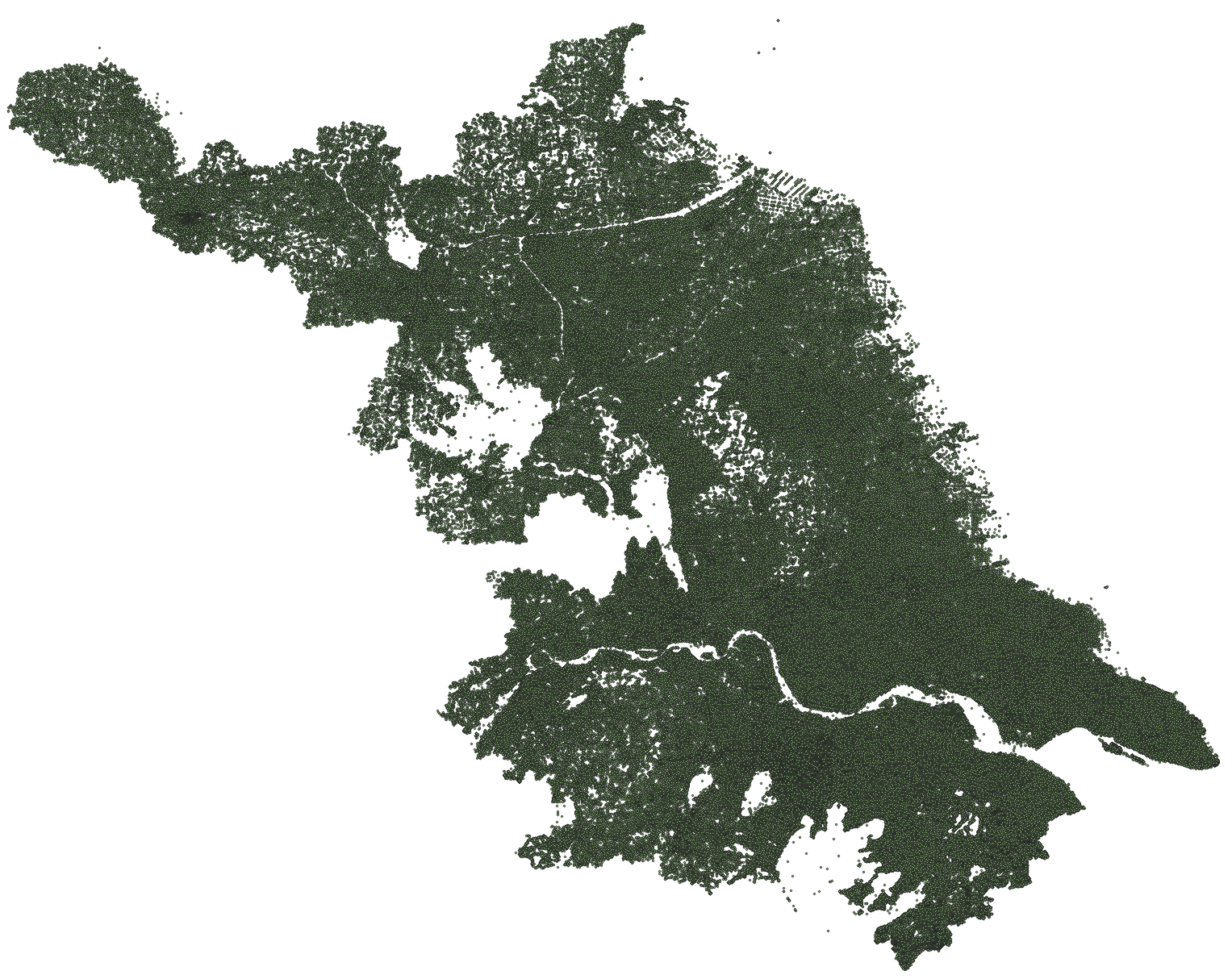

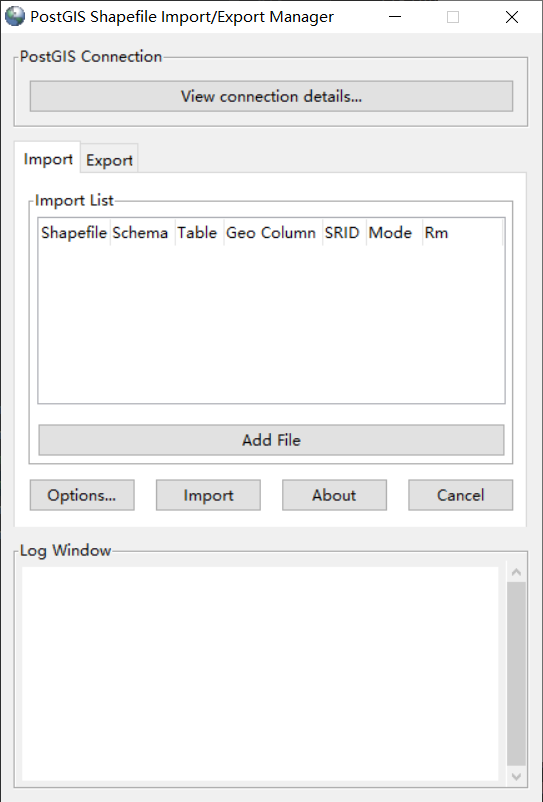
处理好的数据,使用PostGIS矢量入库工具或QGIS,将数据写入PG数据库中。
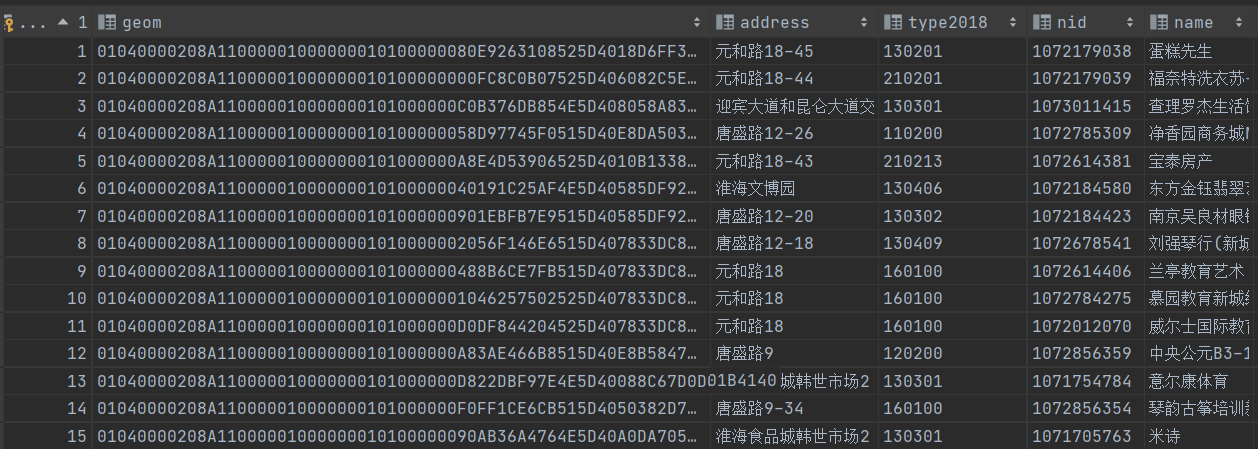
入库的数据如图所示:
# 创建点的mappings
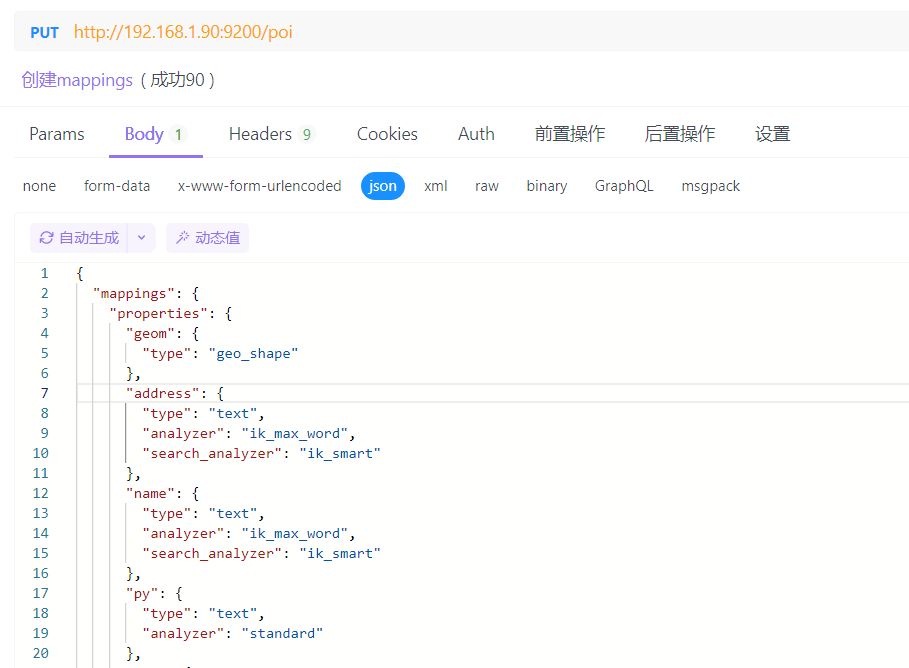
创建点POI的mappings结构如下所示:
{
  "mappings": {
    "properties": {
      "geom": {
        "type": "geo_shape"
      },
      "address": {
        "type": "text",
        "analyzer": "ik_max_word",
        "search_analyzer": "ik_smart"
      },
      "name": {
        "type": "text",
        "analyzer": "ik_max_word",
        "search_analyzer": "ik_smart"
      },
      "py": {
        "type": "text",
        "analyzer": "standard"
      },
      "city": {
        "type": "keyword"
      },
      "county": {
        "type": "keyword"
      },
      "county_dm": {
        "type": "keyword"
      },
      "city_dm": {
        "type": "keyword"
      },
      "lon": {
        "type": "float"
      },
      "lat": {
        "type": "float"
      }
    }
  }
}
1
2
3
4
5
6
7
8
9
10
11
12
13
14
15
16
17
18
19
20
21
22
23
24
25
26
27
28
29
30
31
32
33
34
35
36
37
38
39
40
41
2
3
4
5
6
7
8
9
10
11
12
13
14
15
16
17
18
19
20
21
22
23
24
25
26
27
28
29
30
31
32
33
34
35
36
37
38
39
40
41
使用PUT方式在ES中创建Mappings,如图所示:
# 使用Java将数据写入ES
# 配置maven依赖
我使用的是SpringBoot,配置maven文件,添加ElasticSearch依赖
        <dependency>
            <groupId>org.springframework.boot</groupId>
            <artifactId>spring-boot-starter-data-elasticsearch</artifactId>
        </dependency>
        <dependency>
            <groupId>com.github.pagehelper</groupId>
            <artifactId>pagehelper-spring-boot-starter</artifactId>
            <version>1.3.0</version>
        </dependency>
1
2
3
4
5
6
7
8
9
2
3
4
5
6
7
8
9
# 项目配置ES
项目配置ElasticsearchConfig.java文件
import org.apache.http.HttpHost;
import org.elasticsearch.client.RestClient;
import org.elasticsearch.client.RestClientBuilder;
import org.elasticsearch.client.RestHighLevelClient;
import org.springframework.context.annotation.Bean;
import org.springframework.context.annotation.Configuration;

@Configuration
public class ElasticsearchConfig {
    @Bean
    public RestHighLevelClient client() {
        HttpHost host = new HttpHost("localhost", 9200, "http");
        RestClientBuilder builder = RestClient.builder(host);
        return new RestHighLevelClient(builder);
    }

}
1
2
3
4
5
6
7
8
9
10
11
12
13
14
15
16
17
2
3
4
5
6
7
8
9
10
11
12
13
14
15
16
17
# 数据写入
读取pg数据库中的数据并写入ES中,这里我使用的是分页方式写入,可以提高数据写入效率(如果数据量太大,可以考虑多线程写入)
    @Resource
    PoiMapper poiMapper;

    @Resource
    RestHighLevelClient client;


   @Test
    public void test() {
        int pageSize = 5000; // 设置较大的页面大小以减少分页次数和提高效率
        int totalPageCount = (int) Math.ceil(3006547.0 / pageSize); // 计算总页数

        for (int pageNum = 1; pageNum <= totalPageCount; pageNum++) {
            System.out.println("总共"+totalPageCount+"页,当前第"+pageNum+"页");
            PageHelper.startPage(pageNum, pageSize);
            List<Poi> points = poiMapper.getPoint(); // 从数据库获取当前页的数据
            try {
                addEsBatch(points); // 一次性处理整页的数据
            } catch (IOException e) {
                e.printStackTrace();
                // 适当的错误处理
            }
        }
    }

    /**
     * 批量录入ES数据
     *
     * @param poiList 点数据集合
     * @throws IOException IO异常
     */
    private void addEsBatch(List<Poi> poiList) throws IOException {
        BulkRequest bulkRequest = new BulkRequest();

        for (Poi poi : poiList) {
            String esId = poi.getCountyDm() + "_" + poi.getId();  // 构建 ES 文档 ID
            String geomStr = poi.getGeomStr();  // 从 Poi 对象获取 GeoJSON 字符串
            poi.setGeom(JSON.parseObject(geomStr));  // 将 GeoJSON 字符串转换为 JSON 对象
            poi.setGeomStr(null);  // 清除原始的 GeoJSON 字符串属性

            IndexRequest request = new IndexRequest("poi_point")
                    .id(esId)
                    .source(JSON.toJSONString(poi), XContentType.JSON);  // 序列化 Poi 对象为 JSON 字符串
            bulkRequest.add(request);  // 将 IndexRequest 添加到 BulkRequest
        }

        BulkResponse response = client.bulk(bulkRequest, RequestOptions.DEFAULT);
        boolean hasFailures = response.hasFailures();

        if (hasFailures) {
            // 打印详细的失败信息,以便于调试
            for (BulkItemResponse bulkItemResponse : response) {
                if (bulkItemResponse.isFailed()) {
                    BulkItemResponse.Failure failure = bulkItemResponse.getFailure();
                    System.err.println("Failure: " + failure.getMessage());
                }
            }
        } else {
            System.out.println("All documents inserted successfully!");
        }
    }
1
2
3
4
5
6
7
8
9
10
11
12
13
14
15
16
17
18
19
20
21
22
23
24
25
26
27
28
29
30
31
32
33
34
35
36
37
38
39
40
41
42
43
44
45
46
47
48
49
50
51
52
53
54
55
56
57
58
59
60
61
2
3
4
5
6
7
8
9
10
11
12
13
14
15
16
17
18
19
20
21
22
23
24
25
26
27
28
29
30
31
32
33
34
35
36
37
38
39
40
41
42
43
44
45
46
47
48
49
50
51
52
53
54
55
56
57
58
59
60
61
# 查询数据
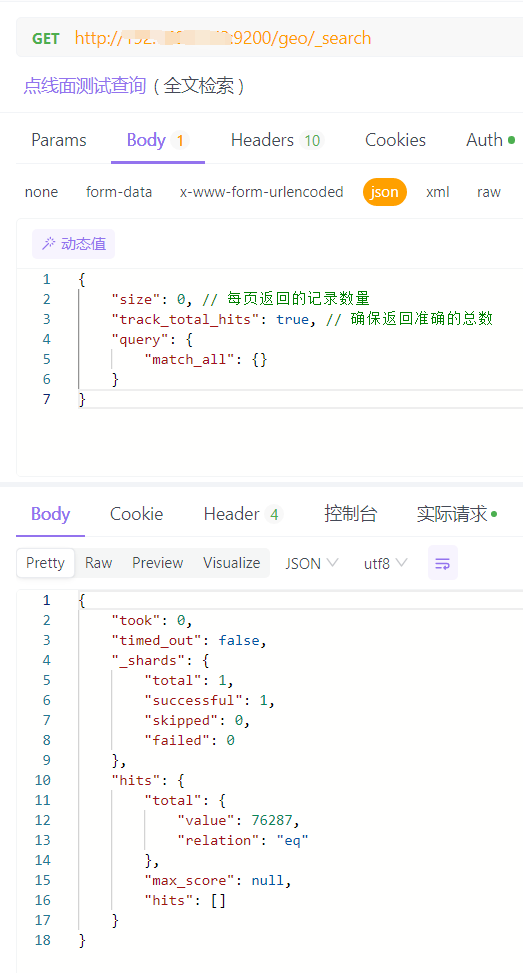
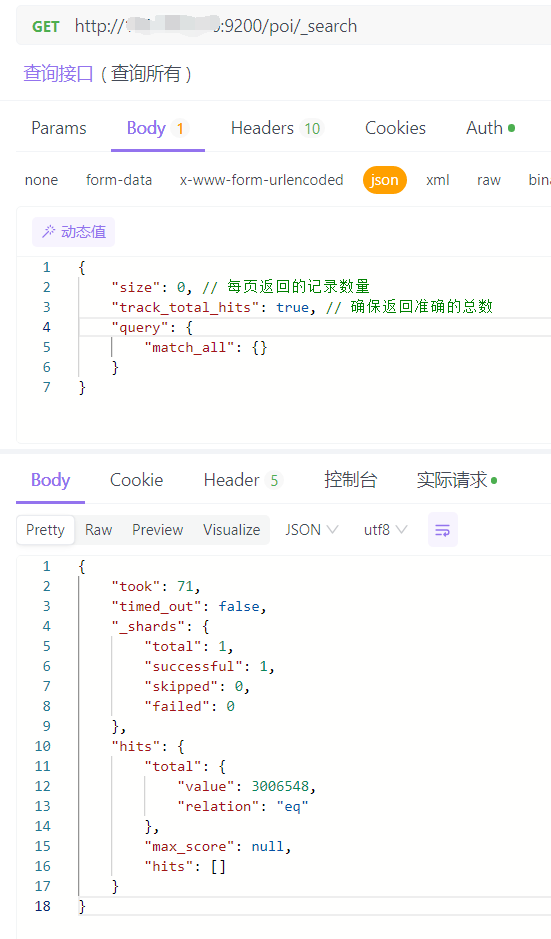
数据写入完成后,测试查询一下数据
{
    "size": 0, // 每页返回的记录数量
    "track_total_hits": true, // 确保返回准确的总数
    "query": {
        "match_all": {}
    }
}
1
2
3
4
5
6
7
2
3
4
5
6
7
返回值如下所示,数据已经全部写入了
# 实现(geo_shape)
# 数据处理
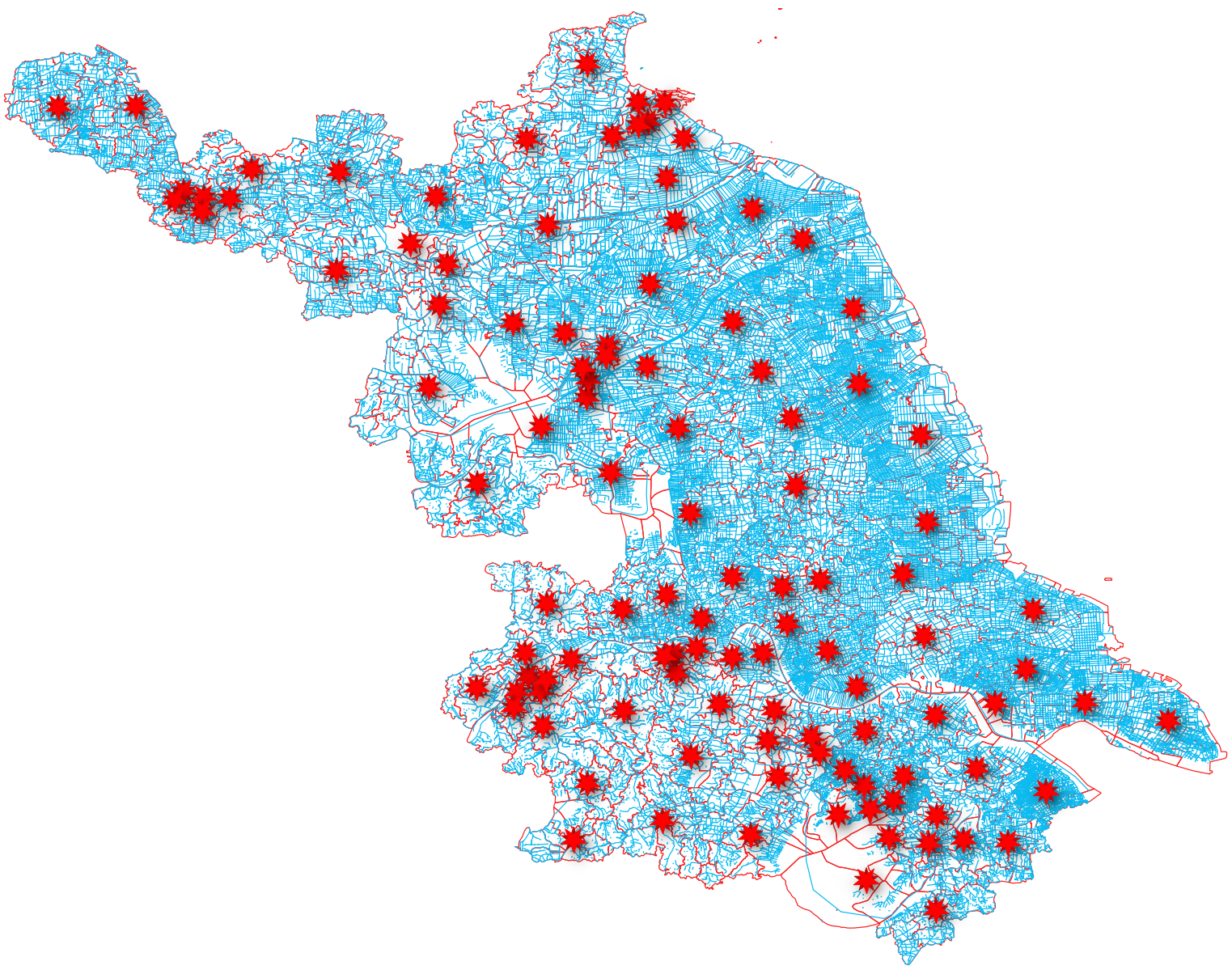
geo_shape数据可以存储点、线、面数据,这里我选取了江苏的县级中心点数据、河流线数据和乡镇面数据,如下图所示:
处理好的数据,使用PostGIS矢量入库工具或QGIS,将数据写入PG数据库中。
# 创建geo_shape的mappings
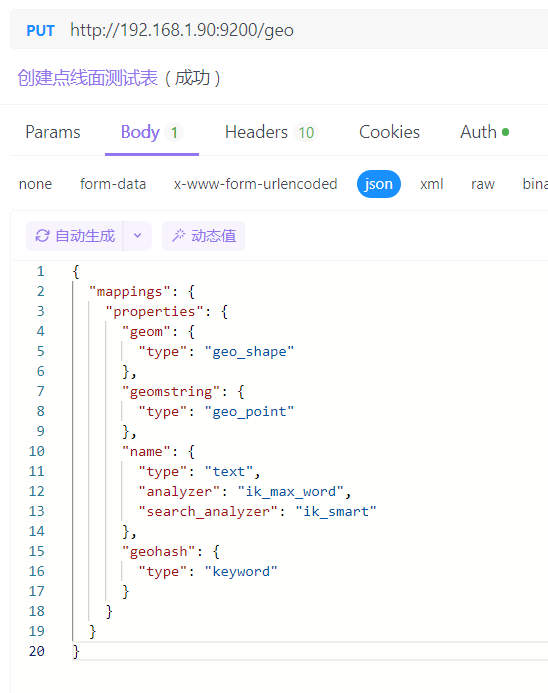
创建点geo_shape的mappings结构如下所示:
{
  "mappings": {
    "properties": {
      "geom": {
        "type": "geo_shape"
      },
      "geomstring": {
        "type": "geo_point"
      },
      "name": {
        "type": "text",
        "analyzer": "ik_max_word",
        "search_analyzer": "ik_smart"
      },
      "geohash": {
        "type": "keyword"
      }
    }
  }
}
1
2
3
4
5
6
7
8
9
10
11
12
13
14
15
16
17
18
19
20
2
3
4
5
6
7
8
9
10
11
12
13
14
15
16
17
18
19
20
使用PUT方式在ES中创建Mappings,如图所示:
# 使用Java将数据写入ES
# 数据写入
读取pg数据库中的数据并写入ES中,这里我使用的是分页方式写入,可以提高数据写入效率(如果数据量太大,可以考虑多线程写入)
    @Resource
    RestHighLevelClient client;

    @Resource
    CountyPointMapper countyPointMapper;

    @Resource
    HctlnMapper hctlnMapper;

    @Resource
    TowplMapper towplMapper;


    @Test
    public void testPoint() {
        int pageSize = 1000; // 设置较大的页面大小以减少分页次数和提高效率
        int totalPageCount = (int) Math.ceil(111.0 / pageSize); // 计算总页数

        for (int pageNum = 1; pageNum <= totalPageCount; pageNum++) {
            System.out.println("总共" + totalPageCount + "页,当前第" + pageNum + "页");
            PageHelper.startPage(pageNum, pageSize);
            List<CountyPoint> list = countyPointMapper.getGeom();// 从数据库获取当前页的数据
            try {
                addEsBatchPoint(list); // 一次性处理整页的数据
            } catch (IOException e) {
                e.printStackTrace();
                // 适当的错误处理
            }
        }
    }

    private void addEsBatchPoint(List<CountyPoint> list) throws IOException {
        BulkRequest bulkRequest = new BulkRequest();

        for (CountyPoint poi : list) {
            String esId = "point_" + poi.getId();
            String geomStr = poi.getGeomStr();  // 从 Poi 对象获取 GeoJSON 字符串
            poi.setGeom(JSON.parseObject(geomStr));  // 将 GeoJSON 字符串转换为 JSON 对象
            poi.setGeomStr(null);  // 清除原始的 GeoJSON 字符串属性

            IndexRequest request = new IndexRequest("geo")
                    .id(esId)
                    .source(JSON.toJSONString(poi), XContentType.JSON);  // 序列化 Poi 对象为 JSON 字符串
            bulkRequest.add(request);  // 将 IndexRequest 添加到 BulkRequest
        }

        BulkResponse response = client.bulk(bulkRequest, RequestOptions.DEFAULT);
        boolean hasFailures = response.hasFailures();

        if (hasFailures) {
            // 打印详细的失败信息,以便于调试
            for (BulkItemResponse bulkItemResponse : response) {
                if (bulkItemResponse.isFailed()) {
                    BulkItemResponse.Failure failure = bulkItemResponse.getFailure();
                    System.err.println("Failure: " + failure.getMessage());
                }
            }
        } else {
            System.out.println("All documents inserted successfully!");
        }
    }

    @Test
    public void testLine() {
        int pageSize = 1000; // 设置较大的页面大小以减少分页次数和提高效率
        int totalPageCount = (int) Math.ceil(74873.0 / pageSize); // 计算总页数

        for (int pageNum = 1; pageNum <= totalPageCount; pageNum++) {
            System.out.println("总共" + totalPageCount + "页,当前第" + pageNum + "页");
            PageHelper.startPage(pageNum, pageSize);
            List<Hctln> list = hctlnMapper.getGeom();// 从数据库获取当前页的数据
            try {
                addEsBatchLine(list); // 一次性处理整页的数据
            } catch (IOException e) {
                e.printStackTrace();
                // 适当的错误处理
            }
        }
    }

    private void addEsBatchLine(List<Hctln> list) throws IOException {
        BulkRequest bulkRequest = new BulkRequest();

        for (Hctln poi : list) {
            String esId = "MultiLineString_" + poi.getId();
            String geomStr = poi.getGeomStr();  // 从 Poi 对象获取 GeoJSON 字符串
            poi.setGeom(JSON.parseObject(geomStr));  // 将 GeoJSON 字符串转换为 JSON 对象
            poi.setGeomStr(null);  // 清除原始的 GeoJSON 字符串属性

            IndexRequest request = new IndexRequest("geo")
                    .id(esId)
                    .source(JSON.toJSONString(poi), XContentType.JSON);  // 序列化 Poi 对象为 JSON 字符串
            bulkRequest.add(request);  // 将 IndexRequest 添加到 BulkRequest
        }

        BulkResponse response = client.bulk(bulkRequest, RequestOptions.DEFAULT);
        boolean hasFailures = response.hasFailures();

        if (hasFailures) {
            // 打印详细的失败信息,以便于调试
            for (BulkItemResponse bulkItemResponse : response) {
                if (bulkItemResponse.isFailed()) {
                    BulkItemResponse.Failure failure = bulkItemResponse.getFailure();
                    System.err.println("Failure: " + failure.getMessage());
                }
            }
        } else {
            System.out.println("All documents inserted successfully!");
        }
    }


    @Test
    public void testMultiPolygon() {
        int pageSize = 1000; // 设置较大的页面大小以减少分页次数和提高效率
        int totalPageCount = (int) Math.ceil(1303.0 / pageSize); // 计算总页数

        for (int pageNum = 1; pageNum <= totalPageCount; pageNum++) {
            System.out.println("总共" + totalPageCount + "页,当前第" + pageNum + "页");
            PageHelper.startPage(pageNum, pageSize);
            List<Towpl> list = towplMapper.getGeom();// 从数据库获取当前页的数据
            try {
                addEsBatchMultiPolygon(list); // 一次性处理整页的数据
            } catch (IOException e) {
                e.printStackTrace();
                // 适当的错误处理
            }
        }
    }

    private void addEsBatchMultiPolygon(List<Towpl> list) throws IOException {
        BulkRequest bulkRequest = new BulkRequest();

        for (Towpl poi : list) {
            String esId = "MultiPolygon_" + poi.getId();
            String geomStr = poi.getGeomStr();  // 从 Poi 对象获取 GeoJSON 字符串
            poi.setGeom(JSON.parseObject(geomStr));  // 将 GeoJSON 字符串转换为 JSON 对象
            poi.setGeomStr(null);  // 清除原始的 GeoJSON 字符串属性

            IndexRequest request = new IndexRequest("geo")
                    .id(esId)
                    .source(JSON.toJSONString(poi), XContentType.JSON);  // 序列化 Poi 对象为 JSON 字符串
            bulkRequest.add(request);  // 将 IndexRequest 添加到 BulkRequest
        }

        BulkResponse response = client.bulk(bulkRequest, RequestOptions.DEFAULT);
        boolean hasFailures = response.hasFailures();

        if (hasFailures) {
            // 打印详细的失败信息,以便于调试
            for (BulkItemResponse bulkItemResponse : response) {
                if (bulkItemResponse.isFailed()) {
                    BulkItemResponse.Failure failure = bulkItemResponse.getFailure();
                    System.err.println("Failure: " + failure.getMessage());
                }
            }
        } else {
            System.out.println("All documents inserted successfully!");
        }
    }
1
2
3
4
5
6
7
8
9
10
11
12
13
14
15
16
17
18
19
20
21
22
23
24
25
26
27
28
29
30
31
32
33
34
35
36
37
38
39
40
41
42
43
44
45
46
47
48
49
50
51
52
53
54
55
56
57
58
59
60
61
62
63
64
65
66
67
68
69
70
71
72
73
74
75
76
77
78
79
80
81
82
83
84
85
86
87
88
89
90
91
92
93
94
95
96
97
98
99
100
101
102
103
104
105
106
107
108
109
110
111
112
113
114
115
116
117
118
119
120
121
122
123
124
125
126
127
128
129
130
131
132
133
134
135
136
137
138
139
140
141
142
143
144
145
146
147
148
149
150
151
152
153
154
155
156
157
158
159
160
2
3
4
5
6
7
8
9
10
11
12
13
14
15
16
17
18
19
20
21
22
23
24
25
26
27
28
29
30
31
32
33
34
35
36
37
38
39
40
41
42
43
44
45
46
47
48
49
50
51
52
53
54
55
56
57
58
59
60
61
62
63
64
65
66
67
68
69
70
71
72
73
74
75
76
77
78
79
80
81
82
83
84
85
86
87
88
89
90
91
92
93
94
95
96
97
98
99
100
101
102
103
104
105
106
107
108
109
110
111
112
113
114
115
116
117
118
119
120
121
122
123
124
125
126
127
128
129
130
131
132
133
134
135
136
137
138
139
140
141
142
143
144
145
146
147
148
149
150
151
152
153
154
155
156
157
158
159
160
# 查询数据
数据写入完成后,测试查询一下数据
{
    "size": 0, // 每页返回的记录数量
    "track_total_hits": true, // 确保返回准确的总数
    "query": {
        "match_all": {}
    }
}
1
2
3
4
5
6
7
2
3
4
5
6
7
返回值如下所示,数据已经全部写入了