# ElasticSearch地理空间数据查询
之前已经介绍了在ElasticSearch中的地理空间数据结构,并且已经将示例数据写入了ES中,接下来我们一起详细看看在ElasticSearch中是如何查询地理空间数据的。
# 查询方式介绍
ElasticSearch 提供了多种查询接口,包括通过 REST API 进行查询和使用 Java 高级客户端(Java High Level Rest Client)进行查询。
ElasticSearch 提供了多种查询接口,包括通过 REST API 进行查询和使用 Java 高级客户端(Java High Level Rest Client)进行查询。以下是这两种方式的介绍和对比:
# 1. REST API 查询方式
# 特点
- 易于使用:通过 HTTP 请求发送 JSON 格式的查询,易于调试和测试。
- 独立于编程语言:任何可以发送 HTTP 请求的语言都可以使用,例如 Python、JavaScript、Curl 等。
- 灵活性:可以直接使用 ElasticSearch 提供的所有查询功能。
这里使用的是DSL,ElasticSearch的Query DSL是一种强大的查询语言,支持多种查询类型,包括全文检索、结构化查询、地理位置查询等。Query DSL主要分为两大类查询:
- 叶子查询(Leaf Query Clauses): 用于搜索特定的字段值。例如
term查询和match查询。 - 复合查询(Compound Query Clauses): 用于组合其他查询子句。例如
bool查询。
# 示例
使用 curl 发送查询请求:
curl -X GET "http://localhost:9200/my_index/_search" -H 'Content-Type: application/json' -d'
{
  "_source": ["city", "population", "state"],
  "query": {
    "term": {
      "city": {
        "value": "徐州市"
      }
    }
  }
}'
1
2
3
4
5
6
7
8
9
10
11
2
3
4
5
6
7
8
9
10
11
# 2. Java 高级客户端(Java High Level Rest Client)
# 特点
- 集成度高:与 ElasticSearch 服务器的 API 紧密集成,提供丰富的 Java API。
- 类型安全:提供类型安全的 API,减少编码错误。
- 更好的性能:相比于通过 HTTP 请求发送 JSON,使用 Java 客户端可以更高效地进行批量操作和数据传输。
# 示例
使用 Java 高级客户端查询:
import org.elasticsearch.action.search.SearchRequest;
import org.elasticsearch.action.search.SearchResponse;
import org.elasticsearch.client.RestHighLevelClient;
import org.elasticsearch.client.RestClient;
import org.elasticsearch.index.query.QueryBuilders;
import org.elasticsearch.search.builder.SearchSourceBuilder;

public class ElasticSearchExample {
    public static void main(String[] args) throws IOException {
        RestHighLevelClient client = new RestHighLevelClient(
                RestClient.builder(new HttpHost("localhost", 9200, "http")));

        SearchRequest searchRequest = new SearchRequest("my_index");
        SearchSourceBuilder sourceBuilder = new SearchSourceBuilder();
        sourceBuilder.query(QueryBuilders.termQuery("city", "徐州市"));
        sourceBuilder.fetchSource(new String[]{"city", "population", "state"}, null);
        searchRequest.source(sourceBuilder);

        SearchResponse searchResponse = client.search(searchRequest, RequestOptions.DEFAULT);

        System.out.println(searchResponse);

        client.close();
    }
}
1
2
3
4
5
6
7
8
9
10
11
12
13
14
15
16
17
18
19
20
21
22
23
24
25
2
3
4
5
6
7
8
9
10
11
12
13
14
15
16
17
18
19
20
21
22
23
24
25
# 对比
| 特点 | REST API 查询方式 | Java 高级客户端查询方式 |
|---|---|---|
| 语言 | 独立于编程语言 | 仅限 Java |
| 易用性 | 易于使用,特别适合调试和快速测试 | 需要更多的设置和配置 |
| 类型安全 | 无类型安全,需要手动解析 JSON 响应 | 提供类型安全的 API |
| 性能 | 性能相对较低,尤其是批量操作时 | 性能较高,适合高效的批量操作 |
| 功能覆盖 | 直接访问所有 ElasticSearch API | 覆盖大部分常用的 ElasticSearch 功能 |
| 依赖 | 仅依赖于 HTTP 和 JSON | 依赖于 ElasticSearch 的 Java 客户端 |
# 总结
- REST API 查询方式:适合所有编程语言,易于使用和调试,灵活性高,但缺乏类型安全。
- Java 高级客户端查询方式:适合 Java 开发者,提供类型安全的 API 和更高的性能,适合于大规模数据操作和高效的查询。
# POI查询
我在ES中录入的geo_point格式数据是POI兴趣点数据,除了经纬度地理数据还包括地名、地址等属性信息。
# POI表结构
POI表结构如下所示:
{
  "mappings": {
    "properties": {
      "geom": {
        "type": "geo_shape"
      },
      "address": {
        "type": "text",
        "analyzer": "ik_max_word",
        "search_analyzer": "ik_smart"
      },
      "name": {
        "type": "text",
        "analyzer": "ik_max_word",
        "search_analyzer": "ik_smart"
      },
      "city": {
        "type": "keyword"
      },
      "county": {
        "type": "keyword"
      },
      "county_dm": {
        "type": "keyword"
      },
      "city_dm": {
        "type": "keyword"
      }
    }
  }
}
1
2
3
4
5
6
7
8
9
10
11
12
13
14
15
16
17
18
19
20
21
22
23
24
25
26
27
28
29
30
31
2
3
4
5
6
7
8
9
10
11
12
13
14
15
16
17
18
19
20
21
22
23
24
25
26
27
28
29
30
31
# 地名地址查询
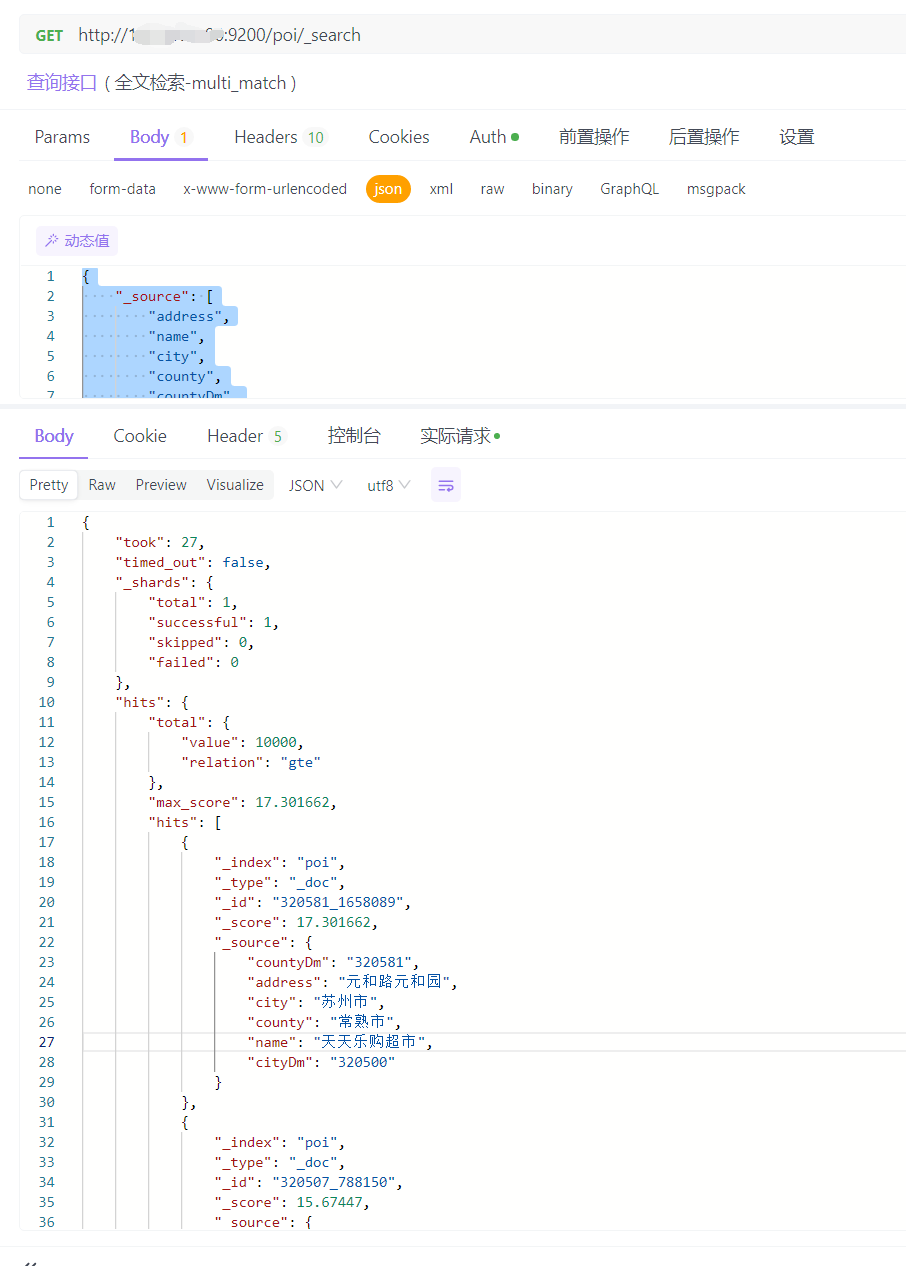
地名地址查询实际上是同时在两个属性中进行查询,将符合条件的数据按照匹配度进行降序排列。
# DSL方式查询
{
    "_source": [
        "address",
        "name",
        "city",
        "county",
        "countyDm",
        "cityDm"
    ],
    "query": {
        "multi_match": {
            "query": "元和",
            "fields": [
                "address",
                "name"
            ]
        }
    }
}
1
2
3
4
5
6
7
8
9
10
11
12
13
14
15
16
17
18
19
2
3
4
5
6
7
8
9
10
11
12
13
14
15
16
17
18
19
返回值如下所示:
# Java方式查询
在SpringBoot中配置ES在之前的文档中已经介绍了,可以看看之前的文档
- 地名地址查询简单实体类(PlaceNameAddressPojo.java)
import io.swagger.annotations.ApiModelProperty;
import lombok.Data;

import javax.validation.constraints.NotNull;

/**
 * 地名地址查询简单实体
 */
@Data
public class PlaceNameAddressPojo {

    @ApiModelProperty(value = "地名")
    private String name;

    @ApiModelProperty(value = "地址")
    private String address;

    @ApiModelProperty(value = "地名和地址")
    private String nameAndAddress;

    @ApiModelProperty(value = "类型")
    private String type;

    @NotNull(message = "页数不能为空")
    @ApiModelProperty(value = "页数")
    private Integer page;

    @NotNull(message = "条数不能为空")
    @ApiModelProperty(value = "条数")
    private Integer limit;
}
1
2
3
4
5
6
7
8
9
10
11
12
13
14
15
16
17
18
19
20
21
22
23
24
25
26
27
28
29
30
31
2
3
4
5
6
7
8
9
10
11
12
13
14
15
16
17
18
19
20
21
22
23
24
25
26
27
28
29
30
31
- POI实体类
import com.alibaba.fastjson.JSONObject;

import java.io.Serializable;

import io.swagger.annotations.ApiModel;
import io.swagger.annotations.ApiModelProperty;
import lombok.Data;
import lombok.EqualsAndHashCode;

/**
 * <p>
 *
 * </p>
 *
 * @author sung
 * @since 2024-04-29
 */
@Data
@EqualsAndHashCode(callSuper = false)
@ApiModel(value = "Poi对象", description = "")
public class Poi implements Serializable {

    private static final long serialVersionUID = 1L;

    private Integer id;

    private JSONObject geom;

    private String address;

    private String type2018;

    private String nid;

    private String name;

    private String city;

    private String county;

    private String countyDm;

    private String cityDm;

}
1
2
3
4
5
6
7
8
9
10
11
12
13
14
15
16
17
18
19
20
21
22
23
24
25
26
27
28
29
30
31
32
33
34
35
36
37
38
39
40
41
42
43
44
45
2
3
4
5
6
7
8
9
10
11
12
13
14
15
16
17
18
19
20
21
22
23
24
25
26
27
28
29
30
31
32
33
34
35
36
37
38
39
40
41
42
43
44
45
- Controller层接口代码
@ApiOperation(value = "地名地址检索")
@PostMapping("/searchPoi")
public ResponseResult searchPoi(@Valid @RequestBody PlaceNameAddressPojo placeNameAddressPojo) {
    return iPoiService.searchPoi(placeNameAddressPojo);
}
1
2
3
4
5
2
3
4
5
- Service层Impl实现代码
@Resource
RestHighLevelClient client;

@Override
public ResponseResult searchPoi(PlaceNameAddressPojo placeNameAddressPojo) {
    // 创建一个BoolQueryBuilder用于组合多个查询条件
    BoolQueryBuilder boolQueryBuilder = new BoolQueryBuilder();

    // 如果nameAndAddress字段不为空,则进行MultiMatch查询
    if (!StringUtils.isEmpty(placeNameAddressPojo.getNameAndAddress())) {
        // 创建MultiMatchQueryBuilder,查询name和address字段
        MultiMatchQueryBuilder matchQueryBuilder = new MultiMatchQueryBuilder(placeNameAddressPojo.getNameAndAddress(),
                "name",
                "address");
        // 设置分析器为ik_smart
        matchQueryBuilder.analyzer("ik_smart");
        // 设置匹配类型为BEST_FIELDS
        matchQueryBuilder.type(MultiMatchQueryBuilder.Type.BEST_FIELDS);
        // 将查询条件添加到bool查询中
        boolQueryBuilder.must(matchQueryBuilder);
    }
    // 如果name字段不为空,则进行Match查询
    else if (!StringUtils.isEmpty(placeNameAddressPojo.getName())) {
        // 创建MatchQueryBuilder,查询name字段
        MatchQueryBuilder matchQueryBuilder = new MatchQueryBuilder("name", placeNameAddressPojo.getName());
        // 设置分析器为ik_smart
        matchQueryBuilder.analyzer("ik_smart");
        // 将查询条件添加到bool查询中
        boolQueryBuilder.must(matchQueryBuilder);
    }
    // 如果address字段不为空,则进行Match查询
    else if (!StringUtils.isEmpty(placeNameAddressPojo.getAddress())) {
        // 创建MatchQueryBuilder,查询address字段
        MatchQueryBuilder matchQueryBuilder = new MatchQueryBuilder("address", placeNameAddressPojo.getAddress());
        // 设置分析器为ik_smart
        matchQueryBuilder.analyzer("ik_smart");
        // 将查询条件添加到bool查询中
        boolQueryBuilder.must(matchQueryBuilder);
    }
    // 如果type字段不为空,则进行Wildcard查询
    else if (!StringUtils.isEmpty(placeNameAddressPojo.getType())) {
        // 创建WildcardQueryBuilder,模糊查询type2018字段
        boolQueryBuilder.must(QueryBuilders.wildcardQuery("type2018", placeNameAddressPojo.getType() + "*"));
    }
    // 如果所有字段都为空,则返回失败响应
    else {
        return new ResponseResult(ResponseCode.FAILURE, "请输入地名或地址查询");
    }

    // 创建SearchSourceBuilder用于构建查询请求
    SearchSourceBuilder sourceBuilder = new SearchSourceBuilder();
    // 设置查询条件
    sourceBuilder.query(boolQueryBuilder)
                 .trackTotalHits(true)
                 // 设置分页参数,第几页
                 .from((placeNameAddressPojo.getPage() - 1) * placeNameAddressPojo.getLimit())
                 // 设置每页显示多少条数据
                 .size(placeNameAddressPojo.getLimit())
                 // 设置搜索结果排序为降序,即匹配度从高到低
                 .sort(new ScoreSortBuilder().order(SortOrder.DESC));

    // 创建SearchRequest并指定索引
    SearchRequest searchRequest = new SearchRequest("poi_point");
    searchRequest.source(sourceBuilder);

    SearchResponse searchResponse = null;
    try {
        // 执行搜索请求
        searchResponse = client.search(searchRequest, RequestOptions.DEFAULT);
    } catch (IOException e) {
        e.printStackTrace();
        return new ResponseResult(ResponseCode.FAILURE, "连接超时");
    }

    // 获取搜索结果
    SearchHits searchHits = searchResponse.getHits();
    if (searchHits != null) {
        long totalHits = searchHits.getTotalHits().value;
        // 处理搜索结果,并返回结果
        List<Poi> pois = new ArrayList<>();
        for (SearchHit hit : searchHits) {
            // 将搜索结果转换为Map
            Map<String, Object> sourceAsMap = hit.getSourceAsMap();
            // 将Map转换为Poi对象
            Poi poi = JSON.parseObject(JSON.toJSONString(sourceAsMap), Poi.class);
            // 将Poi对象添加到列表中
            pois.add(poi);
        }
        // 创建返回结果
        HashMap<String, Object> res = new HashMap<>();
        res.put("total", totalHits);
        res.put("data", pois);
        return new ResponseResult(ResponseCode.SUCCESS, res);
    } else {
        return new ResponseResult(ResponseCode.FAILURE, "查询失败");
    }
}
1
2
3
4
5
6
7
8
9
10
11
12
13
14
15
16
17
18
19
20
21
22
23
24
25
26
27
28
29
30
31
32
33
34
35
36
37
38
39
40
41
42
43
44
45
46
47
48
49
50
51
52
53
54
55
56
57
58
59
60
61
62
63
64
65
66
67
68
69
70
71
72
73
74
75
76
77
78
79
80
81
82
83
84
85
86
87
88
89
90
91
92
93
94
95
96
97
2
3
4
5
6
7
8
9
10
11
12
13
14
15
16
17
18
19
20
21
22
23
24
25
26
27
28
29
30
31
32
33
34
35
36
37
38
39
40
41
42
43
44
45
46
47
48
49
50
51
52
53
54
55
56
57
58
59
60
61
62
63
64
65
66
67
68
69
70
71
72
73
74
75
76
77
78
79
80
81
82
83
84
85
86
87
88
89
90
91
92
93
94
95
96
97
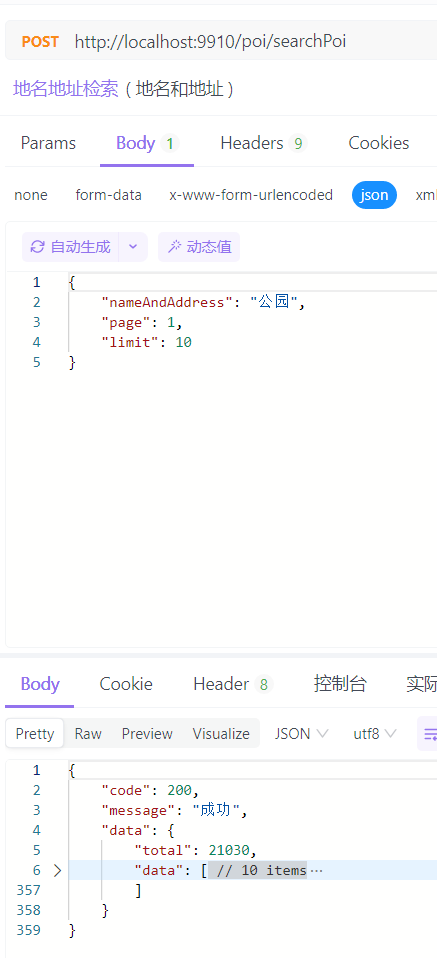
示例查询,如图所示:
# 空间查询-矩形范围
# DSL方式查询
{
    "_source": [
        "address",
        "name",
        "city",
        "county",
        "countyDm",
        "cityDm"
    ],
    "query": {
        "geo_bounding_box": {
            "geom": {
                "top_left": {
                    "lat": 53.55,
                    "lon": 73.55
                },
                "bottom_right": {
                    "lat": 3.85,
                    "lon": 134.75
                }
            }
        }
    }
}
1
2
3
4
5
6
7
8
9
10
11
12
13
14
15
16
17
18
19
20
21
22
23
24
2
3
4
5
6
7
8
9
10
11
12
13
14
15
16
17
18
19
20
21
22
23
24
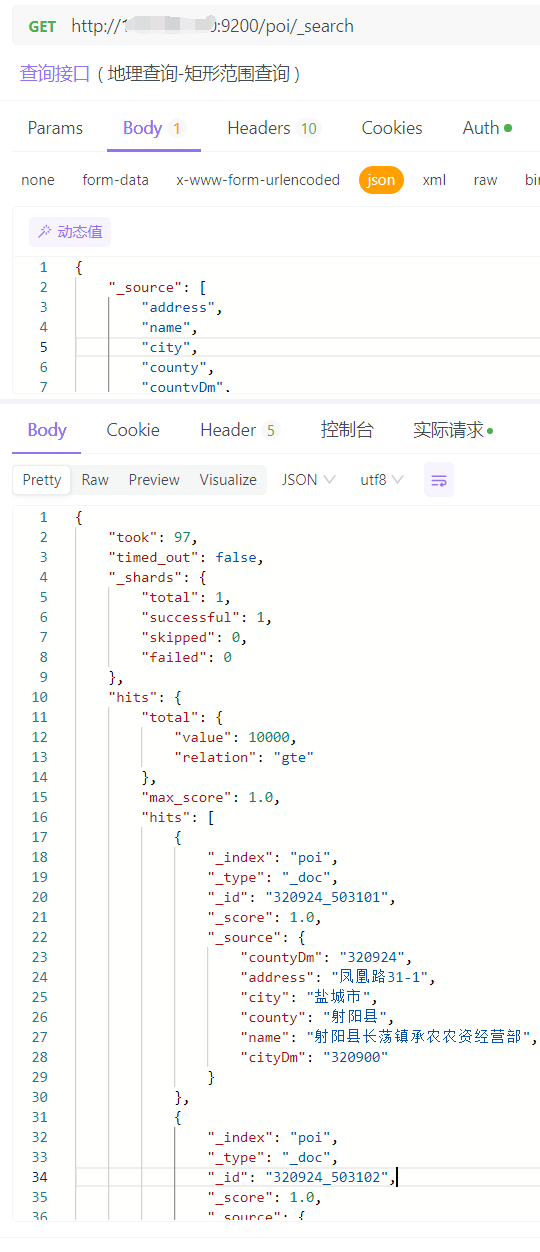
返回值如下所示:
# Java方式查询
- 矩形范围查询实体类(PoiForGeoBoundPojo.java)
import io.swagger.annotations.ApiModelProperty;
import lombok.Data;

import javax.validation.constraints.NotBlank;
import javax.validation.constraints.NotNull;

@Data
public class PoiForGeoBoundPojo {

    @NotNull(message = "矩形框范围不能为空")
    @ApiModelProperty(value = "矩形框查询")
    private Double[] boundingBox;

    @NotBlank(message = "查询类型不能为空")
    @ApiModelProperty(value = "查询类型:page(分页查询),all(查询全部)")
    private String kind;

    @ApiModelProperty(value = "页数")
    private Integer page;

    @ApiModelProperty(value = "条数")
    private Integer limit;

}
1
2
3
4
5
6
7
8
9
10
11
12
13
14
15
16
17
18
19
20
21
22
23
24
2
3
4
5
6
7
8
9
10
11
12
13
14
15
16
17
18
19
20
21
22
23
24
- Controller层接口代码
    @ApiOperation(value = "地名地址空间检索-矩形范围")
    @PostMapping("/searchPoiForGeoBound")
    public ResponseResult searchPoiForGeoBound(@Valid @RequestBody PoiForGeoBoundPojo poiForGeoBoundPojo) {
        return iPoiService.searchPoiForGeoBound(poiForGeoBoundPojo);
    }
1
2
3
4
5
2
3
4
5
- Service层Impl实现代码
@Resource
RestHighLevelClient client;

@Override
public ResponseResult searchPoiForGeoBound(PoiForGeoBoundPojo poiForGeoBoundPojo) {
        String kind = poiForGeoBoundPojo.getKind();
        BoolQueryBuilder boolQueryBuilder = new BoolQueryBuilder();
        String index = "poi_point";

        // 检查矩形框查询条件
        if (poiForGeoBoundPojo.getBoundingBox() != null && poiForGeoBoundPojo.getBoundingBox().length == 4) {
            GeoBoundingBoxQueryBuilder boxQueryBuilder = QueryBuilders.geoBoundingBoxQuery("geom")
                    .setCorners(
                            new GeoPoint(poiForGeoBoundPojo.getBoundingBox()[0], poiForGeoBoundPojo.getBoundingBox()[1]),
                            new GeoPoint(poiForGeoBoundPojo.getBoundingBox()[2], poiForGeoBoundPojo.getBoundingBox()[3])
                    );
            boolQueryBuilder.must(boxQueryBuilder);
        }
        // 分页查询
        if (kind.equals("page")) {
            // 检查分页参数
            if (poiForGeoBoundPojo.getPage() == null || poiForGeoBoundPojo.getLimit() == null) {
                return new ResponseResult(ResponseCode.FAILURE, "缺少分页参数!limit或page!");
            }
            SearchSourceBuilder sourceBuilder = new SearchSourceBuilder();
            sourceBuilder.query(boolQueryBuilder).trackTotalHits(true)
                    //第几页
                    .from((poiForGeoBoundPojo.getPage() - 1) * poiForGeoBoundPojo.getLimit())
                    //第几条
                    .size(poiForGeoBoundPojo.getLimit())
                    //设置搜索排序为降序,即匹配度从高到低
                    .sort(new ScoreSortBuilder().order(SortOrder.DESC));
            SearchRequest searchRequest = new SearchRequest(index);
            searchRequest.source(sourceBuilder);
            SearchResponse searchResponse = null;
            try {
                searchResponse = client.search(searchRequest, RequestOptions.DEFAULT);
            } catch (IOException e) {
                e.printStackTrace();
                return new ResponseResult(ResponseCode.FAILURE, "连接超时");
            }
            // 处理搜索结果
            SearchHits searchHits = searchResponse.getHits();
            if (searchHits != null) {
                long totalHits = searchHits.getTotalHits().value;
                List<Poi> pois = new ArrayList<>();
                for (SearchHit hit : searchHits) {
                    Map<String, Object> sourceAsMap = hit.getSourceAsMap();
                    Poi poi = JSON.parseObject(JSON.toJSONString(sourceAsMap), Poi.class);
                    pois.add(poi);
                }
                HashMap<String, Object> res = new HashMap<>();
                res.put("total", totalHits);
                res.put("data", pois);
                return new ResponseResult(ResponseCode.SUCCESS, res);
            } else {
                return new ResponseResult(ResponseCode.FAILURE, "查询失败");
            }
        }
        // 查询全部
        if (kind.equals("all")) {
            // 使用 Scroll API 来获取所有数据
            final Scroll scroll = new Scroll(TimeValue.timeValueMinutes(1L));
            SearchRequest searchRequest = new SearchRequest(index);
            searchRequest.scroll(scroll);
            SearchSourceBuilder searchSourceBuilder = new SearchSourceBuilder();
            searchSourceBuilder.query(boolQueryBuilder)
                    .size(1000); // 每批获取1000条记录
            searchRequest.source(searchSourceBuilder);
            return performScrollSearch(scroll, searchRequest);
        }
        return new ResponseResult(ResponseCode.FAILURE, "查询失败!");
    }
1
2
3
4
5
6
7
8
9
10
11
12
13
14
15
16
17
18
19
20
21
22
23
24
25
26
27
28
29
30
31
32
33
34
35
36
37
38
39
40
41
42
43
44
45
46
47
48
49
50
51
52
53
54
55
56
57
58
59
60
61
62
63
64
65
66
67
68
69
70
71
72
73
2
3
4
5
6
7
8
9
10
11
12
13
14
15
16
17
18
19
20
21
22
23
24
25
26
27
28
29
30
31
32
33
34
35
36
37
38
39
40
41
42
43
44
45
46
47
48
49
50
51
52
53
54
55
56
57
58
59
60
61
62
63
64
65
66
67
68
69
70
71
72
73
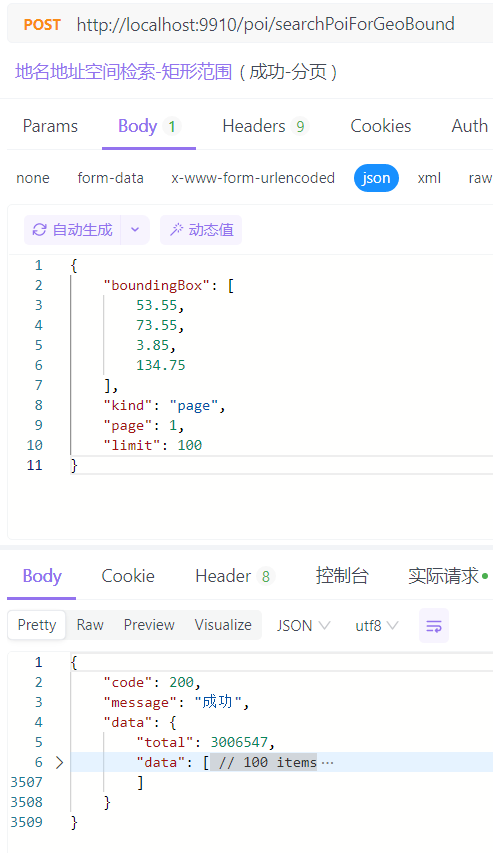
返回值如下所示:
# 空间查询-点半径
# DSL方式查询
{
    "_source": [
        "address",
        "name",
        "city",
        "county",
        "countyDm",
        "cityDm"
    ],
    "from": 0, // 开始的记录位置,例如,第一页从0开始,第二页从10开始,如果每页10条
    "size": 100, // 每页返回的记录数量
    "track_total_hits": true, // 确保返回准确的总数
    "query": {
        "geo_distance": {
            "distance": "100km",
            "geomstring": "34.21717,117.28175"
        }
    },
    "sort": [
        {
            "_geo_distance": {
                "geomstring": {
                    "lat": 34.21717,
                    "lon": 117.28175
                },
                "order": "asc",
                "unit": "km"
            }
        }
    ],
}
1
2
3
4
5
6
7
8
9
10
11
12
13
14
15
16
17
18
19
20
21
22
23
24
25
26
27
28
29
30
31
2
3
4
5
6
7
8
9
10
11
12
13
14
15
16
17
18
19
20
21
22
23
24
25
26
27
28
29
30
31
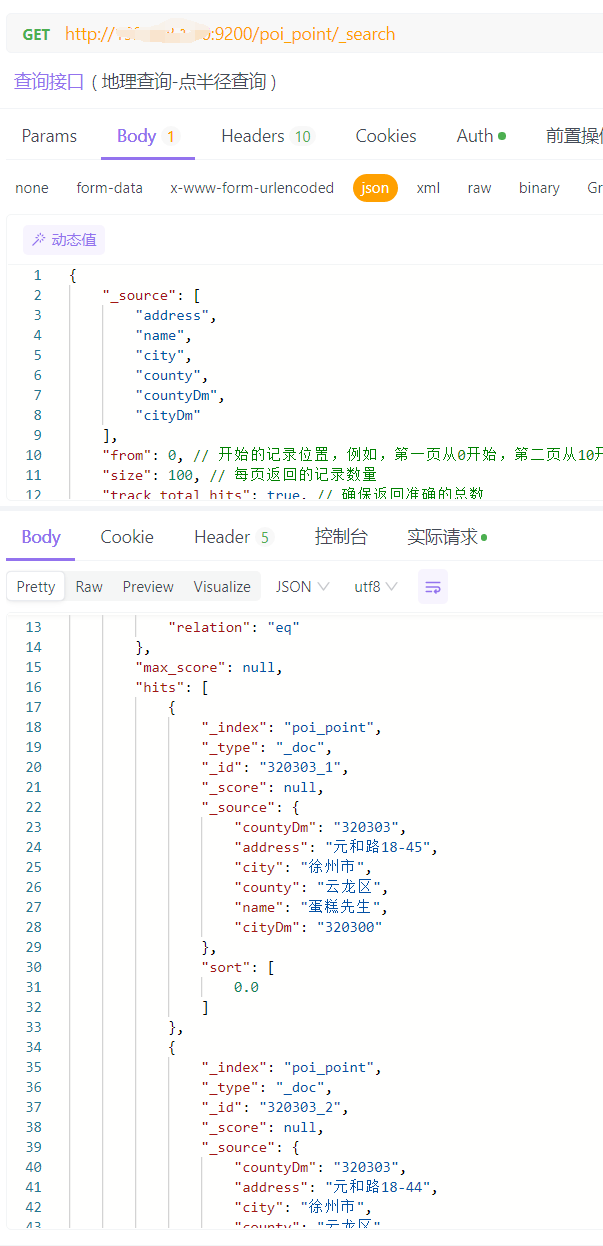
返回值如下所示:
# Java方式查询
- 点半径查询实体类(PoiForGeoDistancePojo.java)
import io.swagger.annotations.ApiModelProperty;
import lombok.Data;

import javax.validation.constraints.NotBlank;
import javax.validation.constraints.NotNull;

@Data
public class PoiForGeoDistancePojo {

    @NotNull(message = "坐标位置(圆心)不能为空")
    @ApiModelProperty(value = "坐标位置(圆心)")
    private Double[] position;

    @NotNull(message = "查询半径(单位米)不能为空")
    @ApiModelProperty(value = "查询半径(单位米)")
    private Integer  distance;

    @NotBlank(message = "查询类型不能为空")
    @ApiModelProperty(value = "查询类型:page(分页查询),all(查询全部)")
    private String kind;

    @ApiModelProperty(value = "页数")
    private Integer page;

    @ApiModelProperty(value = "条数")
    private Integer limit;

}
1
2
3
4
5
6
7
8
9
10
11
12
13
14
15
16
17
18
19
20
21
22
23
24
25
26
27
28
2
3
4
5
6
7
8
9
10
11
12
13
14
15
16
17
18
19
20
21
22
23
24
25
26
27
28
- Controller层接口代码
@ApiOperation(value = "地名地址空间检索-点半径")
@PostMapping("/searchPoiForGeoDistance")
public ResponseResult searchPoiForGeoDistance(@Valid @RequestBody PoiForGeoDistancePojo poiForGeoDistancePojo) {
    return iPoiService.searchPoiForDistance(poiForGeoDistancePojo);
}
1
2
3
4
5
2
3
4
5
- Service层Impl实现代码
@Resource
RestHighLevelClient client;

@Override
public ResponseResult searchPoiForDistance(PoiForGeoDistancePojo poiForGeoDistancePojo) {
        String kind = poiForGeoDistancePojo.getKind();
        BoolQueryBuilder boolQueryBuilder = new BoolQueryBuilder();
        String index = "poi_point";
        // 检查点和半径查询条件
        if (poiForGeoDistancePojo.getPosition() != null && poiForGeoDistancePojo.getPosition().length == 2 && poiForGeoDistancePojo.getDistance() != null) {
            GeoDistanceQueryBuilder distanceQueryBuilder = QueryBuilders.geoDistanceQuery("geomstring")
                    .point(poiForGeoDistancePojo.getPosition()[0], poiForGeoDistancePojo.getPosition()[1])
                    .distance(poiForGeoDistancePojo.getDistance(), DistanceUnit.METERS);  // 设置距离单位为米
            boolQueryBuilder.must(distanceQueryBuilder);
        }
        // 分页查询
        if (kind.equals("page")) {
            // 检查分页参数
            if (poiForGeoDistancePojo.getPage() == null || poiForGeoDistancePojo.getLimit() == null) {
                return new ResponseResult(ResponseCode.FAILURE, "缺少分页参数!limit或page!");
            }
            // 其他查询条件
            SearchSourceBuilder sourceBuilder = new SearchSourceBuilder();
            sourceBuilder.query(boolQueryBuilder).trackTotalHits(true)
                    //第几页
                    .from((poiForGeoDistancePojo.getPage() - 1) * poiForGeoDistancePojo.getLimit())
                    //第几条
                    .size(poiForGeoDistancePojo.getLimit())
                    //设置搜索排序为降序,即匹配度从高到低
                    .sort(SortBuilders.geoDistanceSort("geomstring", poiForGeoDistancePojo.getPosition()[0], poiForGeoDistancePojo.getPosition()[1])
                            .order(SortOrder.ASC)
                            .unit(DistanceUnit.METERS)
                    );

            SearchRequest searchRequest = new SearchRequest(index);
            searchRequest.source(sourceBuilder);
            SearchResponse searchResponse = null;
            try {
                searchResponse = client.search(searchRequest, RequestOptions.DEFAULT);
            } catch (IOException e) {
                e.printStackTrace();
                return new ResponseResult(ResponseCode.FAILURE, "连接超时!");
            }

            // 处理搜索结果
            SearchHits searchHits = searchResponse.getHits();
            if (searchHits != null) {
                long totalHits = searchHits.getTotalHits().value;
                List<Poi> pois = new ArrayList<>();
                for (SearchHit hit : searchHits) {
                    Map<String, Object> sourceAsMap = hit.getSourceAsMap();
                    Poi poi = JSON.parseObject(JSON.toJSONString(sourceAsMap), Poi.class);
                    pois.add(poi);
                }
                HashMap<String, Object> res = new HashMap<>();
                res.put("total", totalHits);
                res.put("data", pois);
                return new ResponseResult(ResponseCode.SUCCESS, res);
            } else {
                return new ResponseResult(ResponseCode.FAILURE, "查询失败!");
            }
        }
        // 查询全部
        if (kind.equals("all")) {
            // 使用 Scroll API 来获取所有数据
            final Scroll scroll = new Scroll(TimeValue.timeValueMinutes(1L));
            SearchRequest searchRequest = new SearchRequest(index);
            searchRequest.scroll(scroll);
            SearchSourceBuilder searchSourceBuilder = new SearchSourceBuilder();
            searchSourceBuilder.query(boolQueryBuilder)
                    .size(1000) // 每批获取1000条记录
                    .sort(SortBuilders.geoDistanceSort("geomstring", poiForGeoDistancePojo.getPosition()[0], poiForGeoDistancePojo.getPosition()[1])
                            .order(SortOrder.ASC)
                            .unit(DistanceUnit.METERS));
            searchRequest.source(searchSourceBuilder);
            return performScrollSearch(scroll, searchRequest);
        }
        return new ResponseResult(ResponseCode.FAILURE, "查询失败!");
    }
1
2
3
4
5
6
7
8
9
10
11
12
13
14
15
16
17
18
19
20
21
22
23
24
25
26
27
28
29
30
31
32
33
34
35
36
37
38
39
40
41
42
43
44
45
46
47
48
49
50
51
52
53
54
55
56
57
58
59
60
61
62
63
64
65
66
67
68
69
70
71
72
73
74
75
76
77
78
79
2
3
4
5
6
7
8
9
10
11
12
13
14
15
16
17
18
19
20
21
22
23
24
25
26
27
28
29
30
31
32
33
34
35
36
37
38
39
40
41
42
43
44
45
46
47
48
49
50
51
52
53
54
55
56
57
58
59
60
61
62
63
64
65
66
67
68
69
70
71
72
73
74
75
76
77
78
79
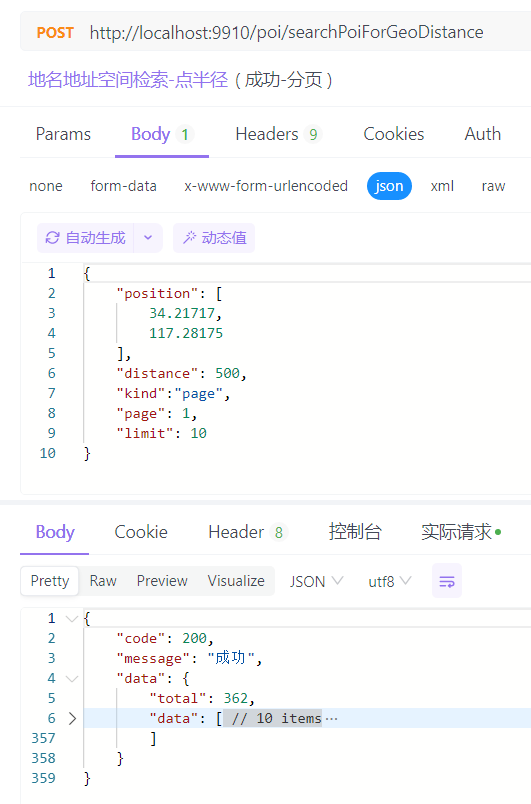
返回值如下所示:
# 地名地址综合查询
这里使用一个接口完成上面所有接口的功能
- 综合查询简单实体类(PoiQueryPojo.java)
import io.swagger.annotations.ApiModelProperty;
import lombok.Data;

import javax.validation.constraints.NotBlank;


@Data
public class PoiQueryPojo {

    @NotBlank(message = "查询类型不能为空")
    @ApiModelProperty(value = "查询类型:page(分页查询),all(查询全部)")
    private String kind;

    @ApiModelProperty(value = "名称模糊查询")
    private String fuzzy;

    @ApiModelProperty(value = "地名")
    private String name;

    @ApiModelProperty(value = "地址")
    private String address;

    @ApiModelProperty(value = "地名和地址")
    private String nameAndAddress;

    @ApiModelProperty(value = "城市")
    private String city;

    @ApiModelProperty(value = "区县")
    private String county;

    @ApiModelProperty(value = "页数")
    private Integer page;

    @ApiModelProperty(value = "条数")
    private Integer limit;

    @ApiModelProperty(value = "矩形框查询")
    private Double[] boundingBox;

    @ApiModelProperty(value = "坐标位置(圆心)")
    private Double[] position;

    @ApiModelProperty(value = "查询半径(单位米)")
    private Integer distance;

}
1
2
3
4
5
6
7
8
9
10
11
12
13
14
15
16
17
18
19
20
21
22
23
24
25
26
27
28
29
30
31
32
33
34
35
36
37
38
39
40
41
42
43
44
45
46
47
2
3
4
5
6
7
8
9
10
11
12
13
14
15
16
17
18
19
20
21
22
23
24
25
26
27
28
29
30
31
32
33
34
35
36
37
38
39
40
41
42
43
44
45
46
47
- Controller层接口代码
    @ApiOperation(value = "地名地址综合查询")
    @PostMapping("/poiQuery")
    public ResponseResult poiQuery(@Valid @RequestBody PoiQueryPojo poiQueryPojo) {
        return iPoiService.poiQuery(poiQueryPojo);
    }
1
2
3
4
5
2
3
4
5
- Service层Impl实现代码
@Resource
RestHighLevelClient client;

@Override
public ResponseResult poiQuery(PoiQueryPojo poiQueryPojo) {
        String kind = poiQueryPojo.getKind();
        BoolQueryBuilder boolQueryBuilder = new BoolQueryBuilder();
        String index = "poi_point";

        String nameAndAddress = poiQueryPojo.getNameAndAddress();
        // 地名和地址查询
        if (StringUtils.isNotBlank(poiQueryPojo.getNameAndAddress()) && StringUtils.isBlank(poiQueryPojo.getName()) && StringUtils.isBlank(poiQueryPojo.getAddress())) {

            if (StringUtils.isNotBlank(poiQueryPojo.getFuzzy()) && poiQueryPojo.getFuzzy().equals("true")) {
    // 添加第一个 wildcard 查询到 should 子句
                    boolQueryBuilder.should(QueryBuilders.wildcardQuery("namekeyword", nameAndAddress + "*"));
    // 添加第二个 wildcard 查询到 should 子句
                    boolQueryBuilder.should(QueryBuilders.wildcardQuery("addresskeyword", nameAndAddress + "*"));
    // 确保至少一个 should 条件得到满足
                    boolQueryBuilder.minimumShouldMatch(1);
            } else {
                // 用于处理城市或区县开头的检索
                extractAddress(poiQueryPojo);
                nameAndAddress = poiQueryPojo.getNameAndAddress();
                // 添加必须匹配的条件(must)
                boolQueryBuilder.must(new MultiMatchQueryBuilder(nameAndAddress, "address", "name")
                        .analyzer("ik_max_word"));

                // 添加应该匹配的条件(should),使用 cross_fields 类型
                boolQueryBuilder.should(new MultiMatchQueryBuilder(nameAndAddress, "address", "name")
                        .analyzer("ik_max_word")
                        .type(MultiMatchQueryBuilder.Type.CROSS_FIELDS)
                        .slop(10));
                boolQueryBuilder.should(new MultiMatchQueryBuilder(nameAndAddress, "address", "name")
                        .analyzer("ik_max_word")
                        .type(MultiMatchQueryBuilder.Type.PHRASE)
                        .slop(10));
            }
        } else if (StringUtils.isNotBlank(nameAndAddress)
                && (StringUtils.isNotBlank(poiQueryPojo.getName()) || StringUtils.isNotBlank(poiQueryPojo.getAddress()))) {
            throw new BisException("同时查询地名和地址时,不要传入单独的地名和地址参数!");
        }


        // 地名查询
        if (StringUtils.isNotBlank(poiQueryPojo.getName())) {
            boolQueryBuilder.must(new MatchQueryBuilder("name", poiQueryPojo.getName()).analyzer("ik_max_word"));
        }

        // 地址查询
        if (StringUtils.isNotBlank(poiQueryPojo.getAddress())) {
            boolQueryBuilder.must(new MatchQueryBuilder("address", poiQueryPojo.getAddress()).analyzer("ik_max_word"));
        }

        // 城市查询
        if (StringUtils.isNotBlank(poiQueryPojo.getCity())) {
            boolQueryBuilder.must(QueryBuilders.wildcardQuery("city", poiQueryPojo.getCity() + "*"));
        }

        // 区县查询
        if (StringUtils.isNotBlank(poiQueryPojo.getCounty())) {
            boolQueryBuilder.must(QueryBuilders.wildcardQuery("county", poiQueryPojo.getCounty() + "*"));
        }

        // 类型查询
        if (StringUtils.isNotBlank(poiQueryPojo.getType())) {
            boolQueryBuilder.must(QueryBuilders.wildcardQuery("type2018", poiQueryPojo.getType() + "*"));
        }

        // 矩形查询,检查矩形框查询条件(此时点半径查询不能存在)
        if (poiQueryPojo.getBoundingBox() != null
                && poiQueryPojo.getPosition() == null && poiQueryPojo.getDistance() == null) {
            // 校验参数格式
            SunGeoUtils.validateBoundingBox(poiQueryPojo.getBoundingBox());
            GeoBoundingBoxQueryBuilder boxQueryBuilder = QueryBuilders.geoBoundingBoxQuery("geom")
                    .setCorners(
                            new GeoPoint(poiQueryPojo.getBoundingBox()[0], poiQueryPojo.getBoundingBox()[1]),
                            new GeoPoint(poiQueryPojo.getBoundingBox()[2], poiQueryPojo.getBoundingBox()[3])
                    );
            boolQueryBuilder.must(boxQueryBuilder);
        }
        // 点半径查询,检查点和半径查询条件(此时矩形查询不能存在)
        else if (poiQueryPojo.getPosition() != null && poiQueryPojo.getPosition().length == 2 && poiQueryPojo.getDistance() != null
                && poiQueryPojo.getBoundingBox() == null
        ) {
            GeoDistanceQueryBuilder distanceQueryBuilder = QueryBuilders.geoDistanceQuery("geomstring")
                    .point(poiQueryPojo.getPosition()[0], poiQueryPojo.getPosition()[1])
                    .distance(poiQueryPojo.getDistance(), DistanceUnit.METERS);  // 设置距离单位为米
            boolQueryBuilder.must(distanceQueryBuilder);
        } else if ((poiQueryPojo.getPosition() != null && poiQueryPojo.getDistance() == null)
                || (poiQueryPojo.getPosition() == null && poiQueryPojo.getDistance() != null)) {
            return new ResponseResult(ResponseCode.FAILURE, "点半径查询条件缺失!请检查传参!");
        } else if ((poiQueryPojo.getPosition() != null || poiQueryPojo.getDistance() != null)
                && poiQueryPojo.getBoundingBox() != null) {
            return new ResponseResult(ResponseCode.FAILURE, "矩形查询和点半径查询条件不能共存!");
        }

        // 分页查询
        if (kind.equals("page")) {
            // 检查分页参数
            if (poiQueryPojo.getPage() == null || poiQueryPojo.getLimit() == null) {
                return new ResponseResult(ResponseCode.FAILURE, "缺少分页参数!limit或page!");
            }
            SearchSourceBuilder sourceBuilder = new SearchSourceBuilder();
            // 如果是点半径查询
            if (poiQueryPojo.getPosition() != null
                    && poiQueryPojo.getPosition().length == 2
                    && poiQueryPojo.getDistance() != null
                    && poiQueryPojo.getBoundingBox() == null) {
                sourceBuilder.query(boolQueryBuilder).trackTotalHits(true)
                        //第几页
                        .from((poiQueryPojo.getPage() - 1) * poiQueryPojo.getLimit())
                        //第几条
                        .size(poiQueryPojo.getLimit());
            } else {
                sourceBuilder.query(boolQueryBuilder).trackTotalHits(true)
                        //第几页
                        .from((poiQueryPojo.getPage() - 1) * poiQueryPojo.getLimit())
                        //第几条
                        .size(poiQueryPojo.getLimit())
                        //设置搜索排序为降序,即匹配度从高到低
                        .sort(new ScoreSortBuilder().order(SortOrder.DESC));
            }

            SearchRequest searchRequest = new SearchRequest(index);
            searchRequest.source(sourceBuilder);
            SearchResponse searchResponse = null;
            try {
                searchResponse = client.search(searchRequest, RequestOptions.DEFAULT);
            } catch (IOException e) {
                e.printStackTrace();
                return new ResponseResult(ResponseCode.FAILURE, "连接超时");
            }
            // 处理搜索结果
            SearchHits searchHits = searchResponse.getHits();
            if (searchHits != null) {
                long totalHits = searchHits.getTotalHits().value;
                List<PoiPojo> pois = new ArrayList<>();
                for (SearchHit hit : searchHits) {
                    Map<String, Object> sourceAsMap = hit.getSourceAsMap();

                    PoiPojo poi = JSON.parseObject(JSON.toJSONString(sourceAsMap), PoiPojo.class);
                    // 获取当前搜索命中的分数并添加到PoiPojo对象
                    float score = hit.getScore();
                    poi.setScore(score);  // 确保PoiPojo类有一个设置分数的方法
                    pois.add(poi);
                }
                HashMap<String, Object> res = new HashMap<>();
                res.put("total", totalHits);
                res.put("page", poiQueryPojo.getPage());
                res.put("limit", poiQueryPojo.getLimit());
                res.put("data", pois);
                return new ResponseResult(ResponseCode.SUCCESS, res);
            } else {
                return new ResponseResult(ResponseCode.FAILURE, "查询失败");
            }
        }
        // 查询全部
        if (kind.equals("all")) {
            // 使用 Scroll API 来获取所有数据
            final Scroll scroll = new Scroll(TimeValue.timeValueMinutes(1L));
            SearchRequest searchRequest = new SearchRequest(index);
            searchRequest.scroll(scroll);
            SearchSourceBuilder searchSourceBuilder = new SearchSourceBuilder();
            // 如果是点半径查询
            if (poiQueryPojo.getPosition() != null
                    && poiQueryPojo.getPosition().length == 2
                    && poiQueryPojo.getDistance() != null
                    && poiQueryPojo.getBoundingBox() == null) {
                searchSourceBuilder.query(boolQueryBuilder)
                        .size(1000); // 每批获取1000条记录
            } else {
                searchSourceBuilder.query(boolQueryBuilder)
                        .size(1000); // 每批获取1000条记录
                searchRequest.source(searchSourceBuilder);
            }
            searchRequest.source(searchSourceBuilder);
            return performScrollSearch(scroll, searchRequest);
        }
        return new ResponseResult(ResponseCode.FAILURE, "查询失败!");

    }
1
2
3
4
5
6
7
8
9
10
11
12
13
14
15
16
17
18
19
20
21
22
23
24
25
26
27
28
29
30
31
32
33
34
35
36
37
38
39
40
41
42
43
44
45
46
47
48
49
50
51
52
53
54
55
56
57
58
59
60
61
62
63
64
65
66
67
68
69
70
71
72
73
74
75
76
77
78
79
80
81
82
83
84
85
86
87
88
89
90
91
92
93
94
95
96
97
98
99
100
101
102
103
104
105
106
107
108
109
110
111
112
113
114
115
116
117
118
119
120
121
122
123
124
125
126
127
128
129
130
131
132
133
134
135
136
137
138
139
140
141
142
143
144
145
146
147
148
149
150
151
152
153
154
155
156
157
158
159
160
161
162
163
164
165
166
167
168
169
170
171
172
173
174
175
176
177
178
179
180
181
182
2
3
4
5
6
7
8
9
10
11
12
13
14
15
16
17
18
19
20
21
22
23
24
25
26
27
28
29
30
31
32
33
34
35
36
37
38
39
40
41
42
43
44
45
46
47
48
49
50
51
52
53
54
55
56
57
58
59
60
61
62
63
64
65
66
67
68
69
70
71
72
73
74
75
76
77
78
79
80
81
82
83
84
85
86
87
88
89
90
91
92
93
94
95
96
97
98
99
100
101
102
103
104
105
106
107
108
109
110
111
112
113
114
115
116
117
118
119
120
121
122
123
124
125
126
127
128
129
130
131
132
133
134
135
136
137
138
139
140
141
142
143
144
145
146
147
148
149
150
151
152
153
154
155
156
157
158
159
160
161
162
163
164
165
166
167
168
169
170
171
172
173
174
175
176
177
178
179
180
181
182
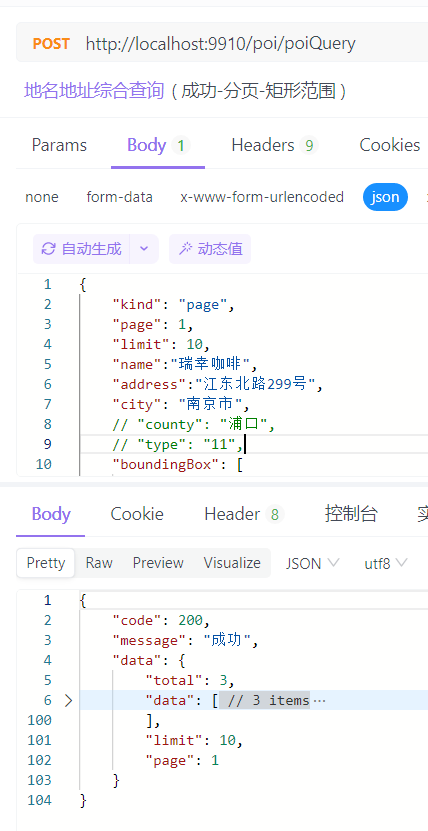
返回值如下所示:
# geo_shape查询
geo_shape点线面混合查询,这里实现一个综合查询
# Geo表结构
Geo表结构如下所示:
{
  "mappings": {
    "properties": {
      "geom": {
        "type": "geo_shape"
      },
      "geomstring": {
        "type": "geo_point"
      },
      "name": {
        "type": "text",
        "analyzer": "ik_max_word",
        "search_analyzer": "ik_smart"
      },
      "geohash": {
        "type": "keyword"
      }
    }
  }
}
1
2
3
4
5
6
7
8
9
10
11
12
13
14
15
16
17
18
19
20
2
3
4
5
6
7
8
9
10
11
12
13
14
15
16
17
18
19
20
# Geo综合查询
- 综合查询简单实体类(GeoQueryPojo.java)
import io.swagger.annotations.ApiModelProperty;
import lombok.Data;

import javax.validation.constraints.NotBlank;


@Data
public class GeoQueryPojo {

    @NotBlank(message = "查询类型不能为空")
    @ApiModelProperty(value = "查询类型:page(分页查询),all(查询全部)")
    private String kind;

    @ApiModelProperty(value = "地名")
    private String name;

    @ApiModelProperty(value = "页数")
    private Integer page;

    @ApiModelProperty(value = "条数")
    private Integer limit;

    @ApiModelProperty(value = "矩形框查询")
    private Double[] boundingBox;

    @ApiModelProperty(value = "坐标位置(圆心)")
    private Double[] position;

    @ApiModelProperty(value = "查询半径(单位米)")
    private Integer distance;

}
1
2
3
4
5
6
7
8
9
10
11
12
13
14
15
16
17
18
19
20
21
22
23
24
25
26
27
28
29
30
31
32
2
3
4
5
6
7
8
9
10
11
12
13
14
15
16
17
18
19
20
21
22
23
24
25
26
27
28
29
30
31
32
- Controller层接口代码
@ApiOperation(value = "Geo综合查询")
@PostMapping("/geoQuery")
public ResponseResult geoQuery(@Valid @RequestBody GeoQueryPojo geoQueryPojo) {
    return iGeoService.geoQuery(geoQueryPojo);
}
1
2
3
4
5
2
3
4
5
- Service层Impl实现代码
    @Override
    public ResponseResult geoQuery(GeoQueryPojo geoQueryPojo) {
        String kind = geoQueryPojo.getKind();
        BoolQueryBuilder boolQueryBuilder = new BoolQueryBuilder();
        String index = "geo";

        // 地名查询
        if (StringUtils.isNotBlank(geoQueryPojo.getName())) {
            boolQueryBuilder.must(new MatchQueryBuilder("name", geoQueryPojo.getName()).analyzer("ik_max_word"));
        }


        // 矩形查询,检查矩形框查询条件(此时点半径查询不能存在)
        if (geoQueryPojo.getBoundingBox() != null
                && geoQueryPojo.getPosition() == null && geoQueryPojo.getDistance() == null) {
            // 校验参数格式
            SunGeoUtils.validateBoundingBox(geoQueryPojo.getBoundingBox());
            GeoBoundingBoxQueryBuilder boxQueryBuilder = QueryBuilders.geoBoundingBoxQuery("geom")
                    .setCorners(
                            new GeoPoint(geoQueryPojo.getBoundingBox()[0], geoQueryPojo.getBoundingBox()[1]),
                            new GeoPoint(geoQueryPojo.getBoundingBox()[2], geoQueryPojo.getBoundingBox()[3])
                    );
            boolQueryBuilder.must(boxQueryBuilder);
        }
        // 点半径查询,检查点和半径查询条件(此时矩形查询不能存在)
        else if (geoQueryPojo.getPosition() != null && geoQueryPojo.getPosition().length == 2 && geoQueryPojo.getDistance() != null
                && geoQueryPojo.getBoundingBox() == null
        ) {
            GeoDistanceQueryBuilder distanceQueryBuilder = QueryBuilders.geoDistanceQuery("geomstring")
                    .point(geoQueryPojo.getPosition()[0], geoQueryPojo.getPosition()[1])
                    .distance(geoQueryPojo.getDistance(), DistanceUnit.METERS);  // 设置距离单位为米
            boolQueryBuilder.must(distanceQueryBuilder);
        } else if ((geoQueryPojo.getPosition() != null && geoQueryPojo.getDistance() == null)
                || (geoQueryPojo.getPosition() == null && geoQueryPojo.getDistance() != null)) {
            return new ResponseResult(ResponseCode.FAILURE, "点半径查询条件缺失!请检查传参!");
        } else if ((geoQueryPojo.getPosition() != null || geoQueryPojo.getDistance() != null)
                && geoQueryPojo.getBoundingBox() != null) {
            return new ResponseResult(ResponseCode.FAILURE, "矩形查询和点半径查询条件不能共存!");
        }

        // 分页查询
        if (kind.equals("page")) {
            // 检查分页参数
            if (geoQueryPojo.getPage() == null || geoQueryPojo.getLimit() == null) {
                return new ResponseResult(ResponseCode.FAILURE, "缺少分页参数!limit或page!");
            }
            SearchSourceBuilder sourceBuilder = new SearchSourceBuilder();
            // 如果是点半径查询
            if (geoQueryPojo.getPosition() != null
                    && geoQueryPojo.getPosition().length == 2
                    && geoQueryPojo.getDistance() != null
                    && geoQueryPojo.getBoundingBox() == null) {
                sourceBuilder.query(boolQueryBuilder).trackTotalHits(true)
                        //第几页
                        .from((geoQueryPojo.getPage() - 1) * geoQueryPojo.getLimit())
                        //第几条
                        .size(geoQueryPojo.getLimit()
                        );
            } else {
                sourceBuilder.query(boolQueryBuilder).trackTotalHits(true)
                        //第几页
                        .from((geoQueryPojo.getPage() - 1) * geoQueryPojo.getLimit())
                        //第几条
                        .size(geoQueryPojo.getLimit())
                        //设置搜索排序为降序,即匹配度从高到低
                        .sort(new ScoreSortBuilder().order(SortOrder.DESC));
            }

            SearchRequest searchRequest = new SearchRequest(index);
            searchRequest.source(sourceBuilder);
            SearchResponse searchResponse = null;
            try {
                searchResponse = client.search(searchRequest, RequestOptions.DEFAULT);
            } catch (IOException e) {
                e.printStackTrace();
                return new ResponseResult(ResponseCode.FAILURE, "连接超时");
            }
            // 处理搜索结果
            SearchHits searchHits = searchResponse.getHits();
            if (searchHits != null) {
                long totalHits = searchHits.getTotalHits().value;
                List<GeoPojo> pois = new ArrayList<>();
                for (SearchHit hit : searchHits) {
                    Map<String, Object> sourceAsMap = hit.getSourceAsMap();
                    GeoPojo geo = JSON.parseObject(JSON.toJSONString(sourceAsMap), GeoPojo.class);
                    // 获取当前搜索命中的分数并添加到PoiPojo对象
                    float score = hit.getScore();
                    geo.setScore(score);  // 确保PoiPojo类有一个设置分数的方法
                    pois.add(geo);
                }
                HashMap<String, Object> res = new HashMap<>();
                res.put("total", totalHits);
                res.put("page", geoQueryPojo.getPage());
                res.put("limit", geoQueryPojo.getLimit());
                res.put("data", pois);
                return new ResponseResult(ResponseCode.SUCCESS, res);
            } else {
                return new ResponseResult(ResponseCode.FAILURE, "查询失败");
            }
        }
        // 查询全部
        if (kind.equals("all")) {
            // 使用 Scroll API 来获取所有数据
            final Scroll scroll = new Scroll(TimeValue.timeValueMinutes(1L));
            SearchRequest searchRequest = new SearchRequest(index);
            searchRequest.scroll(scroll);
            SearchSourceBuilder searchSourceBuilder = new SearchSourceBuilder();
            // 如果是点半径查询
            if (geoQueryPojo.getPosition() != null
                    && geoQueryPojo.getPosition().length == 2
                    && geoQueryPojo.getDistance() != null
                    && geoQueryPojo.getBoundingBox() == null) {
                searchSourceBuilder.query(boolQueryBuilder)
                        .size(1000); // 每批获取1000条记录
            } else {
                searchSourceBuilder.query(boolQueryBuilder)
                        .size(1000); // 每批获取1000条记录
                searchRequest.source(searchSourceBuilder);
            }
            searchRequest.source(searchSourceBuilder);
            return performScrollSearch(scroll, searchRequest);
        }
        return new ResponseResult(ResponseCode.FAILURE, "查询失败!");
    }
1
2
3
4
5
6
7
8
9
10
11
12
13
14
15
16
17
18
19
20
21
22
23
24
25
26
27
28
29
30
31
32
33
34
35
36
37
38
39
40
41
42
43
44
45
46
47
48
49
50
51
52
53
54
55
56
57
58
59
60
61
62
63
64
65
66
67
68
69
70
71
72
73
74
75
76
77
78
79
80
81
82
83
84
85
86
87
88
89
90
91
92
93
94
95
96
97
98
99
100
101
102
103
104
105
106
107
108
109
110
111
112
113
114
115
116
117
118
119
120
121
122
123
124
2
3
4
5
6
7
8
9
10
11
12
13
14
15
16
17
18
19
20
21
22
23
24
25
26
27
28
29
30
31
32
33
34
35
36
37
38
39
40
41
42
43
44
45
46
47
48
49
50
51
52
53
54
55
56
57
58
59
60
61
62
63
64
65
66
67
68
69
70
71
72
73
74
75
76
77
78
79
80
81
82
83
84
85
86
87
88
89
90
91
92
93
94
95
96
97
98
99
100
101
102
103
104
105
106
107
108
109
110
111
112
113
114
115
116
117
118
119
120
121
122
123
124
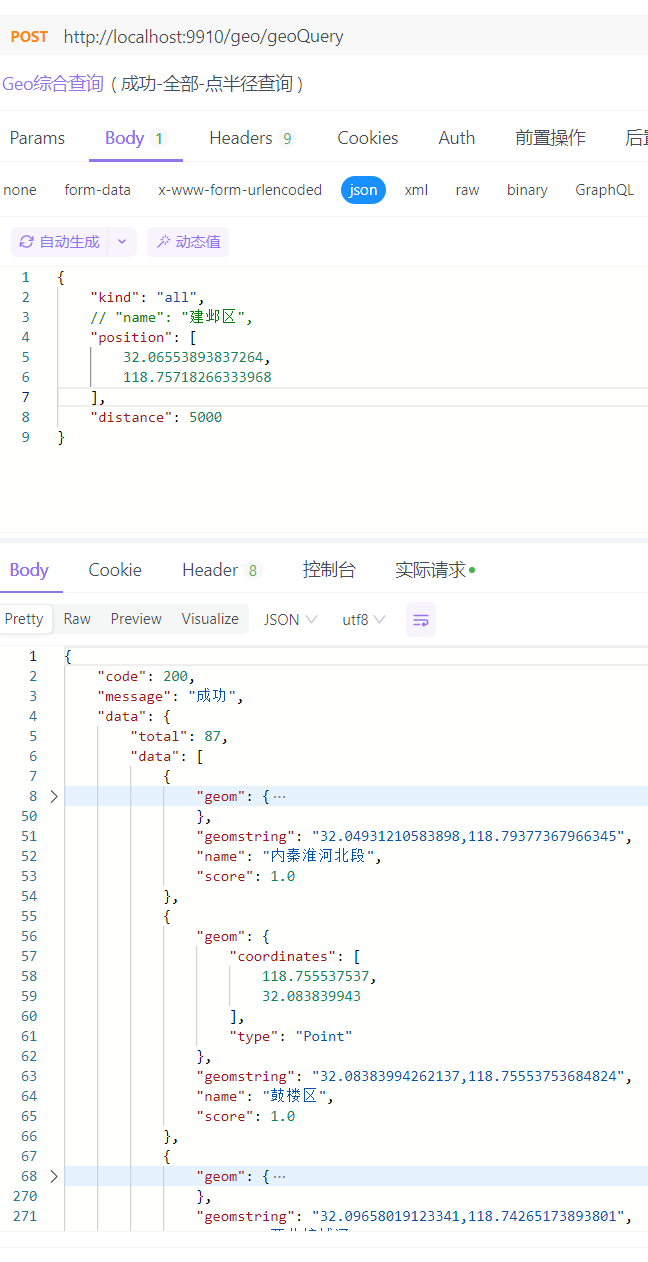
返回值如下所示: