
# SRS学习-配置DVR
# 介绍
硬盘录像机(Digital Video Recorder,简称DVR),即数字视频录像机,相对于传统的模拟视频 (opens new window)录像机,采用硬盘录像 (opens new window),故常常被称为硬盘录像机,也被称为DVR。
它是一套进行图像存储 (opens new window)处理的计算机系统 (opens new window),具有对图像/语音进行长时间录像、录音 (opens new window)、远程监视 (opens new window)和控制的功能。DVR采用的是数字记录技术,在图像处理、图像储存、检索 (opens new window)、备份 (opens new window)、以及网络传递、远程控制 (opens new window)等方面也远远优于模拟监控设备,DVR代表了电视监控系统 (opens new window)的发展方向,是市面上电视监控系统的首选产品。
之前介绍了如何配置SRS服务,现在需要将摄像头数据存储到硬盘中,作为历史数据方便后续查看。
SRS服务中已经集成了DVR功能,我们可以进行简单的配置来开启服务。
# 配置DVR
SRS-DVR官方文档 (opens new window)
DVR的配置文件:
vhost your_vhost {
    # DVR RTMP stream to file,
    # start to record to file when encoder publish,
    # reap flv/mp4 according by specified dvr_plan.
    dvr {
        # whether enabled dvr features
        # default: off
        enabled         on;
        # the filter for dvr to apply to.
        #       all, dvr all streams of all apps.
        #       <app>/<stream>, apply to specified stream of app.
        # for example, to dvr the following two streams:
        #       live/stream1 live/stream2
        # default: all
        dvr_apply       all;
        # the dvr plan. canbe:
        #       session reap flv/mp4 when session end(unpublish).
        #       segment reap flv/mp4 when flv duration exceed the specified dvr_duration.
        # @remark The plan append is removed in SRS3+, for it's no use.
        # default: session
        dvr_plan        session;
        # the dvr output path, *.flv or *.mp4.
        # we supports some variables to generate the filename.
        #       [vhost], the vhost of stream.
        #       [app], the app of stream.
        #       [stream], the stream name of stream.
        #       [2006], replace this const to current year.
        #       [01], replace this const to current month.
        #       [02], replace this const to current date.
        #       [15], replace this const to current hour.
        #       [04], replace this const to current minute.
        #       [05], replace this const to current second.
        #       [999], replace this const to current millisecond.
        #       [timestamp],replace this const to current UNIX timestamp in ms.
        # @remark we use golang time format "2006-01-02 15:04:05.999" as "[2006]-[01]-[02]_[15].[04].[05]_[999]"
        # for example, for url rtmp://ossrs.net/live/livestream and time 2015-01-03 10:57:30.776
        # 1. No variables, the rule of SRS1.0(auto add [stream].[timestamp].flv as filename):
        #       dvr_path ./objs/nginx/html;
        #       =>
        #       dvr_path ./objs/nginx/html/live/livestream.1420254068776.flv;
        # 2. Use stream and date as dir name, time as filename:
        #       dvr_path /data/[vhost]/[app]/[stream]/[2006]/[01]/[02]/[15].[04].[05].[999].flv;
        #       =>
        #       dvr_path /data/ossrs.net/live/livestream/2015/01/03/10.57.30.776.flv;
        # 3. Use stream and year/month as dir name, date and time as filename:
        #       dvr_path /data/[vhost]/[app]/[stream]/[2006]/[01]/[02]-[15].[04].[05].[999].flv;
        #       =>
        #       dvr_path /data/ossrs.net/live/livestream/2015/01/03-10.57.30.776.flv;
        # 4. Use vhost/app and year/month as dir name, stream/date/time as filename:
        #       dvr_path /data/[vhost]/[app]/[2006]/[01]/[stream]-[02]-[15].[04].[05].[999].flv;
        #       =>
        #       dvr_path /data/ossrs.net/live/2015/01/livestream-03-10.57.30.776.flv;
        # 5. DVR to mp4:
        #       dvr_path ./objs/nginx/html/[app]/[stream].[timestamp].mp4;
        #       =>
        #       dvr_path ./objs/nginx/html/live/livestream.1420254068776.mp4;
        # @see https://github.com/ossrs/srs/wiki/v4_CN_DVR#custom-path
        # @see https://github.com/ossrs/srs/wiki/v4_CN_DVR#custom-path
        #       segment,session apply it.
        # default: ./objs/nginx/html/[app]/[stream].[timestamp].flv
        dvr_path        ./objs/nginx/html/[app]/[stream].[timestamp].flv;
        # the duration for dvr file, reap if exceed, in seconds.
        #       segment apply it.
        #       session,append ignore.
        # default: 30
        dvr_duration    30;
        # whether wait keyframe to reap segment,
        # if off, reap segment when duration exceed the dvr_duration,
        # if on, reap segment when duration exceed and got keyframe.
        #       segment apply it.
        #       session,append ignore.
        # default: on
        dvr_wait_keyframe       on;
        # about the stream monotonically increasing:
        #   1. video timestamp is monotonically increasing,
        #   2. audio timestamp is monotonically increasing,
        #   3. video and audio timestamp is interleaved monotonically increasing.
        # it's specified by RTMP specification, @see 3. Byte Order, Alignment, and Time Format
        # however, some encoder cannot provides this feature, please set this to off to ignore time jitter.
        # the time jitter algorithm:
        #   1. full, to ensure stream start at zero, and ensure stream monotonically increasing.
        #   2. zero, only ensure stream start at zero, ignore timestamp jitter.
        #   3. off, disable the time jitter algorithm, like atc.
        # apply for all dvr plan.
        # default: full
        time_jitter             full;

        # on_dvr, never config in here, should config in http_hooks.
        # for the dvr http callback, @see http_hooks.on_dvr of vhost hooks.callback.srs.com
        # @read https://github.com/ossrs/srs/wiki/v4_CN_DVR#http-callback
        # @read https://github.com/ossrs/srs/wiki/v4_CN_DVR#http-callback
    }
}
1
2
3
4
5
6
7
8
9
10
11
12
13
14
15
16
17
18
19
20
21
22
23
24
25
26
27
28
29
30
31
32
33
34
35
36
37
38
39
40
41
42
43
44
45
46
47
48
49
50
51
52
53
54
55
56
57
58
59
60
61
62
63
64
65
66
67
68
69
70
71
72
73
74
75
76
77
78
79
80
81
82
83
84
85
86
87
88
89
90
91
92
93
2
3
4
5
6
7
8
9
10
11
12
13
14
15
16
17
18
19
20
21
22
23
24
25
26
27
28
29
30
31
32
33
34
35
36
37
38
39
40
41
42
43
44
45
46
47
48
49
50
51
52
53
54
55
56
57
58
59
60
61
62
63
64
65
66
67
68
69
70
71
72
73
74
75
76
77
78
79
80
81
82
83
84
85
86
87
88
89
90
91
92
93
DVR的计划即决定什么时候关闭flv文件,打开新的flv文件,主要的录制计划包括:
- session:按照session来关闭flv文件,即编码器停止推流时关闭flv,整个session录制为一个flv。
- segment:按照时间分段录制,flv文件时长配置为dvr_duration和dvr_wait_keyframe。注意:若不按关键帧切flv(即dvr_wait_keyframe配置为off),所以会导致后面的flv启动时会花屏。
- time_jitter: 时间戳抖动算法。full使用完全的时间戳矫正;zero只是保证从0开始;off不矫正时间戳。
- dvr_path: 录制的路径
示例
vhost __defaultVhost__ {
    rtc {
        enabled     on;
        bframe      discard;
    }

  dvr {
        enabled             on;
        dvr_path            /home/srs/[app]/[stream]/[2006]/[01]/[02]/[15].[04].[05].[999].flv;
        dvr_plan            segment;
        dvr_duration        600;
        dvr_wait_keyframe   on;
    }

    http_remux {
        enabled     on;
        mount       [vhost]/[app]/[stream].flv;
    }
}
1
2
3
4
5
6
7
8
9
10
11
12
13
14
15
16
17
18
19
2
3
4
5
6
7
8
9
10
11
12
13
14
15
16
17
18
19
我这里设置的是10分钟记录一次
记录效果如下所示(tmp是临时文件)
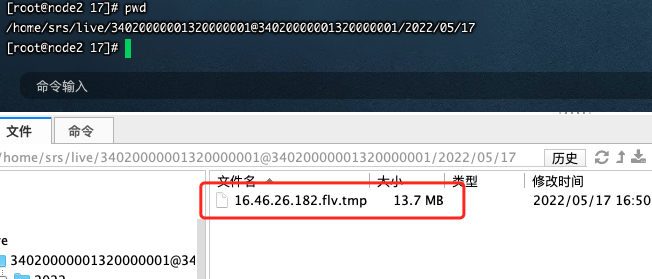
保存成功后的文件为flv格式视频

# 总结
- SRS配置DVR后默认会对所有的视频流进行记录(后面看看能不能指定流进行记录)
- 如果文件存储的太多,可以设置一个定时清理的方法(只保留一个月的视频)