
# 常用命令
# 查看nginx的版本号
nginx -v
# 启动nginx
start nginx
# 快速停止或关闭nginx
nginx -s stop
# 正常停止或关闭nginx
nginx -s quit
# 配置文件nginx.conf修改重装载命令
nginx -s reload
2
3
4
5
6
7
8
9
10
# 静态文件代理
修改nginx.conf(/use/local/nginx)
添加如下server
server {
        listen       8088;
        server_name web_resources;
       # 代理文件地址
        root   /data/nginx/static;
       # 开启浏览器文件目录访问
        autoindex on;
        # 拦截所有的请求
        location / {
         # 禁止浏览器使用缓存
         # add_header Cache-Control no-store;
         # 设置浏览器缓存策略,过期时间为一个月
         add_header Cache-Control "public,max-age=2592000";
         # 解决跨域问题
         add_header 'Access-Control-Allow-Origin' '*';
        }

    }
2
3
4
5
6
7
8
9
10
11
12
13
14
15
16
17
18
设置好后重启nginx,查看前端的header,如图所示证明设置有效
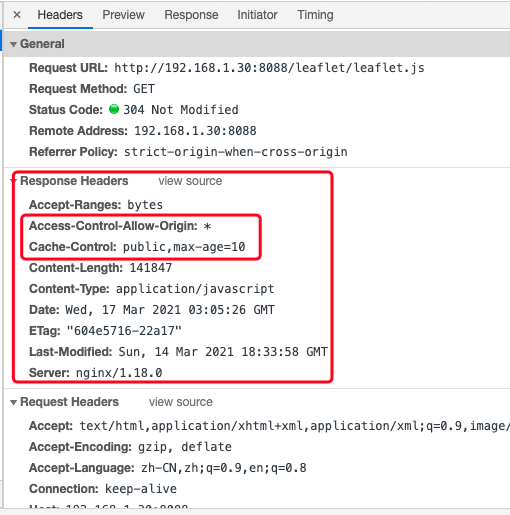
# 设置缓存策略
Cache-Control: max-age 该指令指定从当前请求开始,允许获取的响应被重用的最长时间(单位为秒。
例如:Cache-Control:max-age=60表示响应可以再缓存和重用 60 秒。需要注意的是,在max-age指定的时间之内,浏览器不会向服务器发送任何请求,包括验证缓存是否有效的请求,也就是说,如果在这段时间之内,服务器上的资源发生了变化,那么浏览器将不能得到通知,而使用老版本的资源。所以在设置缓存时间的长度时,需要慎重。
public和private ,如果设置了public,表示该响应可以再浏览器或者任何中继的Web代理中缓存,public是默认值,即Cache-Control:max-age=60等同于Cache-Control:public, max-age=60。 在服务器设置了private比如Cache-Control:private, max-age=60的情况下,表示只有用户的浏览器可以缓存private响应,不允许任何中继Web代理对其进行缓存 - 例如,用户浏览器可以缓存包含用户私人信息的 HTML 网页,但是 CDN 不能缓存。
# 不使用缓存
add_header Cache-Control no-store;
# 设置缓存时间2592000秒
add_header Cache-Control "public,max-age=2592000";
2
3
4
# 使用gzip压缩
修改nginx.conf(/use/local/nginx)
修改如下server
server {  #web_resources
       gzip on;
       gzip_min_length 1k;
       gzip_buffers 4 16k;
       gzip_http_version 1.1;
       gzip_comp_level 6;
       gzip_types text/plain text/css  application/javascript application/json image/jpeg image/png image/gif;
       gzip_disable "MSIE [1-6]\.";
       gzip_vary on;

        listen       8088;
        server_name web_resources;
        root   /data/nginx/static;
        autoindex on;
        location / {
        # add_header Cache-Control no-store;
        add_header Cache-Control "public,max-age=2592000";
         add_header 'Access-Control-Allow-Origin' '*';
        }
    }
2
3
4
5
6
7
8
9
10
11
12
13
14
15
16
17
18
19
20
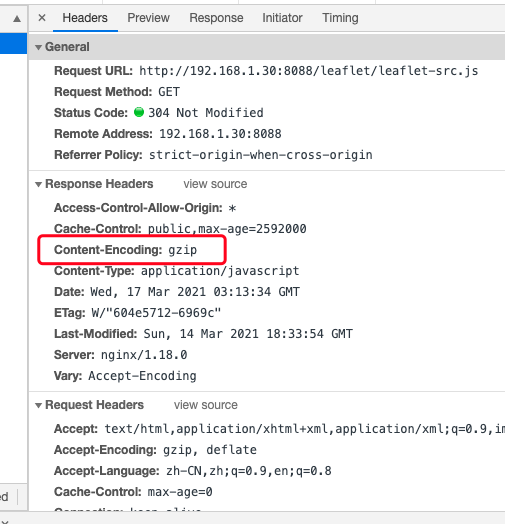
重启nginx,访问资源文件,如图所示就是成功了
| 参数 | 说明 | 默认值 |
|---|---|---|
| gzip on/off | 开启/关闭gzip压缩 | 默认是off |
| gzip_min_length 1k | 允许压缩的页面最小字节数 | 默认为0 |
| gzip_buffers 4 16k | 系统获取几个单位的缓存用于存储gzip的压缩结果数据流,4 16k 代表以16k为单位,按照原始数据大小以16k为单位的4倍申请内存 | |
| gzip_http_version 1.1 | 设置http1.1协议才进行压缩 | 默认为1.1 |
| gzip_comp_level 6 | 表示gzip的压缩级别,范围是1-9,数据越大,压缩的越小,耗CPU,传输更快,一般选择适中的级别 | 默认为1 |
| gzip_types text/plain application/x-javascript text/css application/xml text/javascript application/x-httpd-php application/javascript application/json | 设置哪种类型可以进行压缩,需要什么类型可以在参考nginx.conf同目录下的mime.types文件 | 默认是text/html |
| gzip_disable “MSIE [1-6].” | 禁用gzip的条件,这里表示禁用IE1-6的版本,因为低版本不支持gzip | |
| gzip_vary on | 给代理服务器用的,有的浏览器支持压缩,有的不支持,所以避免浪费不支持的也压缩,所以根据客户端的HTTP头来判断是否需要压缩 |
# 动态服务代理
# 代理后台服务
upstream geoserver{
    ip_hash;
    server 192.168.1.251:8080 weight=1;
    server 192.168.1.252:8080 weight=1;
    server 192.168.1.253:8080 weight=1;
}
server {
     listen 8282;
     server_name  192.168.1.251;

     location / {
        proxy_pass http://geoserver;
        proxy_set_header Host $host:$server_port;
        proxy_set_header X-Real-IP $remote_addr;
        proxy_set_header X-Real-PORT $remote_port;
        proxy_set_header X-Forwarded-For $proxy_add_x_forwarded_for;
        }
}
2
3
4
5
6
7
8
9
10
11
12
13
14
15
16
17
18
如上设置proxy_set_header后,我们访问nginx代理的服务时,就不会因为打开新页面而跳转回原地址了
比如:nginx代理的地址为:192.168.1.251:8282
项目地址为:192.168.1.124:8181
在打开新的页面时地址不会由251变成124或其他地址
upstream geoserver{
    ip_hash;
    server 192.168.1.251:8080 weight=1;
    server 192.168.1.252:8080 weight=1;
    server 192.168.1.253:8080 weight=1;
}
2
3
4
5
6
upstream用于负载均衡
# 配置多个代理
可以配置多个代理服务
# 接口服务
server {
        listen       8090;
        server_name  njzy.natapp1.cc;
        charset utf-8;
        location /project/ {
        proxy_set_header Host $host;
        proxy_set_header X-Real-IP $remote_addr;
        proxy_set_header X-Forwarded-For $proxy_add_x_forwarded_for;
        proxy_pass http://192.168.1.106:8080/;
        }

        location /one/ {
        proxy_set_header Host $host;
        proxy_set_header X-Real-IP $remote_addr;
        proxy_set_header X-Forwarded-For $proxy_add_x_forwarded_for;
        proxy_pass http://192.168.1.243:9000/;
        }
}
2
3
4
5
6
7
8
9
10
11
12
13
14
15
16
17
18
19
# 配置VUE项目
server {
      listen 8071 ;
      listen [::]:8071 ;
      server_name zrzyweb; # 这里是网站的域名
      location / {
      root E:/data/vue/zrzy; # /vue/dist/ 打包后的dist目录
      try_files $uri $uri/ @router; # 指向下面的 @router否则会出现 404
      index index.html index.htm;
      }
        # 对应上面的 @router,主要Vue请求并不是真实路径,无法找到文件,需要重定向到 index.html 中,然后交给路由处理
      location @router {
      rewrite ^.*$ /index.html last;
      }
}
2
3
4
5
6
7
8
9
10
11
12
13
14
# NGINX语法
NGINX可以在一个server中使用不同判断,对不同的问价进行区别处理
# 匹配指定后缀文件
server {
  location ~ .*\.(gif|jpg|jpeg|png|bmp|swf|js|css)$ {
    # 匹配后需要做的事情

    #设置缓存上面定义的后缀文件缓存到浏览器的生存时间
    expires   3d;
  }
}
2
3
4
5
6
7
8
# NGINX解决跨域
配置如下:
server {
    listen       80;
    server_name  localhost;

location / {
    add_header 'Access-Control-Allow-Origin' '*';
    add_header 'Access-Control-Allow-Credentials' 'true';
    add_header 'Access-Control-Allow-Methods' 'GET, POST, OPTIONS';
    add_header 'Access-Control-Allow-Headers' 'DNT,web-token,app-token,Authorization,Accept,Origin,Keep-Alive,User-Agent,X-Mx-ReqToken,X-Data-Type,X-Auth-Token,X-Requested-With,If-Modified-Since,Cache-Control,Content-Type,Range';
    add_header 'Access-Control-Expose-Headers' 'Content-Length,Content-Range';
    if ($request_method = 'OPTIONS') {
        add_header 'Access-Control-Max-Age' 1728000;
        add_header 'Content-Type' 'text/plain; charset=utf-8';
        add_header 'Content-Length' 0;
        return 204;
    }
    root   /var/www/html;
    index  index.html index.htm;
}

    error_page   500 502 503 504  /50x.html;
    location = /50x.html {
        root   /var/www/html;
    }

}
2
3
4
5
6
7
8
9
10
11
12
13
14
15
16
17
18
19
20
21
22
23
24
25
26
# NGINX防盗链
待补充
###补充类容
- NGINX中文件类型对应关系
types {
    text/html                                        html htm shtml;
    text/css                                         css;
    text/xml                                         xml;
    image/gif                                        gif;
    image/jpeg                                       jpeg jpg;
    application/javascript                           js;
    application/atom+xml                             atom;
    application/rss+xml                              rss;

    text/mathml                                      mml;
    text/plain                                       txt;
    text/vnd.sun.j2me.app-descriptor                 jad;
    text/vnd.wap.wml                                 wml;
    text/x-component                                 htc;

    image/png                                        png;
    image/svg+xml                                    svg svgz;
    image/tiff                                       tif tiff;
    image/vnd.wap.wbmp                               wbmp;
    image/webp                                       webp;
    image/x-icon                                     ico;
    image/x-jng                                      jng;
    image/x-ms-bmp                                   bmp;

    font/woff                                        woff;
    font/woff2                                       woff2;

    application/java-archive                         jar war ear;
    application/json                                 json;
    application/mac-binhex40                         hqx;
    application/msword                               doc;
    application/pdf                                  pdf;
    application/postscript                           ps eps ai;
    application/rtf                                  rtf;
    application/vnd.apple.mpegurl                    m3u8;
    application/vnd.google-earth.kml+xml             kml;
    application/vnd.google-earth.kmz                 kmz;
    application/vnd.ms-excel                         xls;
    application/vnd.ms-fontobject                    eot;
    application/vnd.ms-powerpoint                    ppt;
    application/vnd.oasis.opendocument.graphics      odg;
    application/vnd.oasis.opendocument.presentation  odp;
    application/vnd.oasis.opendocument.spreadsheet   ods;
    application/vnd.oasis.opendocument.text          odt;
    application/vnd.openxmlformats-officedocument.presentationml.presentation
                                                     pptx;
    application/vnd.openxmlformats-officedocument.spreadsheetml.sheet
                                                     xlsx;
    application/vnd.openxmlformats-officedocument.wordprocessingml.document
                                                     docx;
    application/vnd.wap.wmlc                         wmlc;
    application/x-7z-compressed                      7z;
    application/x-cocoa                              cco;
    application/x-java-archive-diff                  jardiff;
    application/x-java-jnlp-file                     jnlp;
    application/x-makeself                           run;
    application/x-perl                               pl pm;
    application/x-pilot                              prc pdb;
    application/x-rar-compressed                     rar;
    application/x-redhat-package-manager             rpm;
    application/x-sea                                sea;
    application/x-shockwave-flash                    swf;
    application/x-stuffit                            sit;
    application/x-tcl                                tcl tk;
    application/x-x509-ca-cert                       der pem crt;
    application/x-xpinstall                          xpi;
    application/xhtml+xml                            xhtml;
    application/xspf+xml                             xspf;
    application/zip                                  zip;

    application/octet-stream                         bin exe dll;
    application/octet-stream                         deb;
    application/octet-stream                         dmg;
    application/octet-stream                         iso img;
    application/octet-stream                         msi msp msm;

    audio/midi                                       mid midi kar;
    audio/mpeg                                       mp3;
    audio/ogg                                        ogg;
    audio/x-m4a                                      m4a;
    audio/x-realaudio                                ra;

    video/3gpp                                       3gpp 3gp;
    video/mp2t                                       ts;
    video/mp4                                        mp4;
    video/mpeg                                       mpeg mpg;
    video/quicktime                                  mov;
    video/webm                                       webm;
    video/x-flv                                      flv;
    video/x-m4v                                      m4v;
    video/x-mng                                      mng;
    video/x-ms-asf                                   asx asf;
    video/x-ms-wmv                                   wmv;
    video/x-msvideo                                  avi;
}
2
3
4
5
6
7
8
9
10
11
12
13
14
15
16
17
18
19
20
21
22
23
24
25
26
27
28
29
30
31
32
33
34
35
36
37
38
39
40
41
42
43
44
45
46
47
48
49
50
51
52
53
54
55
56
57
58
59
60
61
62
63
64
65
66
67
68
69
70
71
72
73
74
75
76
77
78
79
80
81
82
83
84
85
86
87
88
89
90
91
92
93
94
95
96
97
# 完整nginx.conf配置文件
{
#user  nobody;
worker_processes  1;

#error_log  logs/error.log;
#error_log  logs/error.log  notice;
#error_log  logs/error.log  info;

#pid        logs/nginx.pid;


events {
    worker_connections  1024;
}


http {
    include       mime.types;
    default_type  application/octet-stream;

    #log_format  main  '$remote_addr - $remote_user [$time_local] "$request" '
    #                  '$status $body_bytes_sent "$http_referer" '
    #                  '"$http_user_agent" "$http_x_forwarded_for"';

    #access_log  logs/access.log  main;

    sendfile        on;
    #tcp_nopush     on;

    #keepalive_timeout  0;
    keepalive_timeout  65;

    #gzip  on;

    server {
        listen       80;
        server_name  localhost;

        #charset koi8-r;

        #access_log  logs/host.access.log  main;

        location / {
            root   html;
            index  index.html index.htm;
        }

        #error_page  404              /404.html;

        # redirect server error pages to the static page /50x.html
        #
        error_page   500 502 503 504  /50x.html;
        location = /50x.html {
            root   html;
        }

        # proxy the PHP scripts to Apache listening on 127.0.0.1:80
        #
        #location ~ \.php$ {
        #    proxy_pass   http://127.0.0.1;
        #}

        # pass the PHP scripts to FastCGI server listening on 127.0.0.1:9000
        #
        #location ~ \.php$ {
        #    root           html;
        #    fastcgi_pass   127.0.0.1:9000;
        #    fastcgi_index  index.php;
        #    fastcgi_param  SCRIPT_FILENAME  /scripts$fastcgi_script_name;
        #    include        fastcgi_params;
        #}

        # deny access to .htaccess files, if Apache's document root
        # concurs with nginx's one
        #
        #location ~ /\.ht {
        #    deny  all;
        #}
    }


# vue
server {
        listen 8071 ;
        listen [::]:8071 ;

         server_name zrzyweb; # 这里是网站的域名

   # root /var/www/ec; # /vue/dist/ 打包后的dist目录

			location / {
        root E:/data/vue/zrzy; # /vue/dist/ 打包后的dist目录
        try_files $uri $uri/ @router; # 指向下面的 @router否则会出现 404
        index index.html index.htm;
       }

        # 对应上面的 @router,主要Vue请求并不是真实路径,无法找到文件,需要重定向到 index.html 中,然后交给路由处理
        location @router {
            rewrite ^.*$ /index.html last;
         }
}

# 静态文件
server {  #web_resources
       gzip on;
       gzip_min_length 1k;
       gzip_buffers 4 16k;
       gzip_http_version 1.1;
       gzip_comp_level 6;
       gzip_types text/plain text/css  application/javascript application/json image/jpeg image/png image/gif;
       gzip_disable "MSIE [1-6]\.";
       gzip_vary on;

        listen       8088;
        server_name web_resources;
        root   /data/nginx/static;
        autoindex on;
        location / {
        # add_header Cache-Control no-store;
        add_header Cache-Control "public,max-age=2592000";
	      add_header 'Access-Control-Allow-Origin' '*';
        }
    }

# 接口服务
server {
        listen       8090;
        server_name  njzy.natapp1.cc;
        charset utf-8;
        location /project/ {
        proxy_set_header Host $host;
	      proxy_set_header X-Real-IP $remote_addr;
        proxy_set_header X-Forwarded-For $proxy_add_x_forwarded_for;
        proxy_pass http://192.168.1.106:8080/;
      }

        location /one/ {
        proxy_set_header Host $host;
	      proxy_set_header X-Real-IP $remote_addr;
        proxy_set_header X-Forwarded-For $proxy_add_x_forwarded_for;
        proxy_pass http://192.168.1.243:9000/;
      }

        location /two/ {
        proxy_set_header Host $host;
	      proxy_set_header X-Real-IP $remote_addr;
        proxy_set_header X-Forwarded-For $proxy_add_x_forwarded_for;
        proxy_pass http://192.168.1.100:9000/;
      }

        location /three/ {
        proxy_set_header Host $host;
	      proxy_set_header X-Real-IP $remote_addr;
        proxy_set_header X-Forwarded-For $proxy_add_x_forwarded_for;
        proxy_pass http://192.168.1.100:8085/;
      }
    }
}
2
3
4
5
6
7
8
9
10
11
12
13
14
15
16
17
18
19
20
21
22
23
24
25
26
27
28
29
30
31
32
33
34
35
36
37
38
39
40
41
42
43
44
45
46
47
48
49
50
51
52
53
54
55
56
57
58
59
60
61
62
63
64
65
66
67
68
69
70
71
72
73
74
75
76
77
78
79
80
81
82
83
84
85
86
87
88
89
90
91
92
93
94
95
96
97
98
99
100
101
102
103
104
105
106
107
108
109
110
111
112
113
114
115
116
117
118
119
120
121
122
123
124
125
126
127
128
129
130
131
132
133
134
135
136
137
138
139
140
141
142
143
144
145
146
147
148
149
150
151
152
153
154
155
156
157
158
159