
# cesium-水面动态提升高度
# 介绍
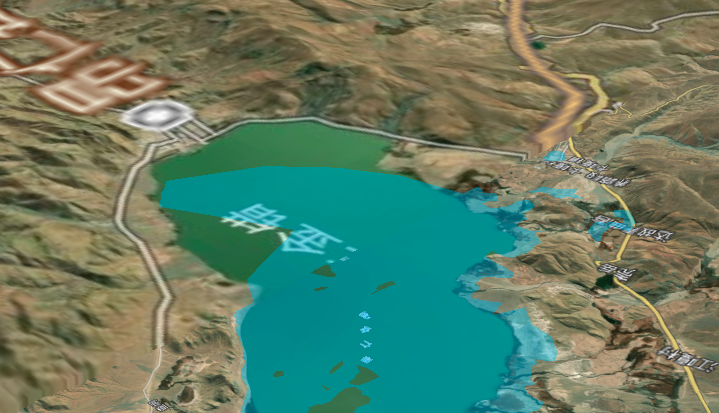
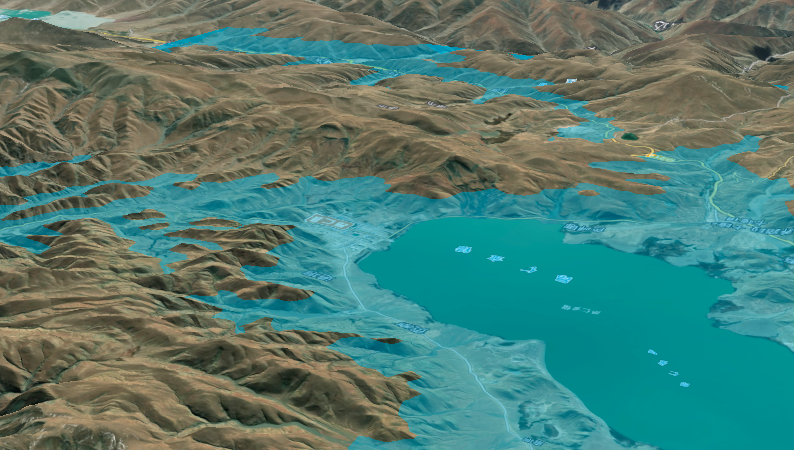
模拟实现水面的淹没效果:
- 先准备一个DEMO数据
- 然后创建一个长方体Entity
- 将长方体置于DEM底下
- 使用回调方法动态提升Entity高度
- 模拟实现淹没效果
# 核心代码
            /**
             *
             * @param {*} targetHeight 目标高度
             * @param {*} areaCoor  范围坐标
             * @param {*} waterHeight 当前水高度
             */
            drawWater(targetHeight, areaCoor, waterHeight) {
                let that = this;
                that._viewer.entities.remove(that.waterEntity);
                that.waterEntity =  that._viewer.entities.add({
                    polygon : {
                        hierarchy : Cesium.Cartesian3.fromDegreesArrayHeights(areaCoor),
                        perPositionHeight: true,
                        extrudedHeight: new Cesium.CallbackProperty(function () {  //此处用属性回调函数,直接设置extrudedHeight会导致闪烁。
                            waterHeight+=2;
                            if(waterHeight>targetHeight){
                                waterHeight=targetHeight;//给个最大值
                            }
                            return waterHeight
                        },false),
                        material : new Cesium.Color.fromBytes(0,191,255,100),
                    }
                });
            }
1
2
3
4
5
6
7
8
9
10
11
12
13
14
15
16
17
18
19
20
21
22
23
24
2
3
4
5
6
7
8
9
10
11
12
13
14
15
16
17
18
19
20
21
22
23
24
# 完整代码
<!DOCTYPE html>
<html lang="en">
<head>
    <!-- Use correct character set. -->
    <meta charset="utf-8"/>
    <!-- Tell IE to use the latest, best version. -->
    <meta http-equiv="X-UA-Compatible" content="IE=edge"/>
    <!-- Make the application on mobile take up the full browser screen and disable user scaling. -->
    <meta name="viewport"
          content="width=device-width, initial-scale=1, maximum-scale=1, minimum-scale=1, user-scalable=no"/>
    <title>cesium-水面提升高度</title>
    <script src="../lib/Cesium-1.89/Build/Cesium/Cesium.js"></script>
    <script src="../../static/lib/vue.min.js"></script>
    <style>
        @import url(../lib/Cesium-1.89/Build/Cesium/Widgets/widgets.css);

        html,
        body, #temp {
            width: 100%;
            height: 100%;
            margin: 0;
            padding: 0;
            overflow: hidden;
        }

        #cesiumContainer {
            width: 100%;
            height: 100%;
            margin: 0;
            padding: 0;
            overflow: hidden;
        }
    </style>
</head>
<body>
<div id="temp">
    <div style="display: -webkit-flex;display: flex;width: 100%;height: 100%">
        <div style="width: 90%;height: 100%">
            <div id="cesiumContainer"></div>
        </div>
        <div style="width: 10%;height: 100%;background-color: #d3d3d3;padding: 30px">
            <button class="btn" @click="addWaterAnimate">添加水面动画</button>
        </div>
    </div>
</div>
<script>

    let EarthComp = new Vue({
        el: "#temp",
        data: {
            _earth: undefined, // 注意:Earth和Cesium的相关变量放在vue中,必须使用下划线作为前缀!
            _viewer: undefined,
            model: null,//切片模型
            marks: [],
            marksIndex: 1,
            pitchValue: -10,
            remainTime: 0,
            usedTime: 0,
        },
        mounted: function () {
            let that = this;
            this.earthInit();
        },
        methods: {
            /**
             * 地球初始化
             */
            earthInit() {
                //天地图token
                let TDT_tk = "tdt_token";
                //Cesium token
                let cesium_tk = "token";

                //标注
                let TDT_CIA_C = "http://{s}.tianditu.gov.cn/cia_c/wmts?service=wmts&request=GetTile&version=1.0.0" +
                    "&LAYER=cia&tileMatrixSet=c&TileMatrix={TileMatrix}&TileRow={TileRow}&TileCol={TileCol}" +
                    "&style=default&format=tiles&tk=" + TDT_tk;

                // 添加mapbox自定义地图实例
                let layer = new Cesium.MapboxStyleImageryProvider({
                    url: 'https://api.mapbox.com/styles/v1',
                    username: 'sungang',
                    styleId: 'styleId',
                    accessToken: 'accessToken',
                    scaleFactor: true
                });

                //初始页面加载
                Cesium.Ion.defaultAccessToken = cesium_tk;
                let viewer = new Cesium.Viewer('cesiumContainer', {
                    geocoder: false,   // 位置查找工具
                    baseLayerPicker: false,// 图层选择器(地形影像服务)
                    timeline: false, // 底部时间线
                    homeButton: false,// 视角返回初始位置
                    fullscreenButton: false, // 全屏
                    animation: false,   // 左下角仪表盘(动画器件)
                    sceneModePicker: false,// 选择视角的模式(球体、平铺、斜视平铺)
                    navigationHelpButton: false, //导航帮助按钮
                    imageryProvider: layer
                });

                //调用影响中文注记服务
                viewer.imageryLayers.addImageryProvider(new Cesium.WebMapTileServiceImageryProvider({
                    url: TDT_CIA_C,
                    layer: "tdtImg_c",
                    style: "default",
                    format: "tiles",
                    tileMatrixSetID: "c",
                    subdomains: ["t0", "t1", "t2", "t3", "t4", "t5", "t6", "t7"],
                    tilingScheme: new Cesium.GeographicTilingScheme(),
                    tileMatrixLabels: ["1", "2", "3", "4", "5", "6", "7", "8", "9", "10", "11", "12", "13", "14", "15", "16", "17", "18", "19"],
                    maximumLevel: 50,
                    show: false
                }))

                this._viewer = viewer;

                // 去除版权信息
                this._viewer._cesiumWidget._creditContainer.style.display = "none";
                // 初始化dem位置
                this.addDem();
            },
            /**
             * 添加模型
             */
            addDem() {
                let that = this;
                let terrainProvider = new Cesium.CesiumTerrainProvider({
                    url: '../res/data/dem/ASTGTM_N29E087D'
                });
                that._viewer.terrainProvider = terrainProvider;

                that._viewer.camera.flyTo({
                    destination: Cesium.Cartesian3.fromDegrees(87.54791, 29.57025, 17863.0),
                    orientation: {
                        heading: Cesium.Math.toRadians(0.0),
                        pitch: Cesium.Math.toRadians(-25.0),
                        roll: 0.0
                    }
                });
            },
            /**
             * 添加水面动画
             */
            addWaterAnimate(){
                let that = this;
                let globe = this._viewer.scene.globe;
                globe.depthTestAgainstTerrain = true;
                this._viewer.camera.setView({//定位到范围中心点
                    destination: Cesium.Cartesian3.fromDegrees(87.07131373100303, 29.40857655725876, 12000),
                    orientation: {
                        heading: Cesium.Math.toRadians(130.304929908965146),//1
                        pitch: Cesium.Math.toRadians(-17.364771143804237),
                        roll:0.09931507517437696
                    }
                });

                let points=[
                    [87.07131373100303, 29.40857655725876],
                    [87.33503858397042, 29.41843499494008],
                    [87.33072496578943, 29.193059292424955],
                    [87.05098771260403, 29.20286249623694]
                ]
                let polygonArr=[];
                for(let i=0;i<points.length;i++){
                    polygonArr.push(points[i][0]);
                    polygonArr.push(points[i][1]);
                    polygonArr.push(0);
                }
                that.drawWater(4500,polygonArr,4000);
            },
            /**
             *
             * @param {*} targetHeight 目标高度
             * @param {*} areaCoor  范围坐标
             * @param {*} waterHeight 当前水高度
             */
            drawWater(targetHeight, areaCoor, waterHeight) {
                let that = this;
                that._viewer.entities.remove(that.waterEntity);
                that.waterEntity =  that._viewer.entities.add({
                    polygon : {
                        hierarchy : Cesium.Cartesian3.fromDegreesArrayHeights(areaCoor),
                        perPositionHeight: true,
                        extrudedHeight: new Cesium.CallbackProperty(function () {  //此处用属性回调函数,直接设置extrudedHeight会导致闪烁。
                            waterHeight+=2;
                            if(waterHeight>targetHeight){
                                waterHeight=targetHeight;//给个最大值
                            }
                            return waterHeight
                        },false),
                        material : new Cesium.Color.fromBytes(0,191,255,100),
                    }
                });
            },
        },
    })
</script>
</body>
</html>
1
2
3
4
5
6
7
8
9
10
11
12
13
14
15
16
17
18
19
20
21
22
23
24
25
26
27
28
29
30
31
32
33
34
35
36
37
38
39
40
41
42
43
44
45
46
47
48
49
50
51
52
53
54
55
56
57
58
59
60
61
62
63
64
65
66
67
68
69
70
71
72
73
74
75
76
77
78
79
80
81
82
83
84
85
86
87
88
89
90
91
92
93
94
95
96
97
98
99
100
101
102
103
104
105
106
107
108
109
110
111
112
113
114
115
116
117
118
119
120
121
122
123
124
125
126
127
128
129
130
131
132
133
134
135
136
137
138
139
140
141
142
143
144
145
146
147
148
149
150
151
152
153
154
155
156
157
158
159
160
161
162
163
164
165
166
167
168
169
170
171
172
173
174
175
176
177
178
179
180
181
182
183
184
185
186
187
188
189
190
191
192
193
194
195
196
197
198
199
200
2
3
4
5
6
7
8
9
10
11
12
13
14
15
16
17
18
19
20
21
22
23
24
25
26
27
28
29
30
31
32
33
34
35
36
37
38
39
40
41
42
43
44
45
46
47
48
49
50
51
52
53
54
55
56
57
58
59
60
61
62
63
64
65
66
67
68
69
70
71
72
73
74
75
76
77
78
79
80
81
82
83
84
85
86
87
88
89
90
91
92
93
94
95
96
97
98
99
100
101
102
103
104
105
106
107
108
109
110
111
112
113
114
115
116
117
118
119
120
121
122
123
124
125
126
127
128
129
130
131
132
133
134
135
136
137
138
139
140
141
142
143
144
145
146
147
148
149
150
151
152
153
154
155
156
157
158
159
160
161
162
163
164
165
166
167
168
169
170
171
172
173
174
175
176
177
178
179
180
181
182
183
184
185
186
187
188
189
190
191
192
193
194
195
196
197
198
199
200
# 实现效果
← 天气效果 添加水面动态贴图效果 →