
# cesium-二三维联动优化(ol-cesium)
之前已经实现了ol和cesium联动的效果了,但还是有点问题:cesium和ol平面视角联动还算正常的,但是当cesium为三维视角时联动的效果就出现问题。
这里使用ol-cesium来实现完善的联动效果
# ol-cesium
# 介绍
在 2D 和 3D 之间平滑切换并同步:
- 地图上下文(边界框和缩放级别);
- 栅格数据源;
- 2D 和 3D 的矢量数据源;
- 地图选择(选定项目);
- 地图和地球视图之间的动画过渡。
ol-cesium官网地址 (opens new window)
# 安装
我这里使用的是vue-cli框架
使用npm安装ol-cesium
npm i ol-cesium
1
使用例子如下:
import OLCesium from 'ol-cesium';
const ol3d = new OLCesium({map: ol2dMap}); // ol2dMap is the ol.Map instance
ol3d.setEnabled(true);
1
2
3
2
3
具体的参考demo可以去官网看看
# 实现效果
我的这个项目并不需要全部的ol-cesium功能,我只需要其中一部分功能:cesium和ol视角联动的效果
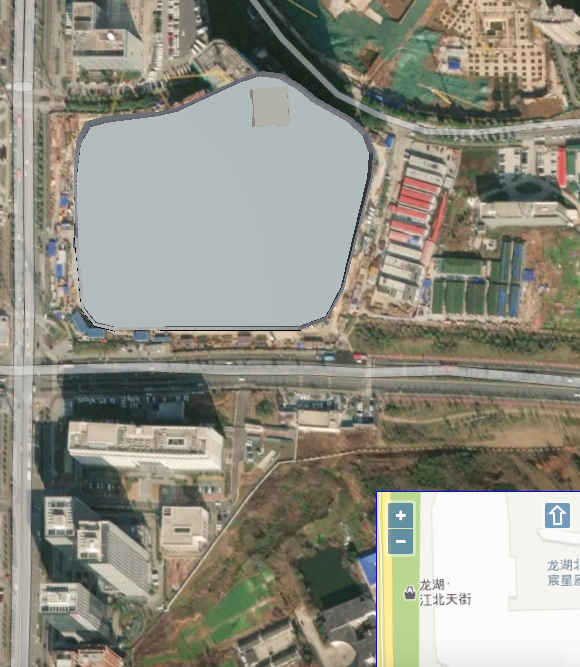
最终效果实现的二三维同步效果如下:
这里我对代码进行来修改,提取了部分功能出来
# 实现代码
# 项目结构
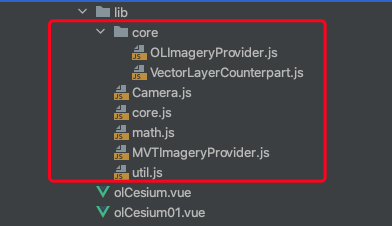
lib目录中为从ol-cesium中提取出来的代码
核心代码是Camera.js,其它代码为相关依赖,主要就是修改一下相应代码的依赖
# 主要代码
# testOLCs()
使用camera方法
- new olcsCamera(this._viewer.scene, this.map);这里传入cesium的viewer和ol的map,让camera来管理两个地图的视角
- checkCameraChange();开启viewer和map变化的监听
# render_()
用于渲染铯场景
# requestAnimationFrame()
请求动画帧回调方法
# 核心方法
    testOlCs() {
      this.camera_ = new olcsCamera(this._viewer.scene, this.map);
      this.camera_.checkCameraChange();
    },
    /**
     * 渲染铯场景
     */
    render_() {
      // 如果对 `requestAnimationFrame`(请求动画帧) 的调用处于挂起状态,请取消它
      if (this.renderId_ !== undefined) {
        cancelAnimationFrame(this.renderId_);
        this.renderId_ = undefined;
      }
      this.renderId_ = requestAnimationFrame(this.onAnimationFrame_.bind(this));
    },


    /**
     * Callback for `requestAnimationFrame`. 请求动画帧回调方法
     * @param {number} frameTime The frame time, from `performance.now()`.帧时间
     * @private
     */
    onAnimationFrame_(frameTime) {
      this.renderId_ = undefined;

      // 检查帧是否在目标帧速率内渲染
      const interval = 1000.0 / this.targetFrameRate_;
      const delta = frameTime - this.lastFrameTime_;
      if (delta < interval) {
        // 太早了,还没渲染
        this.render_();
        return;
      }

      // 渲染一帧的时间,节省时间
      this.lastFrameTime_ = frameTime;

      const julianDate = this.time_();
      this.scene_.initializeFrame();

      this.scene_.render(julianDate);
      this.camera_.checkCameraChange();

      // 在这个完成后请求下一个渲染调用,以确保浏览器不会得到备份
      this.render_();
    }
1
2
3
4
5
6
7
8
9
10
11
12
13
14
15
16
17
18
19
20
21
22
23
24
25
26
27
28
29
30
31
32
33
34
35
36
37
38
39
40
41
42
43
44
45
46
2
3
4
5
6
7
8
9
10
11
12
13
14
15
16
17
18
19
20
21
22
23
24
25
26
27
28
29
30
31
32
33
34
35
36
37
38
39
40
41
42
43
44
45
46
# 完整代码
<template>
  <div class="home">
    <cesiumComponent ref="refCesium"/>
    <div id="eye"></div>
  </div>
</template>

<script>
import cesiumComponent from '../cesium/cesium.vue'
import olcsCamera from './lib/Camera.js';

export default {
  name: "olCesium01",
  data() {
    return {
      _viewer: undefined,
      scene_: undefined,
      view_: undefined,
      camera_: null,
      targetFrameRate_: Number.POSITIVE_INFINITY,
      lastFrameTime_: 0,
      time_: function () {
        return Cesium.JulianDate.now()
      },
      layer: {
        tiandituVecLayer: '',
        tiandituCvaLayer: '',
        tiandituImgLayer: '',
        tiandituCiaLayer: '',
      },
      map: '',
    };
  },
  components: {
    cesiumComponent
  },
  mounted() {
    this.init();
    this.addTiles();
  },
  methods: {

    init() {
      let that=this;
      this.$refs.refCesium.initMap();
      let viewer = this.$refs.refCesium._viewer;
      this._viewer = viewer;
       that.scene_ = viewer.scene;
      //渲染铯场景
       that.render_();
      this.addOlMap();
      this.testOlCs()
    },
    addOlMap() {
      var that = this;
      //普通地图
      this.layer.tiandituVecLayer = new ol.layer.Tile({
        title: 'generalMap',
        source: new ol.source.XYZ({
          url: 'http://t3.tianditu.com/DataServer?T=vec_w&x={x}&y={y}&l={z}&tk=token',
          crossOrigin: 'anonymous'
        }),
        // zIndex: 1,
        visible: true
      });
      //普通地图标记
      that.layer.tiandituCvaLayer = new ol.layer.Tile({
        title: 'generalMapZj',
        source: new ol.source.XYZ({
          url: 'http://t3.tianditu.com/DataServer?T=cva_w&x={x}&y={y}&l={z}&tk=token',
          crossOrigin: 'anonymous'
        }),
        visible: true
      });
      //影像地图
      that.layer.tiandituImgLayer = new ol.layer.Tile({
        title: 'generalMapImg',
        source: new ol.source.XYZ({
          url: 'http://t3.tianditu.com/DataServer?T=img_w&x={x}&y={y}&l={z}&tk=token',
          crossOrigin: 'anonymous'
        }),
        visible: true
      });
      //影像地图标注
      that.layer.tiandituCiaLayer = new ol.layer.Tile({
        title: 'generalMapImgZj',
        source: new ol.source.XYZ({
          url: 'http://t3.tianditu.com/DataServer?T=cia_w&x={x}&y={y}&l={z}&tk=token',
          crossOrigin: 'anonymous'
        }),
        visible: true
      });
      this.map = new ol.Map({
        target: 'eye',
        layers: [
          that.layer.tiandituImgLayer,
          that.layer.tiandituCiaLayer,
          that.layer.tiandituVecLayer,
          that.layer.tiandituCvaLayer,
        ],
        view: new ol.View({
          center: [13410926.774433982, 3715530.4937355495],
          zoom: 12
        }),
        controls: ol.control.defaults({
          attributionOptions: {
            collapsible: false
          }
        })
      });
      this.view_ = this.map.getView();
    },
    addTiles() {
      // cesium加载代码
      let tileSet = this._viewer.scene.primitives.add(new Cesium.Cesium3DTileset({
        url: '../res/data/3dtiles/tianjie/tileset.json',
        modelMatrix: Cesium.Matrix4.fromArray(
            [0.9972458032561666, 0.04372029028528979, 0.05991113506964879, 0,
              -0.03623787897545647, 0.9920229449104262, -0.12073646051879428, 0,
              -0.06471185374661931, 0.11823287609043515, 0.9908750491338749, 0,
              -663.0794944260269, 1211.490494620055, 2974.1003134818748, 1]),
      }));
      this._viewer.flyTo(tileSet);
    },

    testOlCs() {
      this.camera_ = new olcsCamera(this._viewer.scene, this.map);
      this.camera_.checkCameraChange();
    },
    /**
     * Render the Cesium scene
     */
    render_() {
      // if a call to `requestAnimationFrame` is pending, cancel it
      if (this.renderId_ !== undefined) {
        cancelAnimationFrame(this.renderId_);
        this.renderId_ = undefined;
      }

      this.renderId_ = requestAnimationFrame(this.onAnimationFrame_.bind(this));
    },


    /**
     * Callback for `requestAnimationFrame`.
     * @param {number} frameTime The frame time, from `performance.now()`.
     * @private
     */
    onAnimationFrame_(frameTime) {
      this.renderId_ = undefined;

      // check if a frame was rendered within the target frame rate
      const interval = 1000.0 / this.targetFrameRate_;
      const delta = frameTime - this.lastFrameTime_;
      if (delta < interval) {
        // too soon, don't render yet
        this.render_();
        return;
      }

      // time to render a frame, save the time
      this.lastFrameTime_ = frameTime;

      const julianDate = this.time_();
      this.scene_.initializeFrame();

      this.scene_.render(julianDate);
      this.camera_.checkCameraChange();

      // request the next render call after this one completes to ensure the browser doesn't get backed up
      this.render_();
    }
  },
  created() {

  },
}
</script>

<style scoped>
.home {
  height: 100%;
  width: 100%;
  margin: 0;
  padding: 0;
  overflow: hidden;
}

#eye {
  position: absolute;
  width: 20%;
  height: 20%;
  bottom: 0;
  right: 0;
  z-index: 999;
  background: red;
  border: solid blue 1px;
}

#cesiumContainer {
  height: 100%;
  width: 100%;
  margin: 0;
  padding: 0;
  overflow: hidden;
}
</style>
1
2
3
4
5
6
7
8
9
10
11
12
13
14
15
16
17
18
19
20
21
22
23
24
25
26
27
28
29
30
31
32
33
34
35
36
37
38
39
40
41
42
43
44
45
46
47
48
49
50
51
52
53
54
55
56
57
58
59
60
61
62
63
64
65
66
67
68
69
70
71
72
73
74
75
76
77
78
79
80
81
82
83
84
85
86
87
88
89
90
91
92
93
94
95
96
97
98
99
100
101
102
103
104
105
106
107
108
109
110
111
112
113
114
115
116
117
118
119
120
121
122
123
124
125
126
127
128
129
130
131
132
133
134
135
136
137
138
139
140
141
142
143
144
145
146
147
148
149
150
151
152
153
154
155
156
157
158
159
160
161
162
163
164
165
166
167
168
169
170
171
172
173
174
175
176
177
178
179
180
181
182
183
184
185
186
187
188
189
190
191
192
193
194
195
196
197
198
199
200
201
202
203
204
205
206
207
2
3
4
5
6
7
8
9
10
11
12
13
14
15
16
17
18
19
20
21
22
23
24
25
26
27
28
29
30
31
32
33
34
35
36
37
38
39
40
41
42
43
44
45
46
47
48
49
50
51
52
53
54
55
56
57
58
59
60
61
62
63
64
65
66
67
68
69
70
71
72
73
74
75
76
77
78
79
80
81
82
83
84
85
86
87
88
89
90
91
92
93
94
95
96
97
98
99
100
101
102
103
104
105
106
107
108
109
110
111
112
113
114
115
116
117
118
119
120
121
122
123
124
125
126
127
128
129
130
131
132
133
134
135
136
137
138
139
140
141
142
143
144
145
146
147
148
149
150
151
152
153
154
155
156
157
158
159
160
161
162
163
164
165
166
167
168
169
170
171
172
173
174
175
176
177
178
179
180
181
182
183
184
185
186
187
188
189
190
191
192
193
194
195
196
197
198
199
200
201
202
203
204
205
206
207
← ol二三维联动(鹰眼图) 视频融合 →