
# cesium-事件监听(获取点击位置的经纬度和高度)
# 介绍
let handler = new Cesium.ScreenSpaceEventHandler(element);
1
处理用户输入事件。可以添加自定义功能以在用户输入时执行。
# 成员
Cesium.ScreenSpaceEventHandler.mouseEmulationIgnoreMilliseconds=800
1
接收到任何触摸事件后鼠标事件将被禁用的时间量(以毫秒为单位),这样任何模拟的鼠标事件都将被忽略。
Cesium.ScreenSpaceEventHandler.touchHoldDelayMilliseconds=1500
1
在屏幕上的触摸变为触摸并按住之前的时间量(以毫秒为单位)。
# 方法
# destroy()
移除此对象持有的侦听器。
一旦一个对象被销毁,它就不应该被使用;调用除此之外的任何函数 isDestroyed都会导致DeveloperError异常。因此,如示例中所做的那样,将返回值 ( undefined) 分配给对象。
handler = handler && handler.destroy();
1
# getInputAction(type, modifier)
返回要在输入事件上执行的函数。
| 姓名 | 类型 | 描述 |
|---|---|---|
| type | 数字 | 输入事件的ScreenSpaceEventType |
| modifier | 数字 | type发生事件时持有的keyboardEventModifier键 |
返回:要在输入事件上执行的函数。
# isDestroyed()
如果此对象被销毁,则返回 true;否则为假。
如果这个对象被破坏了,它就不应该被使用;调用除此之外的任何函数 isDestroyed都会导致DeveloperError异常。
返回:如果这个对象被破坏了,true;否则,false。
# removeInputAction(type, modifier)
删除要在输入事件上执行的函数。
| 姓名 | 类型 | 描述 |
|---|---|---|
| type | 数字 | 输入事件的ScreenSpaceEventType |
| modifier | 数字 | type发生事件时持有的keyboardEventModifier键 |
# setInputAction(action, type, modifier)
设置要在输入事件上执行的功能。
| 姓名 | 类型 | 描述 |
|---|---|---|
| action | 功能 | 当输入事件发生时要执行的函数 |
| type | 数字 | 输入事件的ScreenSpaceEventType |
| modifier | 数字 | type发生事件时持有的keyboardEventModifier键 |
# 屏幕空间事件类型
ScreenSpaceEventType
此枚举类型用于对鼠标事件进行分类:向下、向上、单击、双击、移动和按住按钮时移动。
| 姓名 | 类型 | 描述 |
|---|---|---|
LEFT_DOWN | 数字 | 表示鼠标左键按下事件。 |
LEFT_UP | 数字 | 表示鼠标左键向上事件。 |
LEFT_CLICK | 数字 | 表示鼠标左键单击事件。 |
LEFT_DOUBLE_CLICK | 数字 | 表示鼠标左键双击事件。 |
RIGHT_DOWN | 数字 | 表示鼠标左键按下事件。 |
RIGHT_UP | 数字 | 表示鼠标右键向上事件。 |
RIGHT_CLICK | 数字 | 表示鼠标右键单击事件。 |
MIDDLE_DOWN | 数字 | 表示鼠标中键按下事件。 |
MIDDLE_UP | 数字 | 表示鼠标中键向上事件。 |
MIDDLE_CLICK | 数字 | 表示鼠标中键单击事件。 |
MOUSE_MOVE | 数字 | 表示鼠标移动事件。 |
WHEEL | 数字 | 表示鼠标滚轮事件。 |
PINCH_START | 数字 | 表示触摸表面上的两指事件的开始。 |
PINCH_END | 数字 | 表示触摸表面上的两指事件的结束。 |
PINCH_MOVE | 数字 | 表示触摸表面上两指事件的变化。 |
示例
Cesium.ScreenSpaceEventType.LEFT_CLICK
1
# 示例方法
# 监听鼠标左击事件
let handler = new Cesium.ScreenSpaceEventHandler(viewer.scene.canvas);
handler.setInputAction(function (click) {
console.log("监听的是鼠标左击事件");
    // 这里编写业务代码
}, Cesium.ScreenSpaceEventType.LEFT_CLICK);
1
2
3
4
5
2
3
4
5
# 移除鼠标左击事件
handler.removeInputAction(Cesium.ScreenSpaceEventType.LEFT_CLICK);
1
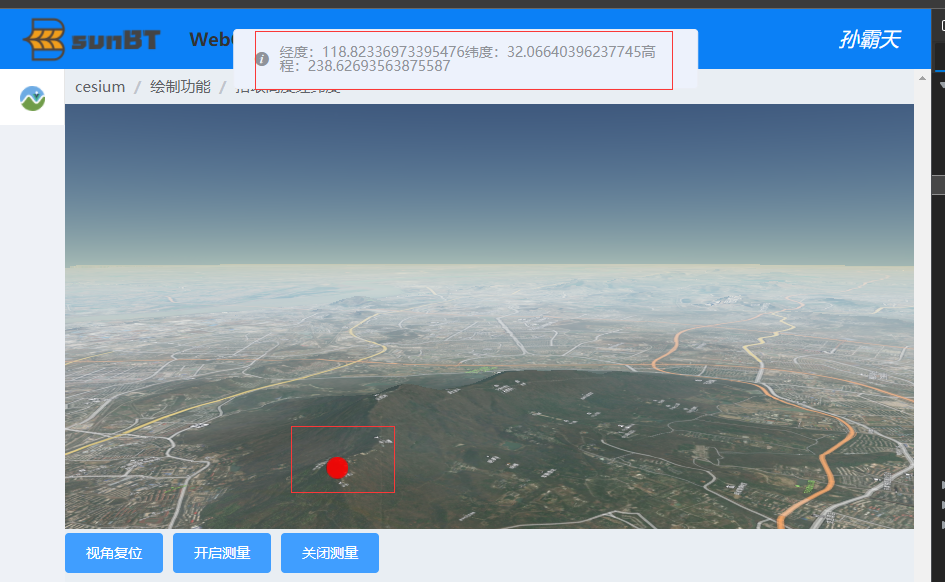
# 获取点击位置的经纬度和高度
# 核心代码
let handler = new Cesium.ScreenSpaceEventHandler(viewer.scene.canvas);
        handler.setInputAction(function (click) {
          // 创建二维笛卡尔点
          let pick = new Cesium.Cartesian2(click.position.x, click.position.y);
          if (pick) {
            //从相机位置通过windowPosition 世界坐标中的像素创建一条射线。viewer.camera.getPickRay(pick)
            //查找射线与渲染的地球表面之间的交点。射线必须以世界坐标给出。
            let cartesian = viewer.scene.globe.pick(viewer.camera.getPickRay(pick), viewer.scene);
            if (cartesian) {
              //世界坐标转地理坐标(弧度)
              let cartographic = viewer.scene.globe.ellipsoid.cartesianToCartographic(cartesian)
              if (cartographic) {
                //海拔
                let height = viewer.scene.globe.getHeight(cartographic)
                //视角海拔高度
                let he = Math.sqrt(
                    viewer.scene.camera.positionWC.x * viewer.scene.camera.positionWC.x +
                    viewer.scene.camera.positionWC.y * viewer.scene.camera.positionWC.y +
                    viewer.scene.camera.positionWC.z * viewer.scene.camera.positionWC.z
                )
                let he2 = Math.sqrt(
                    cartesian.x * cartesian.x + cartesian.y * cartesian.y + cartesian.z * cartesian.z
                )
                //地理坐标(弧度)转经纬度坐标
                let point = [
                  (cartographic.longitude / Math.PI) * 180,
                  (cartographic.latitude / Math.PI) * 180,
                ]
                let lon = point[0];
                let lat = point[1];
                console.log("经度:" + point[0] + "纬度:" + point[1] + "高程:" + height);
                console.log("视角高度:"+(he - he2));

                //添加点
               let entity = new Cesium.Entity({
                  id: 'measure',
                  position: Cesium.Cartesian3.fromDegrees(lon, lat, that.elevation),
                  point: {
                    pixelSize: 20,
                    color: Cesium.Color.RED.withAlpha(0.9),
                    outlineColor: Cesium.Color.RED.withAlpha(0.9),
                    outlineWidth: 1,
                    disableDepthTestDistance: Number.POSITIVE_INFINITY,
                    heightReference: Cesium.HeightReference.CLAMP_TO_GROUND,
                  }
                });
                viewer.entities.add(entity);
              }
            }
          }
        }, Cesium.ScreenSpaceEventType.LEFT_CLICK);//监听鼠标左击事件
1
2
3
4
5
6
7
8
9
10
11
12
13
14
15
16
17
18
19
20
21
22
23
24
25
26
27
28
29
30
31
32
33
34
35
36
37
38
39
40
41
42
43
44
45
46
47
48
49
50
51
2
3
4
5
6
7
8
9
10
11
12
13
14
15
16
17
18
19
20
21
22
23
24
25
26
27
28
29
30
31
32
33
34
35
36
37
38
39
40
41
42
43
44
45
46
47
48
49
50
51
# 实现效果
← 添加标签 动态数据格式CZML介绍 →