
# cesium-绘制多边形
# 通过Entity添加形状
# 创建entity
let redBox = viewer.entities.add({
        name: 'Red box with black outline',
        position: Cesium.Cartesian3.fromDegrees(-107.0, 40.0, 300000.0),
        box: {
            dimensions: new Cesium.Cartesian3(400000.0, 300000.0, 500000.0),
            material: Cesium.Color.RED.withAlpha(0.5),
            outline: true,
            outlineColor: Cesium.Color.BLACK
        }
    });
1
2
3
4
5
6
7
8
9
10
2
3
4
5
6
7
8
9
10
# 完整代码
<!DOCTYPE html>
<html lang="en">
<head>
    <!-- Use correct character set. -->
    <meta charset="utf-8"/>
    <!-- Tell IE to use the latest, best version. -->
    <meta http-equiv="X-UA-Compatible" content="IE=edge"/>
    <!-- Make the application on mobile take up the full browser screen and disable user scaling. -->
    <meta
            name="viewport"
            content="width=device-width, initial-scale=1, maximum-scale=1, minimum-scale=1, user-scalable=no"
    />
    <title>绘制多边形</title>
    <script src="../lib/Cesium-1.89/Build/Cesium/Cesium.js"></script>
    <style>
        @import url(../lib/Cesium-1.89/Build/Cesium/Widgets/widgets.css);

        html,
        body,
        #cesiumContainer {
            width: 100%;
            height: 100%;
            margin: 0;
            padding: 0;
            overflow: hidden;
        }
    </style>

</head>
<body>
<div id="cesiumContainer"></div>
<script>
    Cesium.Ion.defaultAccessToken = "token";
    let viewer = new Cesium.Viewer('cesiumContainer');
    let redBox = viewer.entities.add({
        name: 'Red box with black outline',
        position: Cesium.Cartesian3.fromDegrees(-107.0, 40.0, 300000.0),
        box: {
            dimensions: new Cesium.Cartesian3(400000.0, 300000.0, 500000.0),
            material: Cesium.Color.RED.withAlpha(0.5),
            outline: true,
            outlineColor: Cesium.Color.BLACK
        }
    });

    viewer.zoomTo(redBox);

</script>
</body>
</html>
1
2
3
4
5
6
7
8
9
10
11
12
13
14
15
16
17
18
19
20
21
22
23
24
25
26
27
28
29
30
31
32
33
34
35
36
37
38
39
40
41
42
43
44
45
46
47
48
49
50
2
3
4
5
6
7
8
9
10
11
12
13
14
15
16
17
18
19
20
21
22
23
24
25
26
27
28
29
30
31
32
33
34
35
36
37
38
39
40
41
42
43
44
45
46
47
48
49
50
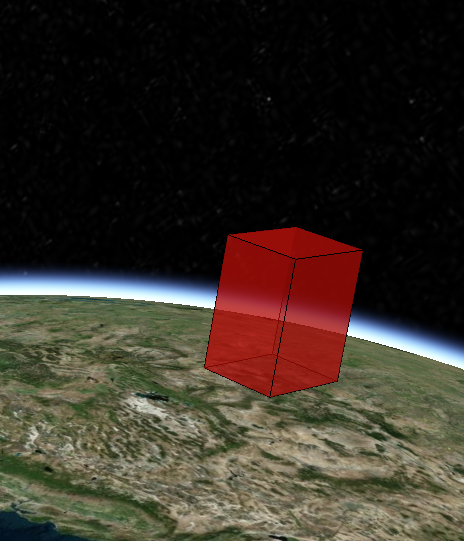
效果如下:
# 通过czml创建
# czml
        let czml = [{
            "id": "document",
            "name": "box",
            "version": "1.0"
        }, {
            "id": "shape2",
            "name": "Red box with black outline",
            "position": {
                "cartographicDegrees": [-107.0, 40.0, 300000.0]
            },
            "box": {
                "dimensions": {
                    "cartesian": [400000.0, 300000.0, 500000.0]
                },
                "material": {
                    "solidColor": {
                        "color": {
                            "rgba": [255, 0, 0, 128]
                        }
                    }
                },
                "outline": true,
                "outlineColor": {
                    "rgba": [0, 0, 0, 255]
                }
            }
        }];
1
2
3
4
5
6
7
8
9
10
11
12
13
14
15
16
17
18
19
20
21
22
23
24
25
26
27
2
3
4
5
6
7
8
9
10
11
12
13
14
15
16
17
18
19
20
21
22
23
24
25
26
27
# 完整代码
<!DOCTYPE html>
<html lang="en">
<head>
    <!-- Use correct character set. -->
    <meta charset="utf-8"/>
    <!-- Tell IE to use the latest, best version. -->
    <meta http-equiv="X-UA-Compatible" content="IE=edge"/>
    <!-- Make the application on mobile take up the full browser screen and disable user scaling. -->
    <meta
            name="viewport"
            content="width=device-width, initial-scale=1, maximum-scale=1, minimum-scale=1, user-scalable=no"
    />
    <title>绘制多边形</title>
    <script src="https://data.sunbt.ltd/lib/Cesium-1.89/Build/Cesium/Cesium.js"></script>
    <style>
        @import url(https://data.sunbt.ltd/lib/Cesium-1.89/Build/Cesium/Widgets/widgets.css);

        html,
        body,
        #cesiumContainer {
            width: 100%;
            height: 100%;
            margin: 0;
            padding: 0;
            overflow: hidden;
        }
    </style>

</head>
<body>
<div id="cesiumContainer"></div>
<script>
    Cesium.Ion.defaultAccessToken = "token";
    let viewer = new Cesium.Viewer('cesiumContainer');


    //测试czml方式,可以描述动画
    function czml() {
        let czml = [{
            "id": "document",
            "name": "box",
            "version": "1.0"
        }, {
            "id": "shape2",
            "name": "Red box with black outline",
            "position": {
                "cartographicDegrees": [-107.0, 40.0, 300000.0]
            },
            "box": {
                "dimensions": {
                    "cartesian": [400000.0, 300000.0, 500000.0]
                },
                "material": {
                    "solidColor": {
                        "color": {
                            "rgba": [255, 0, 0, 128]
                        }
                    }
                },
                "outline": true,
                "outlineColor": {
                    "rgba": [0, 0, 0, 255]
                }
            }
        }];

        let dataSourcePromise = Cesium.CzmlDataSource.load(czml);
        viewer.dataSources.add(dataSourcePromise);
        viewer.zoomTo(dataSourcePromise);
    }

  czml();
</script>
</body>
</html>
1
2
3
4
5
6
7
8
9
10
11
12
13
14
15
16
17
18
19
20
21
22
23
24
25
26
27
28
29
30
31
32
33
34
35
36
37
38
39
40
41
42
43
44
45
46
47
48
49
50
51
52
53
54
55
56
57
58
59
60
61
62
63
64
65
66
67
68
69
70
71
72
73
74
75
2
3
4
5
6
7
8
9
10
11
12
13
14
15
16
17
18
19
20
21
22
23
24
25
26
27
28
29
30
31
32
33
34
35
36
37
38
39
40
41
42
43
44
45
46
47
48
49
50
51
52
53
54
55
56
57
58
59
60
61
62
63
64
65
66
67
68
69
70
71
72
73
74
75
← 地形裁剪-绘制多边形裁剪 绘制点线面 →