
# 前后端数据加密传输基于AES+RSA实现
# 什么是AES和RSA
# AES
AES(Advanced Encryption Standard)是一种对称加密算法,它的加密速度快,安全性也比较高,是目前广泛使用的加密算法之一。AES的密钥长度可以选择128位、192位和256位,其中128位和192位的安全性略低,但加密速度更快,而256位的安全性最高,但加密速度相对较慢。AES的加密过程是将明文数据通过密钥进行“混淆”处理,使其变成无法被识别的密文数据。
# RSA
RSA(Rivest-Shamir-Adleman)是一种非对称加密算法,它的加密速度慢,但安全性极高,是用于保护敏感数据的常用算法。RSA的加密过程是先使用一个公钥(public key)将明文数据进行加密,然后再使用一个私钥(private key)将加密后的密文进行解密。由于公钥是公开的,因此可以提供给任何人使用,而私钥是需要保密的,只有私钥的持有者才能够解密数据。RSA的密钥长度通常为2048位或更长,可以提供足够的安全性。
# 前后端加密实现
这里前后加解密过程是以vue+springBoot为例实现的
案例只针对post请求
这里使用'Content-Type': 'application/x-www-form-urlencoded; charset=UTF-8';为键值对的形式(非json)
AES加密数据,RAS加密AES的key
# 实现思路
- 前台首先请求非加密接口获取后台的公钥
- 前台在请求前生成自己的公钥和私钥,以及AES对称加密的key
- 使用前台生成的aeskey对数据进行加密
- 在请求前使用后台的公钥对前台的aeskey进行加密
- 将前台加密的data、aeskey和前台公钥一起传递给后台
- 后台使用私钥对前台的aeskey进行解密,再用这个aeskey去解密data
- 后台如果需要返回数据,这时使用后台生成的aeskey对数据进行加密
- 后端使用前台的公钥对aeskey进行加密
- 将aeskey和加密后的数据一起返还给前台,由前台使用私钥解密获得后端的aeskey
- 再使用后端的aeskey解密数据
通过这种方式,前后端交互的数据在传输过程中都经过了加密和解密的过程,保证了数据的安全性。
# 后台(Springboot)
在实际开发中,我们不应该在每一个接口都单独调用加密解密方法,这样太臃肿了。我们应该将重复代码进行抽离(事不过三,三则重构),这里我们可以使用AOP(切面)来进行处理。比如,我们可以定义一个切面类来统一处理加密解密的逻辑,然后在需要加密解密的方法上面声明该切面类,即可自动在方法执行前后执行加密解密的逻辑,避免了重复的代码。
# maven依赖
在springboot项目中使用AOP只要引入aop-starter依赖就行:
        <dependency>
            <groupId>org.springframework.boot</groupId>
            <artifactId>spring-boot-starter-aop</artifactId>
        </dependency>
2
3
4
加解密用的依赖:
        <dependency>
            <groupId>org.bouncycastle</groupId>
            <artifactId>bcprov-jdk15on</artifactId>
            <version>1.56</version>
        </dependency>
2
3
4
5
测试项目完整pom.xml依赖如下:
<?xml version="1.0" encoding="UTF-8"?>
<project xmlns="http://maven.apache.org/POM/4.0.0" xmlns:xsi="http://www.w3.org/2001/XMLSchema-instance"
         xsi:schemaLocation="http://maven.apache.org/POM/4.0.0 https://maven.apache.org/xsd/maven-4.0.0.xsd">
    <modelVersion>4.0.0</modelVersion>
    <parent>
        <groupId>org.springframework.boot</groupId>
        <artifactId>spring-boot-starter-parent</artifactId>
        <version>2.2.6.RELEASE</version>
        <relativePath/> <!-- lookup parent from repository -->
    </parent>
    <groupId>com.sun</groupId>
    <artifactId>springboot</artifactId>
    <version>0.0.1-SNAPSHOT</version>
    <name>gis</name>
    <description>Demo project for Spring Boot</description>
    <properties>
        <java.version>8</java.version>
        <log4j2.version>2.17.0</log4j2.version>
    </properties>
    <dependencies>
        <dependency>
            <groupId>org.springframework.boot</groupId>
            <artifactId>spring-boot-starter</artifactId>
        </dependency>
        <dependency>
            <groupId>org.springframework.boot</groupId>
            <artifactId>spring-boot-starter-web</artifactId>
        </dependency>
        <dependency>
            <groupId>org.springframework.boot</groupId>
            <artifactId>spring-boot-starter-test</artifactId>
            <scope>test</scope>
        </dependency>

        <!-- Spring Boot AOP Starter -->
        <dependency>
            <groupId>org.springframework.boot</groupId>
            <artifactId>spring-boot-starter-aop</artifactId>
        </dependency>
        <dependency>
            <groupId>com.google.guava</groupId>
            <artifactId>guava</artifactId>
            <version>19.0</version>
        </dependency>
        <dependency>
            <groupId>com.github.xiaoymin</groupId>
            <artifactId>knife4j-spring-boot-starter</artifactId>
            <version>3.0.2</version>
        </dependency>
        <dependency>
            <groupId>org.projectlombok</groupId>
            <artifactId>lombok</artifactId>
        </dependency>

        <dependency>
            <groupId>com.alibaba</groupId>
            <artifactId>fastjson</artifactId>
            <version>1.2.76</version>
        </dependency>

        <dependency>
            <groupId>org.bouncycastle</groupId>
            <artifactId>bcprov-jdk15on</artifactId>
            <version>1.56</version>
        </dependency>

        <dependency>
            <groupId>org.apache.directory.studio</groupId>
            <artifactId>org.apache.commons.codec</artifactId>
            <version>1.8</version>
        </dependency>

    </dependencies>

    <repositories>
        <repository>
            <id>alimaven</id>
            <name>aliyun maven</name>
            <url>http://maven.aliyun.com/nexus/content/groups/public/</url>
            <snapshots>
                <enabled>false</enabled>
            </snapshots>
        </repository>
    </repositories>

    <build>
        <plugins>
            <plugin>
                <groupId>org.springframework.boot</groupId>
                <artifactId>spring-boot-maven-plugin</artifactId>
            </plugin>
            <!-- 打成jar包自动排除yml配置 可在jar同级目录下(同级目录/config下) 配置yml -->
            <plugin>
                <groupId>org.apache.maven.plugins</groupId>
                <artifactId>maven-jar-plugin</artifactId>
                <configuration>
                    <excludes>
                        <!--不打包的内容文件-->
                        <exclude>*.yml</exclude>
                    </excludes>
                </configuration>
            </plugin>
            <plugin>
                <groupId>org.apache.maven.plugins</groupId>
                <artifactId>maven-surefire-plugin</artifactId>
                <version>3.0.0-M3</version>
                <configuration>
                    <!-- 设置默认跳过测试 -->
                    <skip>true</skip>
                    <includes>
                        <include>**/*Tests.java</include>
                    </includes>
                    <excludes>
                        <exclude>**/Abstract*.java</exclude>
                    </excludes>
                    <systemPropertyVariables>
                        <java.security.egd>file:/dev/./urandom</java.security.egd>
                        <java.awt.headless>true</java.awt.headless>
                    </systemPropertyVariables>
                </configuration>
            </plugin>
        </plugins>
    </build>

</project>
2
3
4
5
6
7
8
9
10
11
12
13
14
15
16
17
18
19
20
21
22
23
24
25
26
27
28
29
30
31
32
33
34
35
36
37
38
39
40
41
42
43
44
45
46
47
48
49
50
51
52
53
54
55
56
57
58
59
60
61
62
63
64
65
66
67
68
69
70
71
72
73
74
75
76
77
78
79
80
81
82
83
84
85
86
87
88
89
90
91
92
93
94
95
96
97
98
99
100
101
102
103
104
105
106
107
108
109
110
111
112
113
114
115
116
117
118
119
120
121
122
123
124
125
# 加解密工具类
这里封装几个常用工具类:
# AES工具类:AesUtil
package com.sun.springboot.util;

import org.apache.tomcat.util.codec.binary.Base64;
import org.bouncycastle.jce.provider.BouncyCastleProvider;

import javax.crypto.Cipher;
import javax.crypto.spec.SecretKeySpec;
import java.nio.charset.StandardCharsets;
import java.security.SecureRandom;
import java.util.Random;

/**
 * @author sungang
 * @date 2021/10/15 1:58 下午
 * AES加、解密算法工具类
 * 对称加密
 */
public class AesUtil {
    /**
     * 加密算法AES
     */
    private static final String KEY_ALGORITHM = "AES";

    /**
     * key的长度,Wrong key size: must be equal to 128, 192 or 256
     * 传入时需要16、24、36
     */
    private static final int KEY_LENGTH = 16 * 8;

    /**
     * 算法名称/加密模式/数据填充方式
     * 默认:AES/ECB/PKCS5Padding
     */
    private static final String ALGORITHMS = "AES/ECB/PKCS5Padding";

    /**
     * 后端AES的key,由静态代码块赋值
     */
    public static String key;

    /**
     * 不能在代码中创建
     * JceSecurity.getVerificationResult 会将其put进 private static final Map<Provider,Object>中,导致内存缓便被耗尽
     */
    private static final BouncyCastleProvider PROVIDER = new BouncyCastleProvider();

    static {
        key = getKey();
    }

    /**
     * 获取key
     */
    public static String getKey() {
        int length = KEY_LENGTH / 8;
        StringBuilder uid = new StringBuilder(length);
        //产生16位的强随机数
        Random rd = new SecureRandom();
        for (int i = 0; i < length; i++) {
            //产生0-2的3位随机数
            switch (rd.nextInt(3)) {
                case 0:
                    //0-9的随机数
                    uid.append(rd.nextInt(10));
                    break;
                case 1:
                    //ASCII在65-90之间为大写,获取大写随机
                    uid.append((char) (rd.nextInt(26) + 65));
                    break;
                case 2:
                    //ASCII在97-122之间为小写,获取小写随机
                    uid.append((char) (rd.nextInt(26) + 97));
                    break;
                default:
                    break;
            }
        }
        return uid.toString();
    }

    /**
     * 加密
     *
     * @param content    加密的字符串
     * @param encryptKey key值
     */
    public static String encrypt(String content, String encryptKey) throws Exception {
        //设置Cipher对象
        Cipher cipher = Cipher.getInstance(ALGORITHMS, PROVIDER);
        cipher.init(Cipher.ENCRYPT_MODE, new SecretKeySpec(encryptKey.getBytes(), KEY_ALGORITHM));

        //调用doFinal
        // 转base64
        return Base64.encodeBase64String(cipher.doFinal(content.getBytes(StandardCharsets.UTF_8)));

    }

    /**
     * 解密
     *
     * @param encryptStr 解密的字符串
     * @param decryptKey 解密的key值
     */
    public static String decrypt(String encryptStr, String decryptKey) throws Exception {
        //base64格式的key字符串转byte
        byte[] decodeBase64 = Base64.decodeBase64(encryptStr);

        //设置Cipher对象
        Cipher cipher = Cipher.getInstance(ALGORITHMS,PROVIDER);
        cipher.init(Cipher.DECRYPT_MODE, new SecretKeySpec(decryptKey.getBytes(), KEY_ALGORITHM));

        //调用doFinal解密
        return new String(cipher.doFinal(decodeBase64));
    }

}
2
3
4
5
6
7
8
9
10
11
12
13
14
15
16
17
18
19
20
21
22
23
24
25
26
27
28
29
30
31
32
33
34
35
36
37
38
39
40
41
42
43
44
45
46
47
48
49
50
51
52
53
54
55
56
57
58
59
60
61
62
63
64
65
66
67
68
69
70
71
72
73
74
75
76
77
78
79
80
81
82
83
84
85
86
87
88
89
90
91
92
93
94
95
96
97
98
99
100
101
102
103
104
105
106
107
108
109
110
111
112
113
114
115
116
# RSA工具类:RsaUtil
package com.sun.springboot.util;

import lombok.extern.slf4j.Slf4j;
import org.apache.commons.codec.binary.Base64;

import javax.crypto.Cipher;
import java.io.ByteArrayOutputStream;
import java.security.Key;
import java.security.KeyFactory;
import java.security.KeyPair;
import java.security.KeyPairGenerator;
import java.security.interfaces.RSAPrivateKey;
import java.security.interfaces.RSAPublicKey;
import java.security.spec.PKCS8EncodedKeySpec;
import java.security.spec.X509EncodedKeySpec;
import java.util.HashMap;
import java.util.LinkedHashMap;
import java.util.Map;

/**
 * @author sungang
 * @date 2021/10/15 2:04 下午
 * RSA加、解密算法工具类
 * 非对称加密
 */
@Slf4j
public class RsaUtil {

    /**
     * 加密算法AES
     */
    private static final String KEY_ALGORITHM = "RSA";

    /**
     * 算法名称/加密模式/数据填充方式
     * 默认:RSA/ECB/PKCS1Padding
     */
    private static final String ALGORITHMS = "RSA/ECB/PKCS1Padding";

    /**
     * Map获取公钥的key
     */
    private static final String PUBLIC_KEY = "publicKey";

    /**
     * Map获取私钥的key
     */
    private static final String PRIVATE_KEY = "privateKey";

    /**
     * RSA最大加密明文大小
     */
    private static final int MAX_ENCRYPT_BLOCK = 117;

    /**
     * RSA最大解密密文大小
     */
    private static final int MAX_DECRYPT_BLOCK = 128;

    /**
     * RSA 位数 如果采用2048 上面最大加密和最大解密则须填写:  245 256
     */
    private static final int INITIALIZE_LENGTH = 1024;

    /**
     * 后端RSA的密钥对(公钥和私钥)Map,由静态代码块赋值
     */
    private static Map<String, Object> genKeyPair = new LinkedHashMap<>(2);

    static {
        try {
            genKeyPair.putAll(genKeyPair());
        } catch (Exception e) {
            //输出到日志文件中
            log.error(ErrorUtil.errorInfoToString(e));
        }
    }

    /**
     * 生成密钥对(公钥和私钥)
     */
    private static Map<String, Object> genKeyPair() throws Exception {
        KeyPairGenerator keyPairGen = KeyPairGenerator.getInstance(KEY_ALGORITHM);
        keyPairGen.initialize(INITIALIZE_LENGTH);
        KeyPair keyPair = keyPairGen.generateKeyPair();
        RSAPublicKey publicKey = (RSAPublicKey) keyPair.getPublic();
        RSAPrivateKey privateKey = (RSAPrivateKey) keyPair.getPrivate();
        Map<String, Object> keyMap = new HashMap<String, Object>(2);
        //公钥
        keyMap.put(PUBLIC_KEY, publicKey);
        //私钥
        keyMap.put(PRIVATE_KEY, privateKey);
        return keyMap;
    }

    /**
     * 私钥解密
     *
     * @param encryptedData 已加密数据
     * @param privateKey    私钥(BASE64编码)
     */
    public static byte[] decryptByPrivateKey(byte[] encryptedData, String privateKey) throws Exception {
        //base64格式的key字符串转Key对象
        Key privateK = KeyFactory.getInstance(KEY_ALGORITHM).generatePrivate(new PKCS8EncodedKeySpec(Base64.decodeBase64(privateKey)));

        //设置加密、填充方式
        /*
            如需使用更多加密、填充方式,引入
            <dependency>
                <groupId>org.bouncycastle</groupId>
                <artifactId>bcprov-jdk16</artifactId>
                <version>1.46</version>
            </dependency>
            并改成
            Cipher cipher = Cipher.getInstance(ALGORITHMS ,new BouncyCastleProvider());
         */
        Cipher cipher = Cipher.getInstance(ALGORITHMS);
        cipher.init(Cipher.DECRYPT_MODE, privateK);

        //分段进行解密操作
        return encryptAndDecryptOfSubsection(encryptedData, cipher, MAX_DECRYPT_BLOCK);
    }

    /**
     * 公钥加密
     *
     * @param data      源数据
     * @param publicKey 公钥(BASE64编码)
     */
    public static byte[] encryptByPublicKey(byte[] data, String publicKey) throws Exception {
        //base64格式的key字符串转Key对象
        Key publicK = KeyFactory.getInstance(KEY_ALGORITHM).generatePublic(new X509EncodedKeySpec(Base64.decodeBase64(publicKey)));

        //设置加密、填充方式
        /*
            如需使用更多加密、填充方式,引入
            <dependency>
                <groupId>org.bouncycastle</groupId>
                <artifactId>bcprov-jdk16</artifactId>
                <version>1.46</version>
            </dependency>
            并改成
            Cipher cipher = Cipher.getInstance(ALGORITHMS ,new BouncyCastleProvider());
         */
        Cipher cipher = Cipher.getInstance(ALGORITHMS);
        cipher.init(Cipher.ENCRYPT_MODE, publicK);

        //分段进行加密操作
        return encryptAndDecryptOfSubsection(data, cipher, MAX_ENCRYPT_BLOCK);
    }

    /**
     * 获取私钥
     */
    public static String getPrivateKey() {
        Key key = (Key) genKeyPair.get(PRIVATE_KEY);
        return Base64.encodeBase64String(key.getEncoded());
    }

    /**
     * 获取公钥
     */
    public static String getPublicKey() {
        Key key = (Key) genKeyPair.get(PUBLIC_KEY);
        return Base64.encodeBase64String(key.getEncoded());
    }

    /**
     * 分段进行加密、解密操作
     */
    private static byte[] encryptAndDecryptOfSubsection(byte[] data, Cipher cipher, int encryptBlock) throws Exception {
        int inputLen = data.length;
        ByteArrayOutputStream out = new ByteArrayOutputStream();
        int offSet = 0;
        byte[] cache;
        int i = 0;
        // 对数据分段加密
        while (inputLen - offSet > 0) {
            if (inputLen - offSet > encryptBlock) {
                cache = cipher.doFinal(data, offSet, encryptBlock);
            } else {
                cache = cipher.doFinal(data, offSet, inputLen - offSet);
            }
            out.write(cache, 0, cache.length);
            i++;
            offSet = i * encryptBlock;
        }
        out.close();
        return out.toByteArray();
    }
}
2
3
4
5
6
7
8
9
10
11
12
13
14
15
16
17
18
19
20
21
22
23
24
25
26
27
28
29
30
31
32
33
34
35
36
37
38
39
40
41
42
43
44
45
46
47
48
49
50
51
52
53
54
55
56
57
58
59
60
61
62
63
64
65
66
67
68
69
70
71
72
73
74
75
76
77
78
79
80
81
82
83
84
85
86
87
88
89
90
91
92
93
94
95
96
97
98
99
100
101
102
103
104
105
106
107
108
109
110
111
112
113
114
115
116
117
118
119
120
121
122
123
124
125
126
127
128
129
130
131
132
133
134
135
136
137
138
139
140
141
142
143
144
145
146
147
148
149
150
151
152
153
154
155
156
157
158
159
160
161
162
163
164
165
166
167
168
169
170
171
172
173
174
175
176
177
178
179
180
181
182
183
184
185
186
187
188
189
190
191
# 加解密方法工具类:ApiSecurityUtil
package com.sun.springboot.util;


import com.sun.springboot.response.AjaxJson;
import lombok.extern.slf4j.Slf4j;
import org.apache.commons.codec.binary.Base64;
import org.springframework.web.context.request.RequestContextHolder;
import org.springframework.web.context.request.ServletRequestAttributes;

import javax.servlet.http.HttpServletRequest;

/**
 * API接口 加解密工具类
 * @author sungang
 */
@Slf4j
public class ApiSecurityUtil {

    /**
     * API解密
     */
    public static String decrypt(){
        try {
            //从RequestContextHolder中获取request对象
            ServletRequestAttributes attributes = (ServletRequestAttributes) RequestContextHolder.getRequestAttributes();
            HttpServletRequest request = attributes.getRequest();

            //AES加密后的数据
            String data = request.getParameter("data");
            //后端RSA公钥加密后的AES的key
            String aesKey = request.getParameter("aesKey");

            //后端私钥解密的到AES的key
            byte[] plaintext = RsaUtil.decryptByPrivateKey(Base64.decodeBase64(aesKey), RsaUtil.getPrivateKey());
            aesKey = new String(plaintext);

            //AES解密得到明文data数据
            return AesUtil.decrypt(data, aesKey);
        } catch (Throwable e) {
            //输出到日志文件中
            log.error(ErrorUtil.errorInfoToString(e));
            throw new RuntimeException("ApiSecurityUtil.decrypt:解密异常!");
        }
    }

    /**
     * API加密
     */
    public static AjaxJson encrypt(Object object){
        try {
            //从RequestContextHolder中获取request对象
            ServletRequestAttributes attributes = (ServletRequestAttributes) RequestContextHolder.getRequestAttributes();
            HttpServletRequest request = attributes.getRequest();

            //前端公钥
            String publicKey = request.getParameter("publicKey");

            //随机获取AES的key,加密data数据
            String key = AesUtil.getKey();

            String dataString;
            if(object instanceof String){
                dataString = String.valueOf(object);
            }else{
                dataString = JsonUtil.stringify(object);
            }

            //随机AES的key加密后的密文
            String data = AesUtil.encrypt(dataString, key);

            //用前端的公钥来解密AES的key,并转成Base64
            String aesKey = Base64.encodeBase64String(RsaUtil.encryptByPublicKey(key.getBytes(), publicKey));

            return AjaxJson.getSuccessData(JsonUtil.parse("{\"data\":\"" + data + "\",\"aesKey\":\"" + aesKey + "\"}", Object.class));
        } catch (Throwable e) {
            //输出到日志文件中
            log.error(ErrorUtil.errorInfoToString(e));
            throw new RuntimeException("ApiSecurityUtil.encrypt:加密异常!");
        }
    }
}
2
3
4
5
6
7
8
9
10
11
12
13
14
15
16
17
18
19
20
21
22
23
24
25
26
27
28
29
30
31
32
33
34
35
36
37
38
39
40
41
42
43
44
45
46
47
48
49
50
51
52
53
54
55
56
57
58
59
60
61
62
63
64
65
66
67
68
69
70
71
72
73
74
75
76
77
78
79
80
81
82
# 报错工具类:ErrorUtil
package com.sun.springboot.util;

import java.io.PrintWriter;
import java.io.StringWriter;

/**
 * @author sungang
 * @date 2021/10/15 2:54 下午
 * 捕获报错日志处理工具类
 */
public class ErrorUtil {

    /**
     * Exception出错的栈信息转成字符串
     * 用于打印到日志中
     */
    public static String errorInfoToString(Throwable e) {
        //try-with-resource语法糖 处理机制
        try (StringWriter sw = new StringWriter(); PrintWriter pw = new PrintWriter(sw)) {
            e.printStackTrace(pw);
            pw.flush();
            sw.flush();
            return sw.toString();
        } catch (Exception ignored) {
            throw new RuntimeException(ignored.getMessage(), ignored);
        }
    }
}
2
3
4
5
6
7
8
9
10
11
12
13
14
15
16
17
18
19
20
21
22
23
24
25
26
27
28
# JSON工具类:JsonUtil
package com.sun.springboot.util;

import com.fasterxml.jackson.databind.DeserializationFeature;
import com.fasterxml.jackson.databind.ObjectMapper;
import com.fasterxml.jackson.databind.SerializationFeature;
import lombok.extern.slf4j.Slf4j;

import java.text.SimpleDateFormat;

/**
 * Json工具类
 * @author sungang
 */
@Slf4j
public class JsonUtil {
    private static ObjectMapper mapper;

    static{
        //jackson
        mapper = new ObjectMapper();

        //设置日期格式
        mapper.setDateFormat(new SimpleDateFormat("yyyy-MM-dd HH:mm:ss"));

        //禁用空对象转换json
        mapper.configure(SerializationFeature.FAIL_ON_EMPTY_BEANS, false);
        mapper.configure(DeserializationFeature.FAIL_ON_UNKNOWN_PROPERTIES, false);

        //设置null值不参与序列化(字段不被显示)
//        mapper.setSerializationInclusion(JsonInclude.Include.NON_NULL);
    }

    /**
     * json字符串转对象
     */
    public static <T> T parse(String jsonStr,Class<T> clazz){
        try {
            return mapper.readValue(jsonStr, clazz);
        } catch (Exception e) {
            //输出到日志文件中
            log.error(ErrorUtil.errorInfoToString(e));
        }
        return null;
    }

    /**
     * 对象转json字符串
     */
    public static String stringify(Object obj){
        try {
            return mapper.writeValueAsString(obj);
        } catch (Exception e) {
            //输出到日志文件中
            log.error(ErrorUtil.errorInfoToString(e));
        }
        return null;
    }
}
2
3
4
5
6
7
8
9
10
11
12
13
14
15
16
17
18
19
20
21
22
23
24
25
26
27
28
29
30
31
32
33
34
35
36
37
38
39
40
41
42
43
44
45
46
47
48
49
50
51
52
53
54
55
56
57
58
# 自定义返回类
AjaxJson.class
package com.sun.springboot.response;

import java.io.Serializable;
import java.util.List;


/**
 * ajax请求返回Json格式数据的封装
 */
public class AjaxJson implements Serializable{
    // 序列化版本号
    private static final long serialVersionUID = 1L;
    // 成功状态码
    public static final int CODE_SUCCESS = 200;
    // 错误状态码
    public static final int CODE_ERROR = 500;
    // 警告状态码
    public static final int CODE_WARNING = 501;
    // 无权限状态码
    public static final int CODE_NOT_JUR = 403;
    // 未登录状态码
    public static final int CODE_NOT_LOGIN = 401;
    // 无效请求状态码
    public static final int CODE_INVALID_REQUEST = 400;
    // 状态码
    public int code;
    // 描述信息
    public String msg;
    // 携带对象
    public Object data;
    // 数据总数,用于分页
    public Long dataCount;

    /**
     * 返回code
     * @return
     */
    public int getCode() {
        return this.code;
    }

    /**
     * 给msg赋值,连缀风格
     */
    public AjaxJson setMsg(String msg) {
        this.msg = msg;
        return this;
    }
    public String getMsg() {
        return this.msg;
    }

    /**
     * 给data赋值,连缀风格
     */
    public AjaxJson setData(Object data) {
        this.data = data;
        return this;
    }

    /**
     * 将data还原为指定类型并返回
     */
    @SuppressWarnings("unchecked")
    public <T> T getData(Class<T> cs) {
        return (T) data;
    }

    // ============================  构建  ==================================

    public AjaxJson(int code, String msg, Object data, Long dataCount) {
        this.code = code;
        this.msg = msg;
        this.data = data;
        this.dataCount = dataCount;
    }

    // 返回成功
    public static AjaxJson getSuccess() {
        return new AjaxJson(CODE_SUCCESS, "ok", null, null);
    }
    public static AjaxJson getSuccess(String msg) {
        return new AjaxJson(CODE_SUCCESS, msg, null, null);
    }
    public static AjaxJson getSuccess(String msg, Object data) {
        return new AjaxJson(CODE_SUCCESS, msg, data, null);
    }
    public static AjaxJson getSuccessData(Object data) {
        return new AjaxJson(CODE_SUCCESS, "ok", data, null);
    }
    public static AjaxJson getSuccessArray(Object... data) {
        return new AjaxJson(CODE_SUCCESS, "ok", data, null);
    }

    // 返回失败
    public static AjaxJson getError() {
        return new AjaxJson(CODE_ERROR, "error", null, null);
    }
    public static AjaxJson getError(String msg) {
        return new AjaxJson(CODE_ERROR, msg, null, null);
    }

    // 返回警告
    public static AjaxJson getWarning() {
        return new AjaxJson(CODE_ERROR, "warning", null, null);
    }
    public static AjaxJson getWarning(String msg) {
        return new AjaxJson(CODE_WARNING, msg, null, null);
    }

    // 返回未登录
    public static AjaxJson getNotLogin() {
        return new AjaxJson(CODE_NOT_LOGIN, "未登录,请登录后再次访问", null, null);
    }

    // 返回没有权限的
    public static AjaxJson getNotJur(String msg) {
        return new AjaxJson(CODE_NOT_JUR, msg, null, null);
    }

    // 返回一个自定义状态码的
    public static AjaxJson get(int code, String msg){
        return new AjaxJson(code, msg, null, null);
    }

    // 返回分页和数据的
    public static AjaxJson getPageData(Long dataCount, Object data){
        return new AjaxJson(CODE_SUCCESS, "ok", data, dataCount);
    }

    // 返回,根据受影响行数的(大于0=ok,小于0=error)
    public static AjaxJson getByLine(int line){
        if(line > 0){
            return getSuccess("ok", line);
        }
        return getError("error").setData(line);
    }

    // 返回,根据布尔值来确定最终结果的  (true=ok,false=error)
    public static AjaxJson getByBoolean(boolean b){
        return b ? getSuccess("ok") : getError("error");
    }

    /* (non-Javadoc)
     * @see java.lang.Object#toString()
     */
    @SuppressWarnings("rawtypes")
    @Override
    public String toString() {
        String data_string = null;
        if(data == null){

        } else if(data instanceof List){
            data_string = "List(length=" + ((List)data).size() + ")";
        } else {
            data_string = data.toString();
        }
        return "{"
                + "\"code\": " + this.getCode()
                + ", \"message\": \"" + this.getMsg() + "\""
                + ", \"data\": " + data_string
                + ", \"dataCount\": " + dataCount
                + "}";
    }


}
2
3
4
5
6
7
8
9
10
11
12
13
14
15
16
17
18
19
20
21
22
23
24
25
26
27
28
29
30
31
32
33
34
35
36
37
38
39
40
41
42
43
44
45
46
47
48
49
50
51
52
53
54
55
56
57
58
59
60
61
62
63
64
65
66
67
68
69
70
71
72
73
74
75
76
77
78
79
80
81
82
83
84
85
86
87
88
89
90
91
92
93
94
95
96
97
98
99
100
101
102
103
104
105
106
107
108
109
110
111
112
113
114
115
116
117
118
119
120
121
122
123
124
125
126
127
128
129
130
131
132
133
134
135
136
137
138
139
140
141
142
143
144
145
146
147
148
149
150
151
152
153
154
155
156
157
158
159
160
161
162
163
164
165
166
167
# 自定义注解
- 加密注解:Encrypt
import java.lang.annotation.*;

/**
 * @author sungang
 * @date 2021/10/15 5:14 下午
 * 加密注解
 */
@Target({ElementType.METHOD, ElementType.TYPE})
@Retention(RetentionPolicy.RUNTIME)
@Documented
public @interface Encrypt {

}
2
3
4
5
6
7
8
9
10
11
12
13
- 解密注解:Decrypt
/**
 * @author sungang
 * @date 2021/10/15 5:13 下午
 * 解密注解
 */
@Target({ElementType.METHOD, ElementType.TYPE})
@Retention(RetentionPolicy.RUNTIME)
@Documented
public @interface Decrypt {

}
2
3
4
5
6
7
8
9
10
11
# AOP切面
- Decrypt
package com.sun.springboot.aspect;

import java.lang.annotation.*;

/**
 * @author sungang
 * @date 2021/10/15 5:13 下午
 * 解密注解
 */
@Target({ElementType.METHOD, ElementType.TYPE})
@Retention(RetentionPolicy.RUNTIME)
@Documented
public @interface Decrypt {

}
2
3
4
5
6
7
8
9
10
11
12
13
14
15
- Encrypt
package com.sun.springboot.aspect;

import java.lang.annotation.*;

/**
 * @author sungang
 * @date 2021/10/15 5:14 下午
 * 加密注解
 */
@Target({ElementType.METHOD, ElementType.TYPE})
@Retention(RetentionPolicy.RUNTIME)
@Documented
public @interface Encrypt {

}
2
3
4
5
6
7
8
9
10
11
12
13
14
15
- SafetyAspect
package com.sun.springboot.aspect;


import com.sun.springboot.util.ApiSecurityUtil;
import com.sun.springboot.util.JsonUtil;
import org.aspectj.lang.ProceedingJoinPoint;
import org.aspectj.lang.annotation.Around;
import org.aspectj.lang.annotation.Aspect;
import org.aspectj.lang.annotation.Pointcut;
import org.aspectj.lang.reflect.MethodSignature;
import org.springframework.stereotype.Component;
import org.springframework.web.context.request.RequestContextHolder;
import org.springframework.web.context.request.ServletRequestAttributes;

import javax.servlet.http.HttpServletRequest;
import java.lang.annotation.Annotation;
import java.lang.reflect.Method;


/**
 * @author sungang
 * @date 2021/10/15 5:15 下午
 */
@Aspect
@Component
public class SafetyAspect {

    /**
     * Pointcut 切入点
     * 匹配com.zykj.heliu.controller包下面的所有方法
     */
    @Pointcut("execution(* com.sun.springboot.controller..*.*(..))")
    public void safetyAspect() {
    }

    /**
     * 环绕通知
     */
    @Around(value = "safetyAspect()")
    public Object around(ProceedingJoinPoint pjp) throws Throwable {

        ServletRequestAttributes attributes = (ServletRequestAttributes) RequestContextHolder.getRequestAttributes();
        assert attributes != null;
        //request对象
        HttpServletRequest request = attributes.getRequest();

        //http请求方法  post get
        String httpMethod = request.getMethod().toLowerCase();

        //method方法
        Method method = ((MethodSignature) pjp.getSignature()).getMethod();

        //method方法上面的注解
        Annotation[] annotations = method.getAnnotations();

        //方法的形参参数
        Object[] args = pjp.getArgs();

        //是否有@Decrypt
        boolean hasDecrypt = false;
        //是否有@Encrypt
        boolean hasEncrypt = false;
        for (Annotation annotation : annotations) {
            if (annotation.annotationType() == Decrypt.class) {
                hasDecrypt = true;
            }
            if (annotation.annotationType() == Encrypt.class) {
                hasEncrypt = true;
            }
        }

        //执行方法之前解密,且只拦截post请求
        if ("post".equals(httpMethod) && hasDecrypt) {
            //api解密
            String decrypt = ApiSecurityUtil.decrypt();

            //注:参数最好用Vo对象来接参,单用String来接,args有长度但获取为空,很奇怪不知道为什么
            if(args.length > 0){
                args[0] = JsonUtil.parse(decrypt, args[0].getClass());
            }
        }

        //执行并替换最新形参参数   PS:这里有一个需要注意的地方,method方法必须是要public修饰的才能设置值,private的设置不了
        Object o = pjp.proceed(args);

        //返回结果之前加密
        if (hasEncrypt) {
            //api加密,转json字符串并转成Object对象,设置到Result中并赋值给返回值o
            o = ApiSecurityUtil.encrypt(o);
        }

        //返回
        return o;
    }
}
2
3
4
5
6
7
8
9
10
11
12
13
14
15
16
17
18
19
20
21
22
23
24
25
26
27
28
29
30
31
32
33
34
35
36
37
38
39
40
41
42
43
44
45
46
47
48
49
50
51
52
53
54
55
56
57
58
59
60
61
62
63
64
65
66
67
68
69
70
71
72
73
74
75
76
77
78
79
80
81
82
83
84
85
86
87
88
89
90
91
92
93
94
95
# 测试接口和实体类
- 公钥获取接口
package com.sun.springboot.controller;


import com.sun.springboot.component.MemoryDataTools;
import com.sun.springboot.constant.RsaConstant;
import com.sun.springboot.util.RsaUtil;
import io.swagger.annotations.Api;
import io.swagger.annotations.ApiOperation;
import org.springframework.web.bind.annotation.GetMapping;
import org.springframework.web.bind.annotation.RequestMapping;
import org.springframework.web.bind.annotation.RestController;

import javax.annotation.PostConstruct;
import javax.annotation.Resource;

/**
 * @author sunbt
 * @date 2023/8/31 21:48
 */
@Api(tags = "加密方法")
@RestController
@RequestMapping(value = "rsa")
public class RsaController {

    @Resource
    MemoryDataTools memoryDataTools;


    @ApiOperation("获取后台公钥")
    @GetMapping("getPublicKey")
    public String getPublicKey() {
        return memoryDataTools.get(RsaConstant.RSA_PUBLIC_KEY).toString();
    }

    @PostConstruct
    private void initRsaKey() {
        String publicKey = RsaUtil.getPublicKey();
        String privateKey = RsaUtil.getPrivateKey();
        memoryDataTools.put(RsaConstant.RSA_PUBLIC_KEY, publicKey);
        memoryDataTools.put(RsaConstant.RSA_PRIVATE_KEY, privateKey);
    }
}
2
3
4
5
6
7
8
9
10
11
12
13
14
15
16
17
18
19
20
21
22
23
24
25
26
27
28
29
30
31
32
33
34
35
36
37
38
39
40
41
42
- 实体类
定义一个VO
package com.sun.aop.entiy;

import lombok.Data;

/**
 * @author sung
 */
@Data
public class LoginVo {

    private String username;

    private String password;

}
2
3
4
5
6
7
8
9
10
11
12
13
14
15
- 加解密测试接口
package com.sun.springboot.controller;

import com.sun.springboot.aspect.Decrypt;
import com.sun.springboot.aspect.Encrypt;
import com.sun.springboot.response.AjaxJson;
import com.sun.springboot.vo.LoginVo;
import org.springframework.web.bind.annotation.CrossOrigin;
import org.springframework.web.bind.annotation.PostMapping;
import org.springframework.web.bind.annotation.RequestMapping;
import org.springframework.web.bind.annotation.RestController;

import java.util.HashMap;

/**
 * @author sung
 * 测试aop方式加解密
 * application/x-www-form-urlencoded 方式
 */
@CrossOrigin(origins = "*", maxAge = 3600)
@RestController
@RequestMapping(value = "ed")
public class EdController {

    @Decrypt
    @Encrypt
    @PostMapping("login")
    public AjaxJson login(LoginVo loginVo) {
        System.out.println(loginVo.getUsername() + "---" + loginVo.getPassword());
        HashMap<String, Object> res = new HashMap<>();
        res.put("username", loginVo.getUsername());
        res.put("password", loginVo.getPassword());
        res.put("token", "token");
        return  AjaxJson.getSuccessData(res);
    }

}
2
3
4
5
6
7
8
9
10
11
12
13
14
15
16
17
18
19
20
21
22
23
24
25
26
27
28
29
30
31
32
33
34
35
36
到这里后台配置完成
# 前台(VUE)
前台使用是vue项目,请求使用axios
# 封装一个自定义的axios请求
request_post_aop.js
import axios from 'axios'
import aes from "@/util/aes";
import rsa from "@/util/rsa";
import qs from "qs";

// 我们通过这个实例去发请求,把需要的配置配置给这个实例来处理
//针对post请求,application/x-www-form-urlencoded
const request_post_aop = axios.create({
    baseURL: '/api', // 请求的基础路径
    timeout: 30000,
    // 定义后端返回的原始数据的处理
    // 参数 data 就是后端返回的原始数据(未经处理的 JSON 格式字符串)
    transformResponse: [function (data) {
        return data
    }]
})

// 请求拦截器(在请求之前进行一些配置)
request_post_aop.interceptors.request.use(
    // 任何所有请求会经过这里
    // config 是当前请求相关的配置信息对象
    // config 是可以修改的
    function (config) {
        // const user = JSON.parse(window.sessionStorage.getItem('token'))
        // // 如果有登录用户信息,则统一设置 token
        // if (user) {
        //     config.headers.Authorization = `Bearer ${user}`
        // }
        //获取前端RSA公钥密码、AES的key,并放到window
        let genKeyPair = rsa.genKeyPair();
        window.jsPublicKey = genKeyPair.publicKey;
        window.jsPrivateKey = genKeyPair.privateKey;
        var javaPublicKey = window.sessionStorage.getItem("javaPublicKey");
        let aesKey = aes.genKey();
        console.log(aesKey);
        let aesKeyRes = rsa.rsaEncrypt(aesKey, javaPublicKey);
        console.log("后端公钥:" + javaPublicKey);
        console.log("使用后端公钥加密的前端aes:" + aesKeyRes);
        let data = config.data;
        console.log("config:" + data)
        let dataRes = aes.encrypt(data, aesKey);
        console.log("使用前端AES加密的data:" + dataRes);
        console.log("前端公钥:" + window.jsPublicKey);
        console.log("前端私钥:" + window.jsPrivateKey);
        let jsPrivateKey = window.jsPrivateKey;
        jsPrivateKey = jsPrivateKey.replace("-----BEGIN RSA PRIVATE KEY-----\n", "");
        jsPrivateKey = jsPrivateKey.replace("\n-----END RSA PRIVATE KEY-----", "");
        console.log("前端私钥+new:" + jsPrivateKey);
        window.jsPrivateKey=jsPrivateKey;
        let jsPublicKey = window.jsPublicKey;
        jsPublicKey = jsPublicKey.replace("-----BEGIN PUBLIC KEY-----\n", "");
        jsPublicKey = jsPublicKey.replace("\n-----END PUBLIC KEY-----", "");
        console.log("前端公钥+new:" + jsPublicKey);
        window.jsPublicKey=jsPublicKey;
        let dataVo = {
            data: dataRes,
            aesKey: aesKeyRes,//后端RSA公钥加密后的AES的key
            publicKey: jsPublicKey//前端公钥,
        };
        config.data = qs.stringify(dataVo);

        console.log("config+data:" + config.data)
        return config
    },
    // 请求失败,会经过这里
    function (error) {
        return Promise.reject(error)
    }
)

//响应了拦截器(在响应之后对数据进行一些处理)
request_post_aop.interceptors.response.use(res=>{
    console.log(res)
    let parse = JSON.parse(res.data);
    console.log(parse.data);
    let bkAes = rsa.rsaDecrypt(parse.data.aesKey, window.jsPrivateKey);
    console.log("使用前端私钥获取后端aesKey:" + bkAes);
    console.log(parse.data.data)
    return aes.decrypt(parse.data.data, bkAes)
})


// 导出请求方法
export {request_post_aop}
2
3
4
5
6
7
8
9
10
11
12
13
14
15
16
17
18
19
20
21
22
23
24
25
26
27
28
29
30
31
32
33
34
35
36
37
38
39
40
41
42
43
44
45
46
47
48
49
50
51
52
53
54
55
56
57
58
59
60
61
62
63
64
65
66
67
68
69
70
71
72
73
74
75
76
77
78
79
80
81
82
83
84
- request请求:用于获取后台的公钥
// 我们通过这个实例去发请求,把需要的配置配置给这个实例来处理
import axios from "axios";

const request = axios.create({
    baseURL: 'http://localhost:8081', // 请求的基础路径
    timeout: 30000,
    // 定义后端返回的原始数据的处理
    // 参数 data 就是后端返回的原始数据(未经处理的 JSON 格式字符串)
    transformResponse: [function (data) {
        return data
    }]
})

// 导出请求方法
export {request}
2
3
4
5
6
7
8
9
10
11
12
13
14
15
# 对axios请求再封装
import {request} from "@/network/request";
import {request_post_aop} from "@/network/request_post_aop";

//加解密接口封装
export const post_aop = data => {
    return request_post_aop({
        headers: {
            'Content-Type': 'application/x-www-form-urlencoded; charset=UTF-8'
        },
        method: 'POST',
        url: '/ed/login',
        data
    })
}

//获取后台公钥
export const getPublicKey = data => {
    return request({
        method: 'GET',
        url: 'rsa/getPublicKey',
        params: data
    })
}
2
3
4
5
6
7
8
9
10
11
12
13
14
15
16
17
18
19
20
21
22
23
24
# 像后台加密接口请求
可以先获取后台公钥,并存储在window对象中
import {post_aop, getPublicKey} from "@/api/api";

export default {
  name: 'HelloWorld',
  props: {
    msg: String
  },
  mounted() {
    let data = {
      "username": "admin",
      "password": "adminpwd"
    };

    let javaPublicKey = "";
    getPublicKey().then(res => {
      //获取公钥
      javaPublicKey = res.data;
      window.sessionStorage.setItem("javaPublicKey", javaPublicKey);
      console.log(javaPublicKey);
      //数据加解密
      post_aop(data).then(res => {
        console.log(res.data);
      }).catch(err => {
        console.log(err)
      })
    })


  }
}
2
3
4
5
6
7
8
9
10
11
12
13
14
15
16
17
18
19
20
21
22
23
24
25
26
27
28
29
30
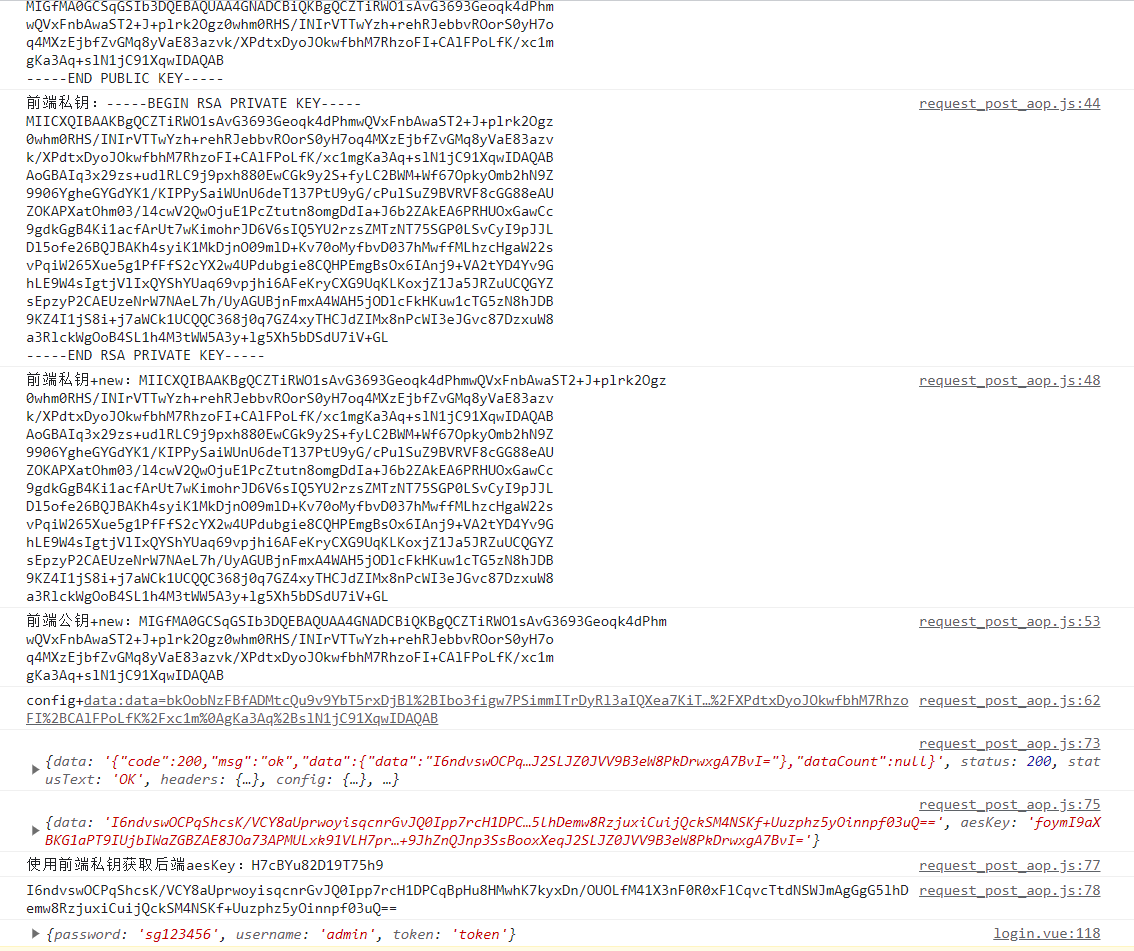
效果如下图:
# 仓库代码地址
请点个star关注一下,后面还会持续分享干货的。
# 后记
使用RSA+AES进行加密只能保证数据在加密过程中不会被明文获取,但还是会有漏洞,避免不了中间人攻击这种方式:
中间人攻击(Man-in-the-Middle Attack)是一种网络攻击形式,攻击者在通信双方之间插入自己,以获取通信双方之间的信息。在这种攻击中,攻击者可以拦截、窃取、篡改通信双方之间的数据,从而破坏通信的安全性。中间人攻击可以通过对网络数据包进行篡改、窃取等方式来实现,通常需要攻击者拥有一定的技术能力和对网络协议的理解。为了防范中间人攻击,通信双方可以采用加密、数字签名等手段来保护数据的安全性。
这里可以使用https来避免中间人攻击:
使用HTTPS可以有效地避免中间人攻击。HTTPS是一种基于SSL/TLS协议的安全通信方式,它可以确保通信双方之间的数据传输是加密的,从而防止攻击者窃取或篡改数据。在HTTPS中,通信双方通过密钥交换协商一个加密算法和密钥,然后使用该密钥对数据进行加密和解密。由于HTTPS使用了加密通信方式,因此可以有效地防止中间人攻击。另外,为了确保通信双方的身份真实可靠,HTTPS还可以使用数字签名来验证通信双方的身份。